

Understanding complex business processes is essential for system architects and developers. An activity diagram serves as a powerful tool to visualize the flow of activities within a system. Specifically, when modeling order processing workflows, these diagrams clarify how data moves, where decisions are made, and how exceptions are handled. This guide explores practical examples of order processing logic using activity diagrams, focusing on structure, decision points, and concurrency.
Whether designing a simple e-commerce checkout or a multi-stage enterprise supply chain, visualizing the workflow prevents logical errors before code is written. We will examine three distinct scenarios: a standard consumer order, a bulk B2B transaction requiring approvals, and a complex return management system. Each example highlights different elements of the diagram, such as swimlanes, forks, joins, and decision nodes.
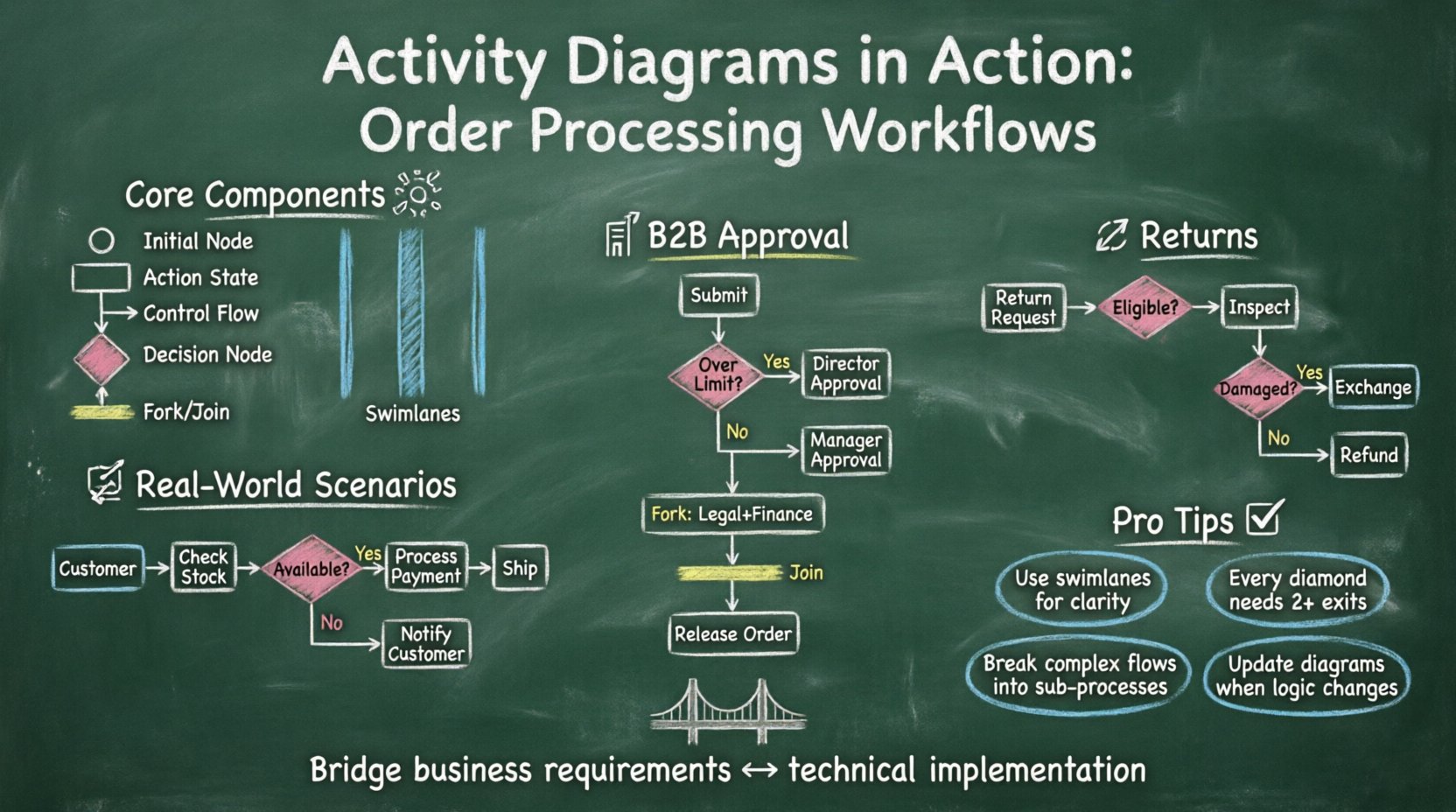
Understanding the Core Components 🧩
Before diving into specific workflows, it is necessary to define the building blocks used in these diagrams. A standard activity diagram relies on a set of specific symbols to represent actions and flows.
- Initial Node: A solid black circle indicating the start of the workflow. It is the single entry point.
- Action State: Rounded rectangles representing a specific task, such as “Validate Payment” or “Update Inventory”.
- Control Flow: Arrows connecting actions to show the sequence of operations.
- Decision Node: A diamond shape used to branch the flow based on conditions (e.g., “Is Stock Available?”).
- Fork and Join: Thick black bars used to create parallel threads or merge them back into a single flow.
- Swimlanes: Horizontal or vertical partitions that group activities by responsible party, such as “Customer”, “System”, or “Warehouse”.
Using these elements allows teams to map out logic without ambiguity. For instance, a decision node ensures that every possible outcome is accounted for, reducing the risk of edge cases during implementation.
Scenario 1: Standard E-Commerce Order Workflow 🛍️
The most common application of activity diagrams is the direct-to-consumer (DTC) purchase. This workflow involves a linear progression with specific validation checkpoints. The goal is to move from a cart selection to a confirmed shipment efficiently.
Workflow Breakdown
The process begins when a user initiates a checkout. The system must verify several prerequisites before processing financial transactions.
- Step 1: Cart Validation. The system checks if items are still in stock and if prices have changed since the item was added.
- Step 2: Address Verification. The shipping address is validated against postal code databases to ensure deliverability.
- Step 3: Payment Processing. The payment gateway is queried for authorization.
- Step 4: Order Fulfillment. Once paid, the inventory is deducted, and a shipping label is generated.
Diagram Logic
In the diagram, swimlanes separate the user actions from system processes. This distinction is crucial for understanding who initiates a step versus who executes it.
| Swimlane | Action | Output |
|---|---|---|
| Customer | Submit Order | Order Request Data |
| System | Check Inventory | Stock Status (Yes/No) |
| Payment Gateway | Authorize Charge | Transaction Token |
| Warehouse | Pick and Pack | Shipment ID |
Notice the decision node after “Check Inventory”. If stock is unavailable, the flow diverges to a “Notify Customer” action. If stock is available, the flow continues to “Process Payment”. This branching logic ensures the customer is informed immediately if an item cannot be shipped, preventing frustration later in the supply chain.
Scenario 2: B2B Bulk Order with Approval Gates 🏢
Business-to-business transactions often involve higher value and stricter compliance requirements. A simple “buy now” button is insufficient here. These workflows require approval chains and budget checks.
Workflow Breakdown
This scenario introduces concurrency and conditional loops. A large order might exceed a single manager’s approval limit, requiring escalation to higher-level executives.
- Initiation: A procurement officer submits a purchase request.
- Threshold Check: The system evaluates the total cost against departmental limits.
- Approval Routing: If under the limit, the direct supervisor approves. If over, it routes to a finance director.
- Funding Verification: The system checks if the allocated budget for the quarter is sufficient.
- Final Release: Once all approvals are secured, the order is sent to the vendor.
Concurrency in Approvals
Complex orders may require multiple departments to sign off simultaneously. In the diagram, a fork node splits the flow into parallel approval lanes. For example, Legal and Security might need to review the contract terms at the same time as Finance reviews the budget.
- Fork Node: Splits the path into “Legal Review” and “Finance Review”.
- Join Node: Merges the paths. The order cannot proceed until both Legal and Finance have completed their tasks.
This structure prevents bottlenecks where one slow approver delays the entire process unnecessarily. It also ensures that no single department can bypass the necessary checks required by the other.
Scenario 3: Exception Handling and Returns 🔄
Not every order proceeds smoothly. Returns, refunds, and cancellations are critical parts of the lifecycle. Modeling these exceptions in an activity diagram ensures the system handles negative outcomes gracefully.
Workflow Breakdown
This workflow starts after the shipment is confirmed. It focuses on the reverse logistics process.
- Customer Request: The user submits a return request within the allowed window.
- Condition Check: The system verifies if the item is eligible for return (e.g., not a final sale item).
- Inspection: Upon receipt at the warehouse, the item is inspected for damage.
- Decision Logic:
- If item is good: Process refund.
- If item is damaged: Process exchange or partial refund.
Handling Timeouts
Activity diagrams also handle timeouts. If a payment authorization expires, the system must rollback the transaction. A specific “Timeout” flow can be modeled where the order status is set to “Expired” and the inventory is restored.
This level of detail is often overlooked in high-level flowcharts. By explicitly mapping the error paths, developers know exactly how to code the error handling routines.
Swimlanes and Responsibility Assignment 🏊
One of the most valuable features of an activity diagram is the swimlane. This visual aid assigns ownership to every step. In order processing, responsibility is often distributed across different systems or teams.
Types of Swimlanes
- Organizational Swimlanes: Grouped by department (Sales, Logistics, Finance).
- System Swimlanes: Grouped by software component (Frontend API, Backend DB, Payment Service).
- Role Swimlanes: Grouped by user role (Admin, Customer, Vendor).
When designing a workflow, it is vital to keep actions within the correct lane. For example, a “Customer” should not have an action node for “Update Database”. If such a node appears in the customer lane, it indicates a security vulnerability or a design flaw.
Comparison: Activity Diagram vs. Other Models 📊
While activity diagrams are excellent for workflows, other diagrams serve different purposes. Understanding when to use which model prevents confusion.
| Diagram Type | Primary Focus | Best Used For |
|---|---|---|
| Activity Diagram | Workflow Logic | Process steps, decision branches, parallel tasks |
| Sequence Diagram | Object Interaction | Message passing between specific objects over time |
| State Machine | Object Lifecycle | How a single object changes states (e.g., Order: Pending -> Shipped) |
| Flowchart | General Logic | Simple scripts or algorithmic steps without object context |
For order processing, the activity diagram is often the best fit because it captures the interaction between different systems and the flow of data across time. A state machine might tell you an order is “Shipped”, but an activity diagram tells you how it got to “Shipped”.
Common Pitfalls in Modeling ⚠️
Creating these diagrams requires discipline. Several common mistakes can render the model useless.
- Over-Complexity: Trying to model every single function in one diagram makes it unreadable. Break large processes into sub-processes.
- Missing Decision Outcomes: Every diamond node must have at least two outgoing arrows (e.g., Yes/No, True/False). A node with only one exit is just a redundant action.
- Inconsistent Naming: Use clear verbs for actions. “Process” is vague; “Verify Credit Card” is specific.
- Ignoring Concurrency: Failing to use fork and join nodes when multiple tasks happen simultaneously creates a false impression of sequential processing.
- Ignoring Start/End Nodes: Every diagram should have a clear beginning and end point to avoid ambiguity about where the process terminates.
Benefits for Development and Testing 🛠️
Why invest time in drawing these diagrams? The benefits extend beyond documentation.
- Early Detection of Logic Errors: It is easier to spot a loop or a missing condition on paper than in code.
- Test Case Generation: Every path in the diagram corresponds to a potential test case. This ensures comprehensive coverage.
- Stakeholder Communication: Non-technical stakeholders can understand the diagram better than a database schema or API spec.
- Onboarding Tool: New team members can learn the business logic of the order system quickly by reviewing the workflow.
Implementation Best Practices ✅
To ensure the diagrams remain useful throughout the project lifecycle, follow these guidelines.
- Version Control: Treat the diagram files like code. Commit changes when the logic changes.
- Standardize Symbols: Ensure all team members use the same notation for diamonds, circles, and arrows.
- Keep it Updated: If the business process changes, update the diagram immediately. An outdated diagram is misleading.
- Use Sub-Flows: If a section of the diagram is complex, encapsulate it into a sub-flow to maintain clarity.
Final Thoughts on Workflow Visualization 🌟
Activity diagrams provide a clear, structured view of how order processing works. They bridge the gap between business requirements and technical implementation. By mapping out standard flows, approval chains, and exception handling, teams can build robust systems that handle real-world complexity.
The examples provided here—ranging from simple retail checks to complex B2B approvals—demonstrate the versatility of this modeling technique. Whether you are handling a single transaction or managing a global supply chain, the logic remains the same: define the start, map the actions, anticipate the decisions, and verify the end state.
Investing in clear workflow documentation pays dividends during development and maintenance. It reduces miscommunication, speeds up debugging, and ensures that the final product aligns with the intended business goals.