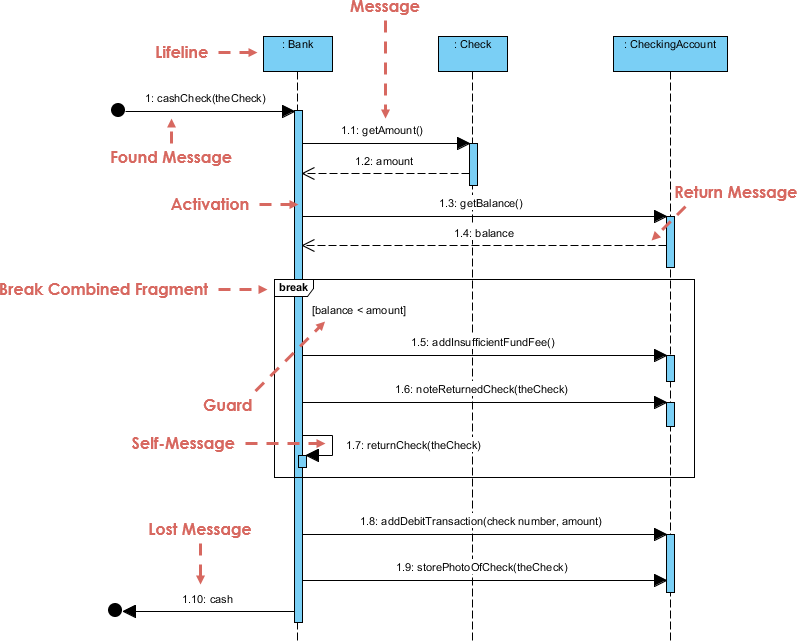
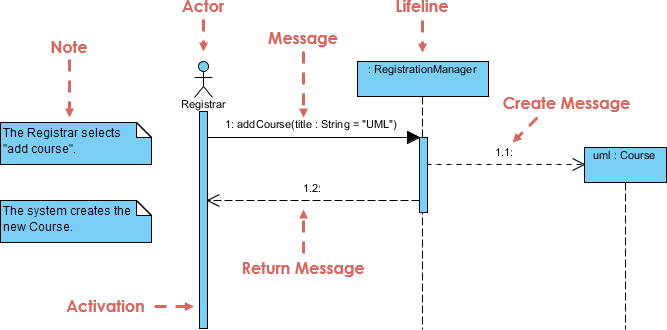
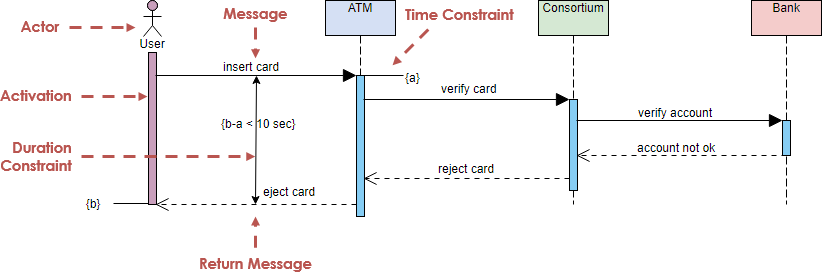
UML (Unified Modeling Language) sequence diagrams are a type of interaction diagram that illustrates how objects interact in a particular scenario of a use case. They capture the sequence of messages exchanged between objects over time, providing a clear view of the system’s dynamic behavior.

Key Concepts of UML Sequence Diagrams
- Lifeline:
- Definition: Represents the existence of an object during the interaction.
- Representation: A dashed vertical line with a rectangle at the top containing the object’s name.
- Example: In the attached diagram,
window : UI,aChain : HotelChain, andaHotel : Hotelare lifelines.
- Activation:
- Definition: Indicates that an object is performing an operation.
- Representation: A thin, tall rectangle on the lifeline.
- Example: The activation bar on
aHotel : Hotelwhen it processes themakeReservationmessage.
- Message:
- Definition: Represents communication between objects.
- Types:
- Synchronous Message: A solid line with a filled arrowhead.
- Asynchronous Message: A solid line with an open arrowhead.
- Return Message: A dashed line with an open arrowhead.
- Create Message: A solid line with an open arrowhead pointing to a new lifeline.
- Self Message: A message sent from an object to itself.
- Example: The
makeReservationmessage fromaChain : HotelChaintoaHotel : Hotel.
- Loop:
- Definition: Indicates a repetitive process.
- Representation: A rectangular frame with the keyword
loopand a condition. - Example: The loop labeled
[each day]in the diagram.
- Alternative Combined Fragment (alt):
- Definition: Represents conditional branches.
- Representation: A rectangular frame with the keyword
altand conditions. - Example: The
altfragment with the condition[isRoom = true].
- Create Message:
- Definition: Indicates the creation of a new object.
- Representation: A solid line with an open arrowhead pointing to a new lifeline.
- Example: The
aReservation : Reservationobject is created within thealtfragment.
- Self Message:
- Definition: A message sent from an object to itself.
- Representation: A message arrow that loops back to the same lifeline.
- Example: The
available(roomId, date): isRoomself message in the loop.
Steps to Create a UML Sequence Diagram
- Identify Actors and Objects:
- Determine the key objects involved in the interaction.
- Place them as lifelines in the diagram.
- Define Messages:
- Identify the messages exchanged between objects.
- Determine the type of each message (synchronous, asynchronous, return, create, self).
- Add Activations:
- Indicate when objects are performing operations.
- Draw activation bars on the lifelines.
- Include Loops and Conditions:
- Identify repetitive processes and conditional branches.
- Use loop and alternative combined fragments to represent these.
- Review and Refine:
- Review the diagram to ensure all interactions are captured.
- Refine the diagram based on feedback and further analysis.
Example Walkthrough
Let’s walk through the sequence diagram example:

- Lifelines:
window : UIaChain : HotelChainaHotel : Hotel
- Messages:
window : UIsends amakeReservationmessage toaChain : HotelChain.aChain : HotelChainforwards themakeReservationmessage toaHotel : Hotel.aHotel : Hotelenters a loop labeled[each day].- Within the loop,
aHotel : Hotelsends a self messageavailable(roomId, date): isRoom. - If
isRoomis true, an alternative combined fragment (alt) is executed:aReservation : Reservationis created.aNotice : Confirmationis created and sent as a return message.
- Activations:
- Activation bars are shown on
aHotel : Hotelduring the processing of themakeReservationmessage and within the loop.
- Activation bars are shown on
Using Visual Paradigm for UML Sequence Diagrams
Visual Paradigm is a powerful tool for creating UML diagrams, including sequence diagrams. It offers both free and commercial versions, making it accessible for all software developers. Here’s why Visual Paradigm is the best tool for UML sequence diagrams:
- User-Friendly Interface:
- Easy to use with drag-and-drop functionality.
- Intuitive design for creating and editing diagrams.
- Comprehensive Features:
- Supports all UML diagram types.
- Advanced features like code generation, reverse engineering, and model-driven development.
- Collaboration:
- Supports team collaboration with version control and real-time collaboration features.
- Integrates with popular version control systems like Git.
- Customization:
- Highly customizable diagrams with various styles and themes.
- Supports custom UML profiles and stereotypes.
- Documentation:
- Generates detailed documentation from UML models.
- Supports exporting diagrams to various formats (PDF, PNG, SVG, etc.).
Conclusion
UML sequence diagrams are essential for understanding the dynamic behavior of a system by illustrating the interactions between objects over time. By following the steps outlined in this tutorial and using a powerful tool like Visual Paradigm, you can create clear and comprehensive sequence diagrams that effectively communicate your system’s behavior. Whether you are a beginner or an experienced developer, Visual Paradigm offers the tools and features you need to succeed in UML modeling.