

The landscape of software engineering is vast and ever-evolving. As systems grow in complexity, the need for clear structural planning becomes paramount. This is where the role of a software architect emerges, bridging the gap between business requirements and technical implementation. A critical tool in this architect’s toolkit is the Unified Modeling Language (UML). Developing strong UML skills is not merely about drawing boxes and lines; it is about mastering the visual language of system design. This guide explores how to cultivate these skills to advance your career in software architecture.
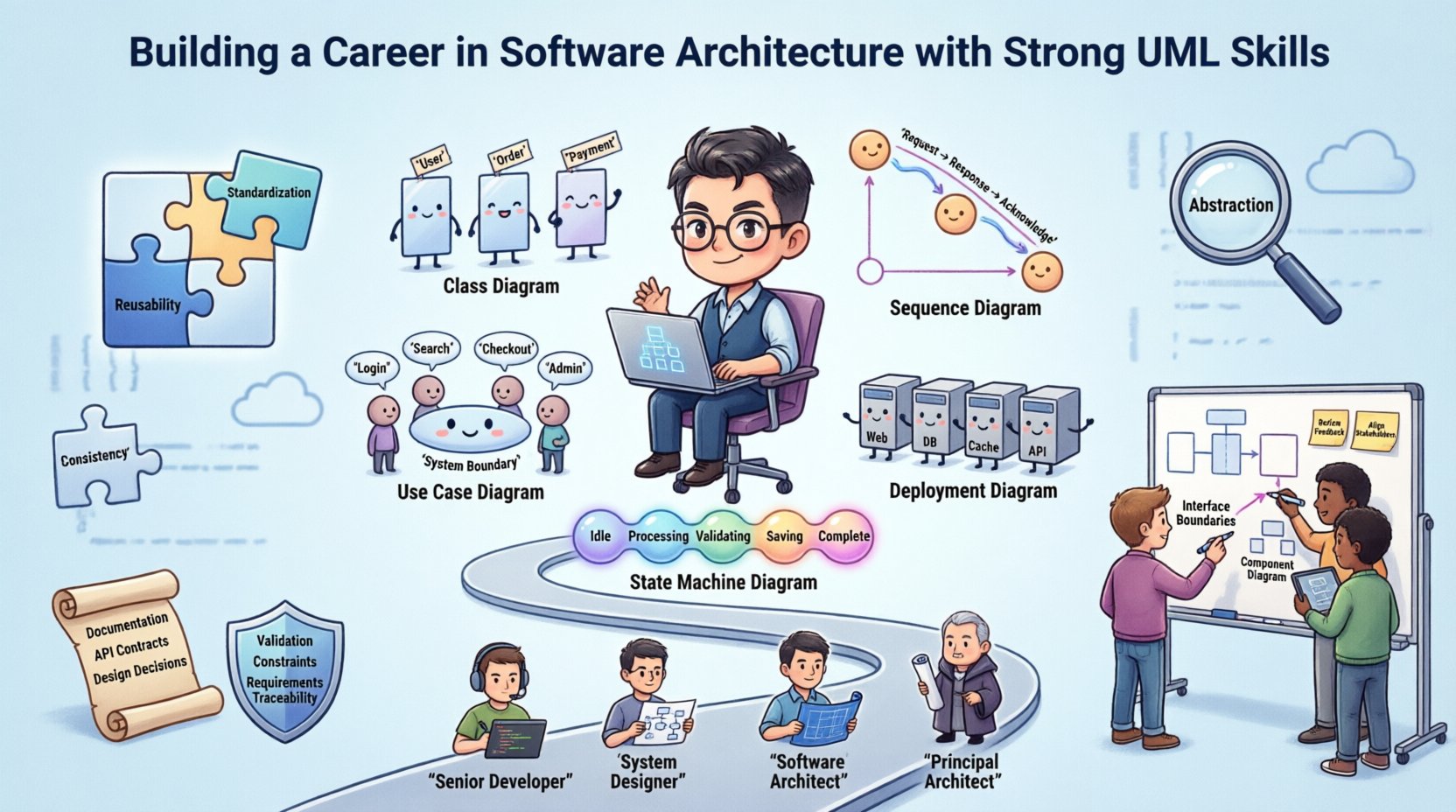
🧩 Why UML Matters for Architects
Software architecture is the fundamental organization of a system, embodied in its components, their relationships to each other, and to the environment. Without a clear representation of this organization, communication breaks down. UML provides a standardized way to describe these structures. It serves as a common ground for developers, stakeholders, and project managers.
- Standardization: UML offers a universal syntax understood across the industry. This reduces ambiguity when discussing complex system behaviors.
- Abstraction: It allows architects to focus on high-level logic without getting bogged down in implementation details immediately.
- Documentation: Models serve as living documentation that evolves with the codebase, ensuring knowledge is retained over time.
- Validation: Diagrams help identify logical flaws early in the design phase, saving significant resources during development.
For professionals aiming to transition from development to architecture, proficiency in these diagrams signals a shift in thinking from code-level tasks to system-level strategy.
📊 Core UML Diagrams Every Architect Should Know
UML is divided into structural and behavioral diagrams. An architect must understand when to apply each type to convey specific information effectively. Below is a breakdown of the essential diagrams.
🔹 Structural Diagrams
These diagrams depict the static aspects of a system. They define the building blocks that make up the architecture.
- Class Diagram: The backbone of object-oriented design. It shows classes, interfaces, attributes, and relationships like inheritance, aggregation, and composition. It is vital for defining the domain model.
- Component Diagram: Focuses on the high-level software components and their interfaces. It helps in understanding how parts of the system interact at a module level.
- Deployment Diagram: Illustrates the physical hardware and software nodes. This is crucial for infrastructure planning and understanding where services will run.
- Object Diagram: A snapshot of instances at a specific point in time. It helps verify that the Class Diagram logic holds true for actual data scenarios.
- Package Diagram: Groups related elements into packages to manage complexity. This is essential for organizing large codebases into logical namespaces.
🔹 Behavioral Diagrams
These diagrams describe the dynamic behavior of the system. They show how the system reacts to inputs over time.
- Use Case Diagram: Represents the functional requirements from the perspective of actors (users or external systems). It defines the scope of the system.
- Sequence Diagram: Shows object interactions arranged in time sequence. It is excellent for detailing API calls and message flows between services.
- Activity Diagram: Similar to a flowchart, it models the flow of control from activity to activity. It is useful for business logic workflows.
- State Machine Diagram: Describes the states an object can be in and the transitions between them. This is critical for systems with complex lifecycle management.
- Communication Diagram: Similar to sequence diagrams but focuses on object relationships rather than time. It highlights the structural organization of messages.
To assist in selecting the right diagram for your needs, refer to the table below.
| Diagram Type | Primary Focus | Best Used For |
|---|---|---|
| Class Diagram | Static Structure | Defining domain entities and relationships |
| Sequence Diagram | Dynamic Interaction | API design and service communication flows |
| Use Case Diagram | Functional Requirements | Stakeholder communication and scope definition |
| Deployment Diagram | Physical Infrastructure | Cloud architecture and server topology |
| State Machine Diagram | Object Lifecycle | Order processing or session management logic |
🔄 From Developer to Architect: The Shift in Mindset
Moving from a developer role to a software architect role requires a significant shift in perspective. Developers focus on the “how” of implementation. Architects focus on the “what” and the “why” of the system.
🔸 Scope of Responsibility
Developers often manage a single service or module. Architects manage the entire ecosystem. This involves making trade-offs. You must decide when to prioritize performance over scalability, or consistency over availability. UML helps visualize these trade-offs by showing the impact of design choices on the whole system.
🔸 Abstraction Levels
Architects must communicate at different levels of abstraction depending on the audience. A diagram for a technical team might include specific interface signatures. A diagram for business stakeholders might only show high-level user flows. Strong UML skills allow you to toggle between these views seamlessly.
🔸 Long-Term Vision
While developers solve immediate bugs, architects design for the future. This means considering extensibility and maintainability. Using UML to model potential future states helps in planning for growth without disrupting current operations.
🤝 Communication: The Hidden Power of Diagrams
One of the most underestimated aspects of software architecture is communication. An architect’s job is to ensure everyone understands the system design. Text is often insufficient for complex logic. Visuals bridge this gap.
- Reducing Ambiguity: Natural language is prone to interpretation. A well-drawn Sequence Diagram leaves little room for doubt regarding message order.
- Facilitating Collaboration: Diagrams serve as a focal point during design reviews. Teams can point to specific parts of a model to discuss issues.
- Onboarding New Members: New hires can study architecture diagrams to understand the system faster than reading code repositories.
- Risk Mitigation: Visualizing dependencies helps identify single points of failure or tight coupling that might cause issues later.
Effective communication also involves knowing when not to model. Over-documentation can slow down development. The goal is clarity, not completeness for the sake of completeness.
📈 Career Progression and Skill Acquisition
Gaining recognition as a software architect takes time. It involves a combination of technical depth and soft skills. Here is a roadmap for acquiring the necessary competencies.
| Stage | Focus Area | UML Application |
|---|---|---|
| Senior Developer | Code Quality | Class Diagrams for Refactoring |
| System Designer | Module Integration | Component and Sequence Diagrams |
| Software Architect | System Strategy | Deployment and Package Diagrams |
| Principal Architect | Enterprise Standards | Use Case and State Diagrams for Governance |
To progress through these stages, focus on the following:
- Learn Design Patterns: Understand how patterns translate into UML structures. This helps in creating reusable architectures.
- Study Legacy Systems: Reverse engineer existing systems by drawing diagrams. This practice improves your ability to understand complex existing codebases.
- Participate in Design Reviews: Present your models to peers. Feedback on your diagrams is as valuable as feedback on your code.
- Stay Current: UML evolves. Stay informed about new modeling standards and best practices within the industry.
⚠️ Common Pitfalls in Modeling
Even experienced professionals can fall into traps when using modeling languages. Being aware of these pitfalls ensures your documentation remains useful.
- Over-Modeling: Creating diagrams for every minor detail leads to maintenance nightmares. Focus on the architecture, not the implementation logic.
- Outdated Models: A model that does not match the code is worse than no model. Ensure diagrams are updated as the system evolves.
- Lack of Context: Diagrams without context are confusing. Always include a legend or a brief explanation of the scope.
- Ignoring Constraints: Models should reflect technical constraints like latency limits or data privacy requirements. Do not create idealized diagrams that cannot be implemented.
- Tool Dependency: Do not let the tool dictate the quality of your thinking. The value lies in the logic, not the drawing aesthetics.
🛠️ Best Practices for Sustainable Documentation
To maintain the value of your architectural documentation, follow these best practices.
- Iterative Approach: Start with rough sketches during brainstorming. Refine them as decisions are made. Avoid Big Design Up Front where possible.
- Tool Agnostic: Use formats that are accessible. While specific software exists, the ability to export to standard image formats ensures longevity.
- Integration with Code: Where possible, link diagrams to the codebase. This creates a traceability matrix between design and implementation.
- Version Control: Treat diagrams as code. Store them in version control systems to track changes over time.
- Stakeholder Feedback: Regularly review models with non-technical stakeholders. If they do not understand the diagram, it is not doing its job.
🚀 The Future of UML in Software Design
The role of modeling languages continues to adapt. While some argue that code is the only truth, the complexity of modern distributed systems makes visual planning essential. As cloud-native architectures and microservices become standard, the need for clear interface definitions and data flow visualizations increases. UML provides the vocabulary to discuss these complex topologies.
Architects who can effectively combine UML skills with modern architectural patterns will remain in high demand. The ability to translate business needs into technical blueprints is a rare and valuable skill set. By focusing on clear communication and strategic planning, you position yourself as a leader in the field.
Investing time in learning and applying UML is an investment in your career longevity. It transforms you from a coder who builds features to an architect who builds systems. This distinction defines the trajectory of a successful technical career.