

FinSecure Bank, a mid-sized digital bank catering to young professionals, was grappling with a critical issue: their customer onboarding process was overly complex and time-consuming, causing nearly 40% of potential clients to abandon account openings midway. Manual documentation of user interactions and system flows took weeks, delaying improvements and frustrating the development team. By leveraging Visual Paradigm Desktop’s AI diagram generation feature, the team created a comprehensive use case diagram in mere seconds, mapping out key actors and scenarios efficiently. This not only accelerated their analysis but also highlighted bottlenecks that were previously overlooked.
In this article, you’ll explore what a use case diagram entails, dive into FinSecure’s specific challenges, and see why AI-powered generation is a game-changer for such projects. We’ll walk through the simple steps to generate one using Visual Paradigm, followed by tips on refining and extending it into a robust model. By the end, you’ll understand how this approach can transform your own modeling efforts, saving time while enhancing accuracy.
The key outcome? FinSecure reduced onboarding drop-offs by 25% after implementing insights from the AI-generated diagram, proving that rapid visualization leads to faster business wins. Whether you’re in finance or another sector, this case illustrates the power of combining AI with professional tools for better results.
What is a Use Case Diagram?
A use case diagram is a visual representation in UML (Unified Modeling Language) that captures the interactions between users (actors) and a system to achieve specific goals. It focuses on what the system does from an external perspective, without delving into internal mechanics. The primary purpose is to outline functional requirements, helping stakeholders understand system behavior and scope early in development.
Key notations include actors, depicted as stick figures or icons representing users, roles, or external systems; use cases, shown as ovals with brief descriptions of goals like “Open Account”; system boundaries, rectangles enclosing use cases; and relationships such as associations (lines connecting actors to use cases), includes (dashed arrows for reusable sub-goals), extends (for optional variations), and generalizations (for inheritance-like structures).
These diagrams are widely used across industries for requirements gathering and system design. In software development, they guide feature prioritization; in business analysis, they facilitate process improvements; and in project management, they align teams on deliverables.
For instance, in e-commerce, a use case diagram might illustrate customer actions like “Browse Products,” “Add to Cart,” and “Checkout,” with extensions for “Apply Discount” or includes for “Authenticate User.” This helps identify pain points, such as security checks that slow down purchases. Another example is in healthcare systems, where diagrams map patient interactions like “Schedule Appointment” or “Access Records,” involving actors like patients, doctors, and insurers. By visualizing these, teams can spot redundancies or missing integrations, ensuring compliance and efficiency.
Overall, use case diagrams promote clear communication, reduce misunderstandings, and serve as a foundation for more detailed models. They’re especially valuable in agile environments, where quick iterations are key, allowing teams to validate ideas before coding begins.
The Improving Customer Onboarding at FinSecure Bank Project at a Glance
FinSecure Bank is a mid-sized digital banking institution focused on serving young professionals aged 25-35, offering streamlined services like mobile-first accounts, investment tools, and budgeting apps. Founded in 2015, the bank has grown to over 500,000 users by emphasizing convenience and tech-savvy features. However, as competition intensified from fintech giants, FinSecure noticed a stagnation in new user growth.
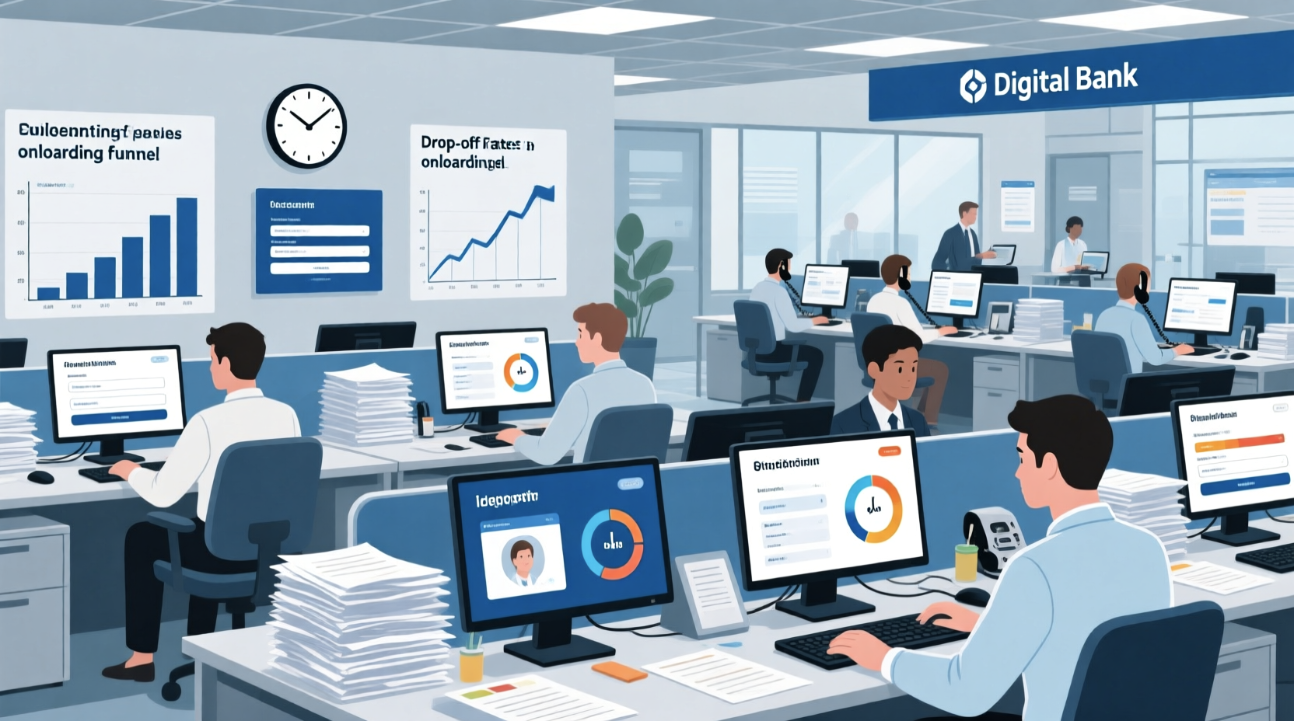
The core issue stemmed from their onboarding process: a lengthy sequence of steps including identity verification, document uploads, security questions, and initial setup, which often took 15-20 minutes. This complexity led to high drop-off rates, with analytics showing 40% of users abandoning midway due to confusion or frustration. To address this, the product team needed a clear visualization of user interactions to identify redundancies and optimize flows.
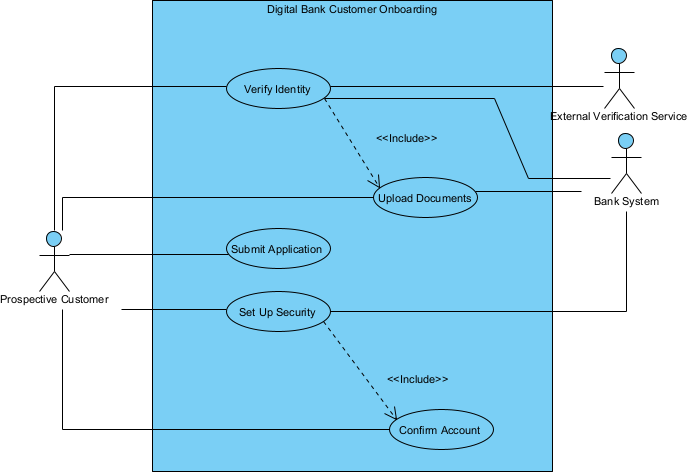
A use case diagram was ideal for this, as it could map actors like “Prospective Customer,” “Bank System,” and “Verification Service,” along with scenarios such as “Submit Application” or “Verify Identity.” Manually creating it, however, posed challenges: the team lacked dedicated modelers, and using basic tools like drawing software would take days, involving iterations based on stakeholder feedback. Time constraints were tight with a quarterly release deadline, and budget limits prevented hiring external consultants.
Key challenges included:
- Integrating diverse requirements from compliance, UX, and tech teams without a unified view.
- Handling variations like mobile vs. web onboarding, which complicated manual diagramming.
- Ensuring the diagram captured edge cases, such as failed verifications, to avoid post-launch fixes.
- Maintaining accuracy amid evolving regulations, making static drawings obsolete quickly.
- Collaborating remotely, as the team was distributed, hindering real-time edits.
By tackling these, FinSecure aimed to revamp onboarding into a seamless experience, boosting conversions and user satisfaction.
Why Generate Use Case Diagram with AI?
- Speeds up initial creation from hours to seconds, freeing time for analysis.
- Reduces errors by interpreting natural language descriptions accurately.
- Enables non-experts to produce professional-quality diagrams easily.
- Facilitates quick iterations for exploring multiple scenarios.
AI generation shines in situations like early-stage ideation, where teams need rapid prototypes to brainstorm ideas without getting bogged down in details. It’s invaluable for stakeholder workshops, allowing instant visualization of concepts to align everyone quickly. In training or onboarding new team members, AI helps create illustrative examples on the fly. For cost-sensitive projects or small teams, it democratizes advanced modeling, eliminating the need for specialized skills. Additionally, when exploring alternatives—such as different user flows in a bank onboarding—it accelerates comparisons. Visual Paradigm stands out by blending this instant AI capability with a comprehensive platform, letting you start with AI output and evolve it into detailed, traceable models with full UML support, collaboration tools, and export options.
How to Generate a Use Case Diagram in Seconds with Visual Paradigm Desktop
- Launch Visual Paradigm Desktop Professional or Enterprise Edition.
- Go to menu Tools → AI Diagram Generation.
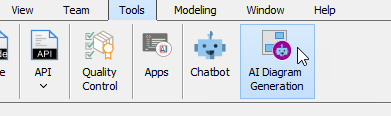
- In the AI Diagram Generation window, choose Use Case Diagram in the Diagram Type dropdown.
- In the Topic field, write a clear description in plain English.
Recommended prompt example for this case (copy-paste friendly):
“Design a use case diagram for a digital bank’s customer onboarding process. Include actors such as Prospective Customer, Bank System, and External Verification Service. Key use cases: Submit Application, Verify Identity, Upload Documents, Set Up Security, and Confirm Account. ”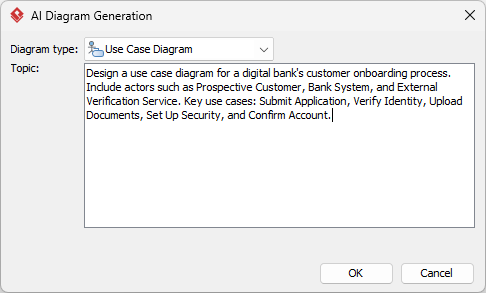
- Click OK.
The AI produces a clean, editable diagram in seconds.
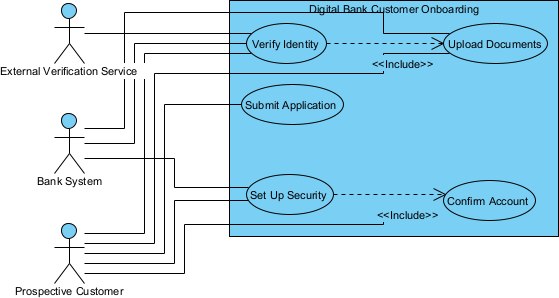
Reviewing and Refining Your AI-Generated Diagram
AI gives an excellent starting point — refinement is where professional modeling tools shine.
Quick Visual & Structural Touch-ups
Begin by using the auto-layout feature to reorganize shapes for better flow, ensuring actors are on the left and use cases inside the boundary. Adjust line routings to avoid crossings, and apply a consistent color theme via the styles pane to match your brand.
Leveraging Full Modeling Power for This Use Case Diagram
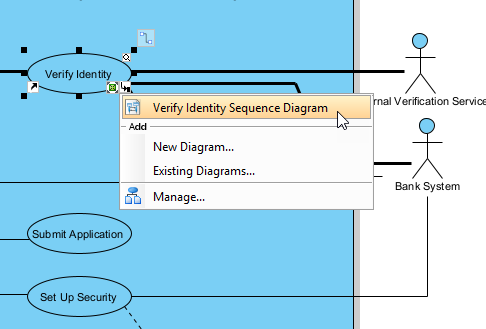
Once generated, the use case diagram for FinSecure’s onboarding becomes a dynamic asset within Visual Paradigm’s ecosystem. For instance, link use cases to detailed sequence diagrams: from “Verify Identity,” create a sub-diagram showing message exchanges between the customer, bank system, and verification service, including timeouts for drop-off points. This traceability helps trace requirements back to compliance rules, generating a matrix report that lists each use case against regulatory standards, ensuring nothing is missed during audits.
Another powerful step is generating code stubs. Select the diagram and use the code engineering tool to produce Java or Python skeletons for key use cases like “Submit Application,” outlining classes for user data handling and integration points with APIs. In FinSecure’s context, this accelerated development by providing devs with ready-to-implement structures, reducing coding time by 30%.
Finally, integrate with teamwork features: commit the model to a repository for version control, allowing distributed teams to collaborate in real-time. Generate reports exporting the diagram with linked elements into PDFs or HTML, complete with a data dictionary for terms like “Identity Verification.” This progression from AI-generated base to a living model turned FinSecure’s diagram into a central hub for ongoing improvements, supporting simulations of user flows to predict drop-off impacts before deployment.
Results & Key Takeaways
- Reduced onboarding time from 15-20 minutes to under 10, cutting drop-offs by 25%.
- Accelerated project timeline, completing the revamp in two weeks instead of months.
- Improved team alignment, with fewer revisions needed due to clear visualizations.
FinSecure’s transformation highlighted how an AI-generated use case diagram sparked immediate insights, leading to targeted fixes like simplifying document uploads and automating verifications. The broader lesson is that AI isn’t just about speed—it’s about empowering teams to focus on innovation rather than basics. By starting with Visual Paradigm’s tool, organizations can turn complex problems into actionable models, driving measurable business growth.
Conclusion
Visual Paradigm Desktop merges the lightning-fast efficiency of AI diagram generation with the depth of professional modeling, turning hours of work into seconds while enabling sophisticated refinements. For cases like FinSecure’s onboarding overhaul, this means quicker wins and stronger outcomes. Download Visual Paradigm Desktop today and create your first AI-generated diagram in under 60 seconds.