

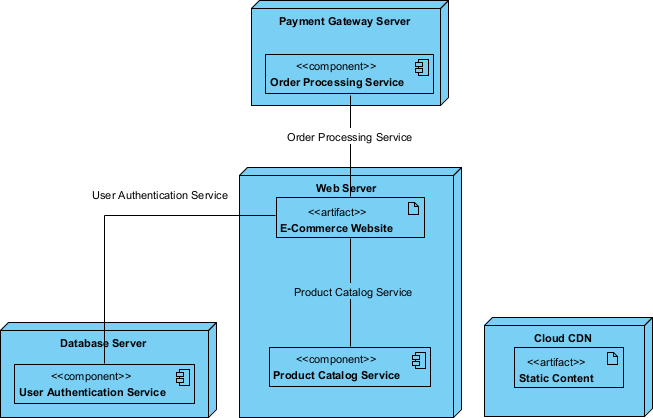
The complexity of modern software architecture necessitates tools that can rapidly translate conceptual requirements into technical visualizations. AI Diagram Generation within Visual Paradigm Desktop serves as a sophisticated bridge between natural language descriptions and professional modeling standards. By leveraging advanced machine learning, this feature allows architects and developers to produce a comprehensive Deployment Diagram without the labor-intensive process of manual shape placement and connection. This automated approach ensures that system blueprints are both logically sound and standards-compliant from the moment of inception.
- Efficiency in Modeling: It significantly reduces the time required to establish complex infrastructure layouts by automating the initial structure.
- Intelligent Inference: The AI interprets functional requirements to determine necessary nodes, artifacts, and components.
- Full Editor Integration: Every generated model remains fully editable, allowing for precise refinement within the Visual Paradigm Desktop environment.
- Consistency and Accuracy: The tool maintains rigorous adherence to notation standards, ensuring professional-grade documentation.
The Mechanics of Intelligent Architecture Modeling
The core utility of this technology lies in its ability to transform abstract text into a concrete model. When a user describes a system, the AI-powered diagram maker analyzes the semantic relationships between entities. For instance, identifying that a “database” serves as a storage node while “web services” represent execution environments. This capability is particularly beneficial for rapid design exploration, where multiple architectural scenarios must be visualized and compared in a short timeframe.
To begin the process, the user must navigate the interface of the professional desktop application. By selecting the “Tools” menu and then choosing the AI Diagram Generation option, the system prepares the environment for natural language processing. This centralized access point ensures that the AI capabilities are seamlessly woven into the existing modeling workflow.
From Textual Prompts to Component Mapping
Upon clicking the generation command, the engine processes the input and constructs the model in seconds. The resulting output is a high-fidelity Deployment Diagram that includes essential elements such as a Cloud CDN for static content, a Web Server for the e-commerce website, and a dedicated Database Server for user authentication services. These components are automatically interconnected, reflecting the logical flow of data and service dependencies required for a robust e-commerce environment.
While the initial generation provides a logically accurate foundation, the final phase of the workflow involves manual layout optimization. Professional documentation often requires specific spatial organization to improve readability for various stakeholders. Using the integrated editor in Visual Paradigm Desktop, the user can adjust the positioning of nodes and refine the routing of connectors to create a polished, presentation-ready visualization of the cloud infrastructure.
Benefits of Automated Infrastructure Visualization
Utilizing AI Diagram Generation provides a significant advantage for technical teams. It eliminates the “blank canvas” problem, providing an immediate starting point that adheres to best practices. Furthermore, it facilitates better communication between technical architects and non-technical stakeholders by producing clear, precise views of complex systems without requiring deep expertise in diagramming notation. This results in improved documentation, faster review cycles, and a more streamlined development lifecycle.
In conclusion, the integration of artificial intelligence into the diagramming process represents a major advancement in system design. By automating the transition from description to model, Visual Paradigm Desktop empowers professionals to focus on architectural decisions rather than the mechanics of drawing. This professional AI-powered diagram maker is an indispensable asset for any organization seeking to maintain high standards of technical documentation while optimizing productivity.
Experience Professional AI Modeling Today
To incorporate these advanced automated features into your professional workflow, you are encouraged to download the latest version of the software. Follow these instructions to begin:
- Navigate to the official download page: https://www.visual-paradigm.com/download/
- Install the application on your workstation.
- Open the “Tools” menu and select AI Diagram Generation to start your first project.
Related Links
Deployment diagrams are a type of structural UML diagram used to model the physical architecture of a software system, specifically how software artifacts are deployed onto physical or virtual nodes. They provide critical insights for designing scalable and maintainable systems by visualizing the hardware topology and the distribution of software components across different environments. Modern tools now offer AI-driven automation to instantly generate deployment diagrams for cloud applications from text descriptions, while supporting real-time collaboration and seamless integration with broader UML modeling suites.
-
What is a Deployment Diagram? A Complete Guide to UML Deployment Diagrams: A foundational guide covering the purpose, key components, and best practices for modeling software architecture.
-
Step-by-Step Tutorial: Creating Deployment Diagrams with Visual Paradigm: A hands-on walkthrough for building diagrams from scratch, including defining nodes, artifacts, and real-world relationships.
-
How to Create a UML Deployment Diagram for Cloud Apps with AI: Explores how to leverage AI-powered tools to efficiently generate deployment models tailored for cloud-native applications.
-
Deployment Diagram Examples in Visual Paradigm Gallery: A curated collection of real-world examples to inspire and guide system architecture design.
-
Beginner’s Guide to Deployment Diagrams Using Visual Paradigm Online: An introductory resource for newcomers focused on infrastructure modeling and basic deployment concepts.
-
UML Deployment Diagram Tutorial for Beginners – Go UML: A practical tutorial focused on system architecture modeling to visualize the relationships between nodes and artifacts.