
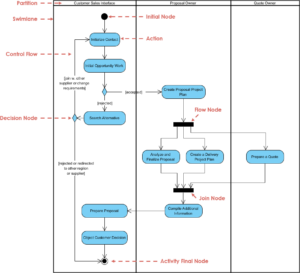
For years, a persistent narrative has circulated through software engineering circles. It suggests that Unified Modeling Language (UML) belongs to the past, a relic of heavyweight Waterfall methodologies that have no place in modern, iterative Agile environments. This belief often stems from a misunderstanding of what Agile actually demands and what UML truly provides.
Agile prioritizes working software over comprehensive documentation. However, this does not mean documentation is obsolete. It means documentation must be valuable, concise, and fit for purpose. UML, when applied correctly, serves as a critical tool for communication, design clarity, and architectural stability within iterative cycles.
This guide explores the practical realities of using UML in an Agile context. We will dismantle the myths, examine specific diagram types, and demonstrate how visual modeling supports rapid development without slowing down the pace.

Understanding the Conflict: Waterfall vs. Agile 🏗️
The friction between UML and Agile often arises from historical context. In the early days of software engineering, UML was frequently used to create massive specifications before a single line of code was written. This approach, often called Big Design Up Front (BDUF), was rigid. Changes were costly and documentation lagged behind implementation.
Agile emerged to counter this rigidity. It values responding to change over following a plan. Consequently, many teams associated UML with the very practices they sought to leave behind. They assumed that drawing a diagram meant committing to a static plan that would never change.
This association is the core myth. UML is a language, not a process. It describes structure and behavior. It does not dictate when or how often you update it. In an Agile team, UML diagrams are living artifacts, evolving alongside the code.
Why the Misconception Persists
Tooling Overload: Many modeling tools encourage creating detailed, static diagrams that are hard to update. This creates the perception of UML being cumbersome.
Lack of Integration: When diagrams exist in silos (e.g., a document folder) separate from the codebase, they become outdated quickly.
Over-Engineering: Using complex diagrams for simple features creates unnecessary friction.
The solution lies not in abandoning UML, but in adapting its application to fit the iterative nature of Agile.
The Cognitive Value of Visual Modeling 🧠
Software development is fundamentally a communication problem. Teams must align on requirements, logic, and data flow. Text-based specifications (like User Stories) are excellent for describing what the system should do, but they often struggle to convey how it will behave in complex scenarios.
Human cognition processes visual information significantly faster than text. A well-drawn diagram can reveal architectural flaws, race conditions, or data bottlenecks that a description might miss.
Benefits of Visual Communication
Reduced Ambiguity: Visual representations remove interpretive layers between stakeholders and developers.
Shared Mental Model: Diagrams create a single source of truth that the entire team can reference during planning and review.
Complexity Management: For intricate logic flows, a diagram simplifies the cognitive load required to understand the system.
Onboarding: New team members grasp system architecture faster with visual aids than with code alone.
In this context, UML acts as a lingua franca for the team, bridging the gap between business stakeholders, designers, and engineers.
Which UML Diagrams Fit Agile? 🛠️
You do not need to master every notation in the UML specification to benefit from it. Agile teams benefit most from diagrams that are quick to create, easy to update, and high in information density. Focus on the following types.
1. Use Case Diagrams 📋
These diagrams map out the interactions between actors (users or external systems) and the system itself. They are particularly useful during the refinement phase of a Sprint Planning session.
When to use: Early in the iteration to scope the feature.
Agile Value: Ensures the team understands the full scope of user interactions before writing code.
Frequency: Create once per major feature, update only if requirements shift significantly.
2. Sequence Diagrams ⏱️
Sequence diagrams show how objects interact over time. They are essential for understanding the flow of data between components, especially in distributed systems.
When to use: During technical design discussions for complex back-end logic.
Agile Value: Helps identify integration points and API contracts before implementation begins.
Frequency: Create for specific high-complexity user stories.
3. Class Diagrams 🏗️
These diagrams depict the static structure of a system, including classes, attributes, operations, and relationships. In Agile, these should be lightweight.
When to use: When refactoring existing code or designing new data models.
Agile Value: Prevents technical debt by ensuring the domain model aligns with business rules.
Frequency: Update as part of the refactoring process.
4. State Machine Diagrams 🔄
For systems with complex lifecycle states (e.g., order processing, ticket management), state diagrams clarify the rules governing transitions.
When to use: When a feature has many conditional states.
Agile Value: Prevents bugs related to invalid state transitions.
Frequency: Update when business rules change.
Documentation Balance: The Agile Sweet Spot ⚖️
Agile does not forbid documentation; it forbids documentation that does not add value. The challenge is determining when a diagram adds value versus when it becomes a waste of time.
Consider the following criteria before creating a UML artifact:
Is the logic too complex for a User Story description? If yes, a diagram helps.
Will this diagram help onboarding new developers? If yes, it is worth the effort.
Does it clarify dependencies between teams? If yes, it is necessary for coordination.
Will it become outdated before the next Sprint? If yes, skip it or keep it minimal.
Documentation should be just-in-time. Do not model the entire system at the start of the project. Model as you go, keeping the diagrams close to the code they represent.
Table: Agile Artifacts vs. UML Diagrams
Agile Artifact | Corresponding UML Diagram | Purpose |
|---|---|---|
User Story (Functional Req) | Use Case Diagram | Visualize actor interactions |
Technical Spike / Design Doc | Sequence Diagram | Map data flow and timing |
Refactoring Plan | Class Diagram | Visualize structural changes |
Workflow Logic | State Machine Diagram | Define state transitions |
System Architecture | Component Diagram | Define system boundaries |
Integrating UML into the Sprint Cycle 🔄
Integrating modeling into Agile requires shifting the mindset from “documentation first” to “modeling for communication.” Here is how to weave it into the standard Agile workflow.
1. Backlog Refinement
During refinement, teams break down epics into stories. If a story involves complex logic, the team can sketch a quick whiteboard sequence diagram. This does not need to be formal; it just needs to be clear enough to agree on the approach.
Benefit: Uncovers edge cases early.
Cost: Minimal time investment.
2. Sprint Planning
Once stories are selected, developers may need to define the technical approach. A simplified class diagram can ensure the data model supports the new feature without breaking existing logic.
Benefit: Prevents architectural drift.
Cost: Moderate, but saves debugging time later.
3. Development
As code is written, the diagrams should be updated if the implementation diverges from the initial design. Ideally, the code and the diagrams remain in sync. Some teams prefer generating diagrams from code to ensure accuracy.
Benefit: Documentation is always current.
Cost: Requires tooling setup.
4. Review and Retrospective
During the review, stakeholders can look at the diagrams to understand what was built. If a diagram reveals a misunderstanding, it can be corrected immediately.
Benefit: Faster feedback loop.
Cost: Low.
Managing Technical Debt with Modeling 🛡️
One of the biggest risks in Agile is the accumulation of technical debt. When teams move fast, they sometimes cut corners on design. Over time, this leads to a system that is difficult to change.
UML helps mitigate this risk. By forcing the team to visualize the structure before coding, you create a safety net. It highlights coupling and cohesion issues that might otherwise be hidden in the code.
When refactoring is required, a Class Diagram serves as a map. It shows how components are connected, allowing developers to plan the migration without breaking dependencies. This is crucial for long-term maintainability.
Key Practices for Debt Management
Keep it Simple: Don’t model every variable. Focus on the boundaries and interfaces.
Automate Where Possible: Use tools that can generate diagrams from the codebase to keep them accurate.
Review Regularly: Include diagram reviews in code review processes to ensure alignment.
Cross-Functional Team Alignment 🤝
Agile teams are often cross-functional, including developers, testers, designers, and product owners. Each role has a different perspective on the system. UML provides a neutral ground for these perspectives.
Product Owners: Can use Use Case diagrams to verify that user flows are logical.
Designers: Can use State diagrams to understand system behavior for UI transitions.
Developers: Use Sequence and Class diagrams to implement the logic correctly.
Testers: Use Sequence diagrams to derive test cases based on interaction flows.
This alignment reduces the risk of miscommunication. When everyone looks at the same visual representation, the definition of “done” becomes clearer.
Legacy Systems and Modernization 🏛️
Many Agile teams do not start from scratch. They are often tasked with modernizing legacy systems. In these scenarios, UML is invaluable. It allows the team to understand the existing architecture without reading thousands of lines of code.
Reverse engineering diagrams from existing code can create a map for migration. This helps in identifying which parts of the system are stable and which are volatile. It guides the strategy for breaking down a monolith into microservices.
Steps for Legacy Modernization
Extract: Generate Class and Component diagrams from the legacy code.
Analyze: Identify tightly coupled modules and high-churn areas.
Plan: Design new diagrams for the target architecture.
Execute: Refactor iteratively, updating diagrams as the new system takes shape.
This approach prevents the “spaghetti code” trap, where changes in one area break another. Visualizing the dependencies makes the risks explicit.
Conclusion: A Tool, Not a Mandate 🎯
The debate over UML in Agile often centers on rigidity versus flexibility. The truth is that UML is neither inherently rigid nor flexible. It is a tool. Like any tool, its value depends on how it is used.
When used to enforce bureaucracy, it slows teams down. When used to enhance communication and clarify complexity, it accelerates delivery. Agile teams that recognize this distinction gain a competitive advantage. They build software that is not only fast to deliver but also stable and maintainable.
Embrace UML not as a relic of the past, but as a modern asset for clarity. Use it where it adds value, discard it where it adds noise, and keep your diagrams living and breathing alongside your code.
By integrating visual modeling into your Agile workflow, you ensure that your team remains aligned, your architecture remains sound, and your development process remains efficient. The myth is that UML and Agile are opposites. The reality is that they are partners in building quality software.