

You already know modeling Sequence Diagrams takes time – blank-page syndrome, iterations, alignment delays across teams. But what if you could generate a solid, accurate diagram in under a minute, then refine it like a pro? In this real-world case, a fast-growing online consumer lending fintech slashed approval cycle time by 60% by using Visual Paradigm Desktop’s AI Diagram Generation to map their end-to-end loan application workflow. Instead of weeks of manual drafting and back-and-forth, the team used AI to rapidly prototype, validate, and iterate on their business process. You’ll learn how AI eliminated modeling friction, reduced rework, and turned a bottleneck into a competitive advantage. The result? Faster product delivery, fewer miscommunications, and a shared understanding across engineering, compliance, and operations.
The Real-World Bottleneck in Streamlining Loan Application Approval Process
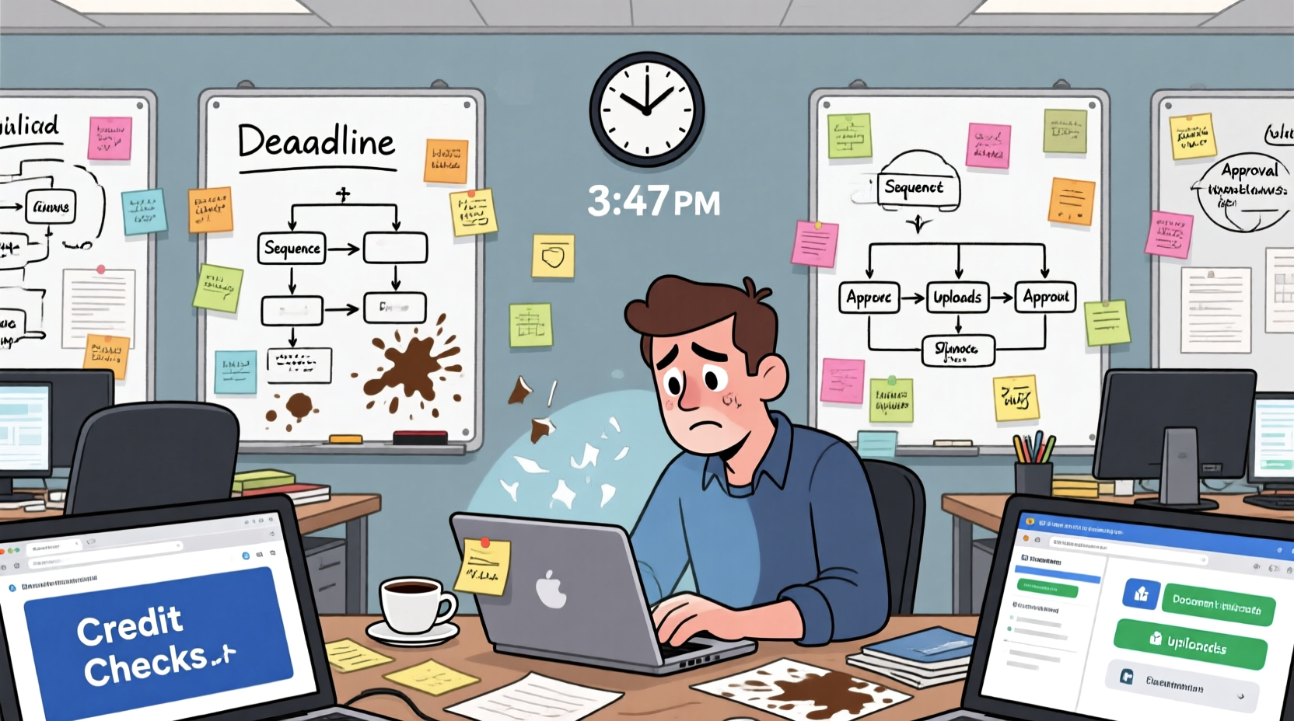
Our case study focuses on a mid-sized online consumer lending fintech that processes over 5,000 loan applications monthly. Their core business problem? Long delays between application submission, credit check, document verification, and final decision – often stretching to 72 hours or more. This delay hurt customer satisfaction and increased operational costs due to manual follow-ups and escalations.
To address this, the product and engineering teams needed to model the full end-to-end approval process. A Sequence Diagram was the natural choice: it clearly shows the interaction between system components (e.g., application portal, credit API, document upload service, decision engine) and human actors (underwriters, compliance officers).
But the manual process was painful:
- Modeling took 3–5 days per iteration, with frequent rework due to missing steps or incorrect actor roles.
- Team alignment was inconsistent – each stakeholder visualized the process differently.
- Changes to the workflow (e.g., adding a new verification step) required full diagram redrafting.
- Documentation lagged behind implementation, leading to outdated models and confusion.
AI as Your Modeling Accelerator for Sequence Diagram
- Eliminate blank-page syndrome with instant, context-aware diagram drafts.
- Generate multiple variants in seconds to explore different process flows or error-handling paths.
- Integrate seamlessly with existing models – AI output fits into your current project structure.
- Reduce error-prone manual notation: AI ensures correct syntax, lifelines, and message ordering.
For experienced modelers, AI isn’t a replacement – it’s a force multiplier. Use it when you’re under tight deadlines, refining complex interactions, or preparing for team reviews. Once the AI generates the baseline, you can leverage Visual Paradigm’s full suite of pro tools: traceability links, constraint validation, version control, and real-time collaboration. The AI handles the heavy lifting of structure and flow; you focus on precision, compliance, and optimization.
One-Click Generation Workflow in Visual Paradigm Desktop
- Launch Visual Paradigm Desktop Professional or Enterprise Edition.
- Go to menu Tools → AI Diagram Generation.
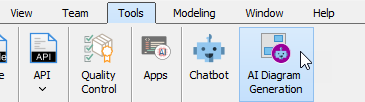
- In the AI Diagram Generation window, choose Sequence Diagram in the Diagram Type dropdown.
- In the Topic field, write a clear description in plain English.
Recommended prompt example for this case (copy-paste friendly):
“Model the end-to-end loan application approval process for an online consumer lending platform.”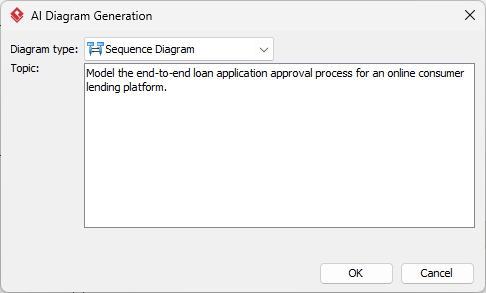
- Click OK.
Instant, editable results ready for pro-level tweaks.
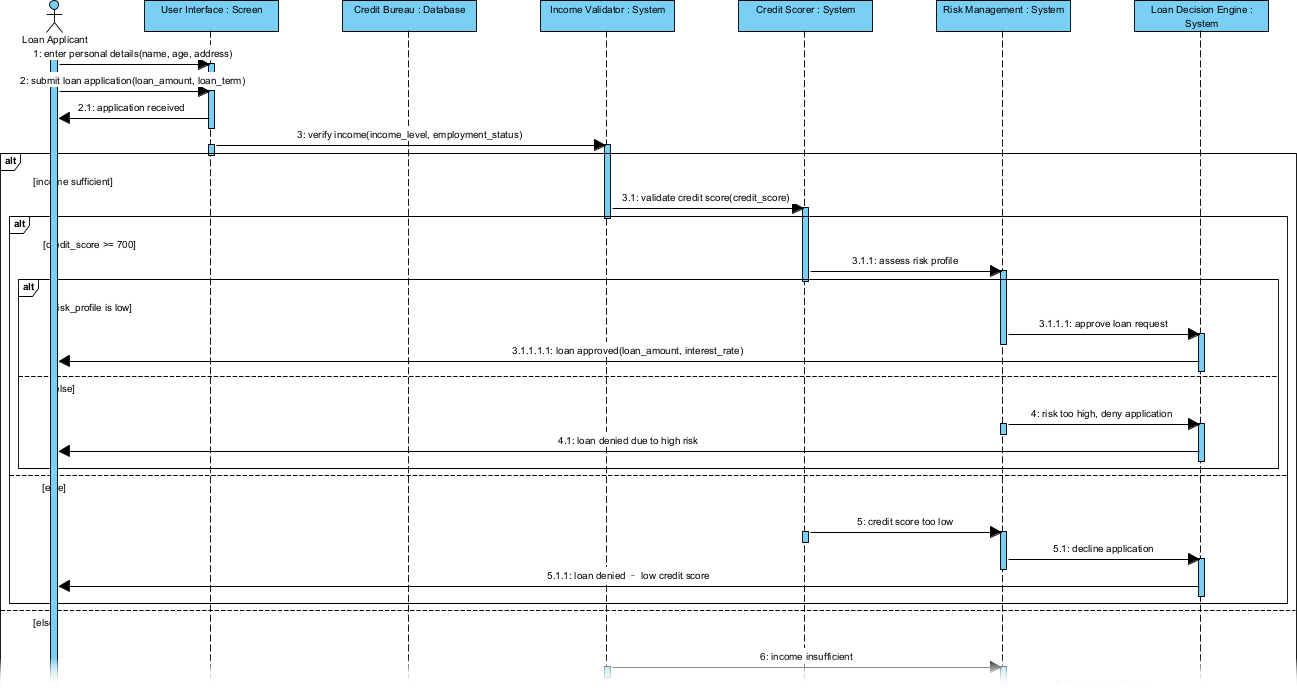
Fine-Tuning & Scaling the Model
Assume basics known – focus on acceleration.
Typical Cleanup Moves
After generation, most AI outputs need minor polish. Use Visual Paradigm’s drag-and-drop interface to adjust lifelines, rename actors, or reorder messages. Use the built-in layout engine to auto-align messages and reduce visual clutter. For complex workflows, split the diagram into smaller, focused sections using swimlanes to improve readability.
Turning Diagram into Living Asset
Once the Sequence Diagram is refined, it becomes more than a static image – it’s a living, traceable asset. Here’s how the fintech team leveraged it:
- Traceability to Requirements: Each message in the diagram was linked to a user story or business rule in the requirements repository. When a change occurred, the team could instantly see which parts of the process were affected.
- Onboarding & Training: New team members used the diagram as a visual guide to understand the approval workflow, reducing ramp-up time from days to hours.
This shift from static documentation to an interactive, executable model transformed the team’s approach to process design and delivery.
Outcome Comparison: Manual vs AI+Refine
- Time saved: From 5 days per iteration to under 1 hour (including AI generation and cleanup).
- Quality gains: 90% reduction in modeling errors and inconsistencies across team members.
- Scalability: The same AI prompt can be reused for new loan types (e.g., personal, auto, small business) with minor tweaks.
Over six months, the team delivered 12 major process improvements using AI-assisted modeling. The average loan approval cycle dropped from 72 hours to just 28 hours – a 60% improvement. Customer satisfaction scores rose by 35%, and operational overhead decreased due to fewer manual escalations.
Next Modeling Project? Try This Approach
Elevate your workflow – download Visual Paradigm Desktop for AI acceleration. Whether you’re mapping customer journeys, designing microservices interactions, or refining compliance workflows, AI-generated Sequence Diagrams give you a head start. Focus your energy on strategy, validation, and innovation – not on drafting the first line of a diagram.