

Revolutionizing System Architecture with AI
In the rapidly evolving landscape of software architecture and system design, the gap between conceptual ideas and technical blueprints has traditionally been bridged by laborious manual drafting. The AI-Powered Use Case Modeling Studio represents a paradigm shift in this process. Designed to transform textual descriptions into a comprehensive suite of visual models, this tool handles both the logic and the layout simultaneously. This automation allows architects to focus on high-level design rather than the minutiae of manual drawing.
To understand the magnitude of this shift, consider the following analogy: Traditional modeling is akin to hand-drawing a map of a new city while walking through it. The process is slow, prone to error, and difficult to update when a new road is constructed. Conversely, using the AI modeling studio is like utilizing GPS-mapped satellite imagery. You simply provide the destination, and the system instantly generates the fastest routes, street views, and traffic alerts, updating every perspective automatically the moment a path changes.
Behavioral Models: Visualizing Dynamic Views
One of the primary capabilities of the studio is the generation of behavioral models. These diagrams are crucial for visualizing the step-by-step workflows and interactions that occur within a system. The AI engine parses textual input to create accurate dynamic views without manual intervention.
Use Case Diagrams
At the highest level of abstraction, the studio generates Use Case Diagrams. These visuals utilize standard notations, representing actors as stick figures and use cases as ovals. Crucially, the AI places these elements within a defined system boundary to clearly delineate the overall system scope and functional
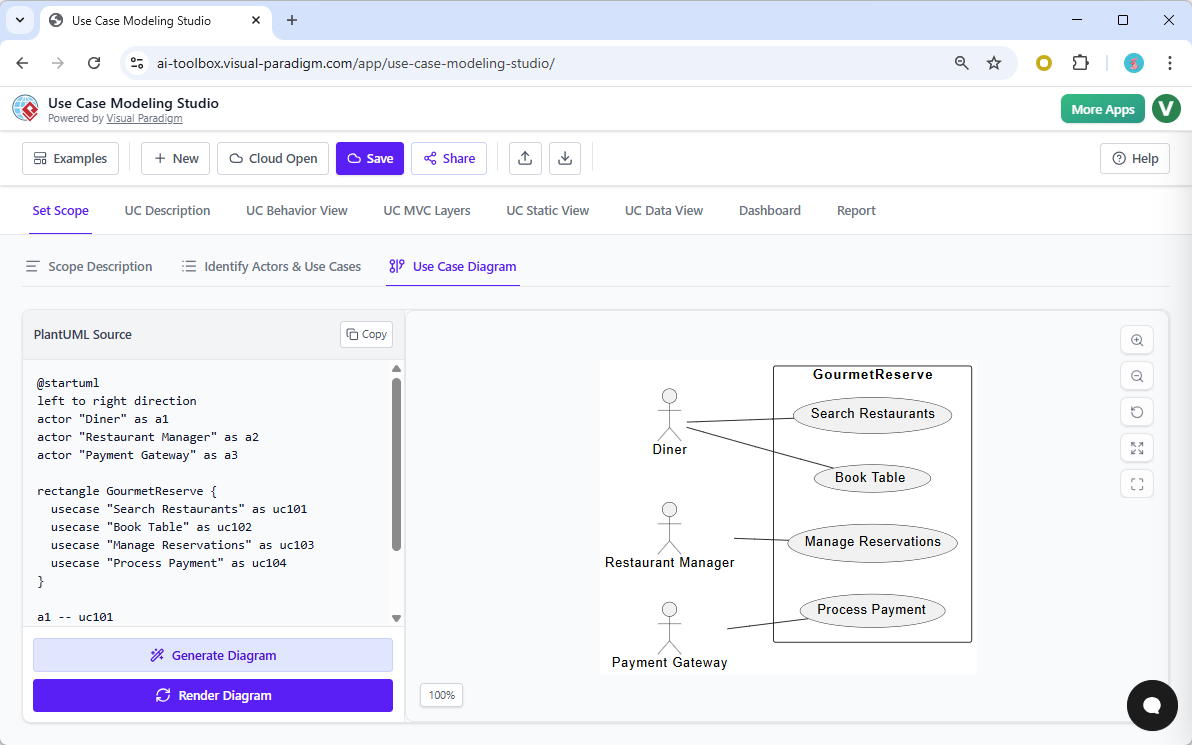
limits.
Activity Diagrams
Drilling down into the specifics, the studio creates Activity Diagrams to illustrate operational workflows. These are directly derived from the flow of events described in the use cases. The AI automatically structures these diagrams to show:
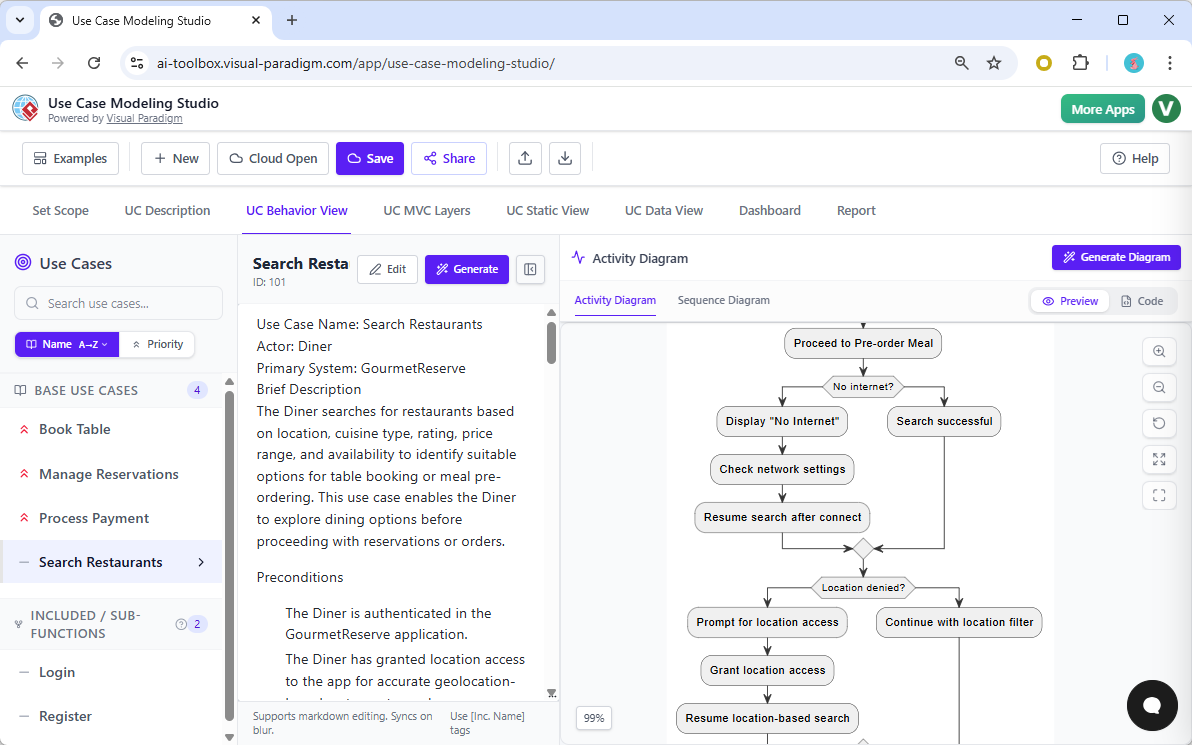
- Step-by-step workflows.
- Complex decision points (branching logic).
- Parallel activities occurring simultaneously.
Sequence Diagrams
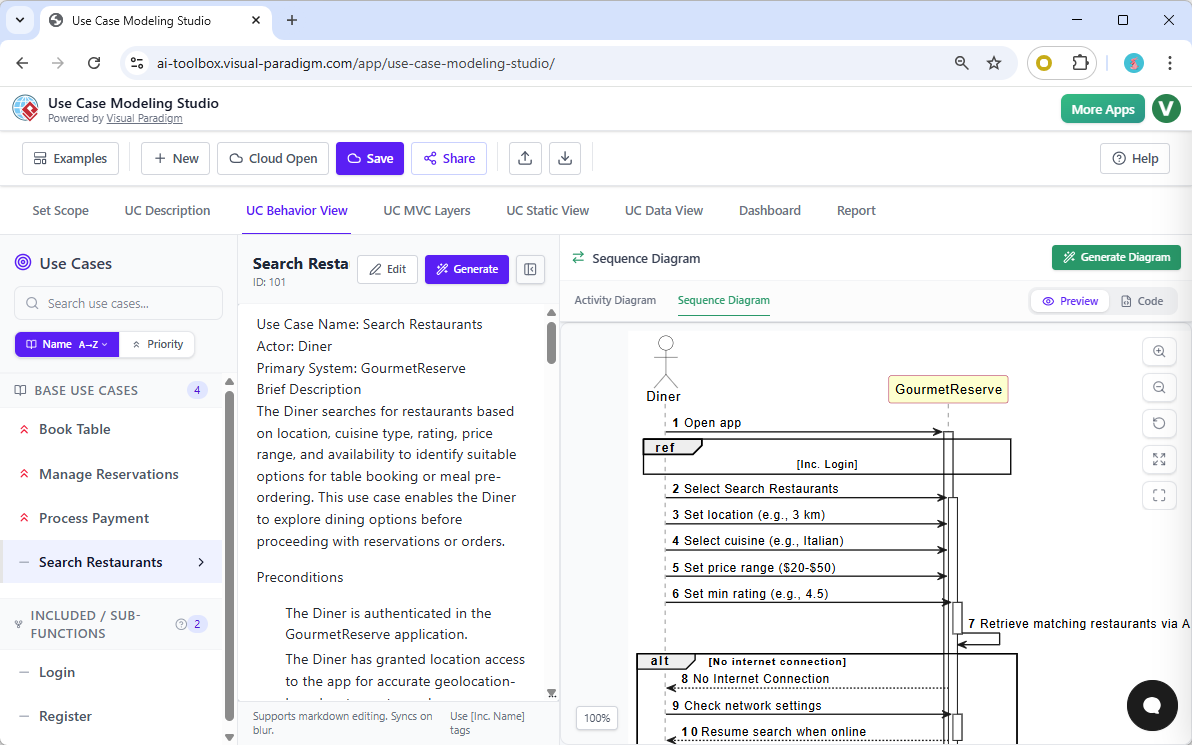
To map the chronological interactions between system components, the studio generates Sequence Diagrams. These models display how actors and system objects interact over time. For instance, in a restaurant management context, the tool can generate a sequence for a “Book Table” flow, precisely plotting the message exchanges between a “Diner” and a “Payment Gateway.”
Structural and Data Models: Defining the Architecture
Beyond dynamic behaviors, the AI-Powered Use Case Modeling Studio excels at creating static views that define the system’s underlying architecture and data schema.
Class Diagrams
The studio analyzes textual descriptions to infer essential system components. It generates Class Diagrams that identify entities, attributes, and operations. Furthermore, it intelligently detects relationships—such as association or composition—between the identified classes, ensuring the structural integrity of the proposed design.
Entity-Relationship Diagrams (ERDs)
While Class Diagrams focus on object-oriented structure, the studio also caters to database design through Entity-Relationship Diagrams (ERDs). By identifying data requirements embedded within the functional descriptions, the tool builds these models to ensure that the data layer remains fully synchronized with the functional requirements.

Automated Refinement and The Consistency Engine
The true power of the AI-Powered Use Case Modeling Studio lies in its ability to maintain coherence across a complex project. It moves beyond simple generation to offer intelligent refinement and synchronization.
The Consistency Engine
In manual modeling, changing a requirement often leads to broken links across different diagrams. The studio employs a robust Consistency Engine to mitigate this. If a user renames a use case or updates a flow description, those changes automatically propagate across all linked diagrams. This feature ensures that the structural views, behavioral models, and data schemas remain in perfect alignment without manual updates.
Refining with AI
Finally, the “Refine with AI” feature assists designers in achieving technical accuracy. It helps identify and apply complex Unified Modeling Language (UML) relationships that might be missed during initial drafting. This includes detecting opportunities for <<include>> or <<extend>> relationships, resulting in blueprints that are not only visually clear but technically precise.
| Feature | Traditional Modeling | AI-Powered Studio |
|---|---|---|
| Diagram Generation | Manual drawing tools | Automated from text |
| Updates | Manual propagation across files | Auto-propagation via Consistency Engine |
| Layout | User-defined | AI-optimized logic and layout |
| UML Precision | Relies on user knowledge | AI suggestions for <<include>>/<<extend>> |