

Designing a system requires more than just defining logic; it demands clear communication. When creating a UML State Machine Diagram, the labels you choose are not merely decorative. They serve as the primary interface between the designer’s intent and the developer’s implementation. Poor naming creates friction, misunderstanding, and technical debt. This guide explores the fundamental principles for naming states and events within state machine diagrams to ensure clarity and maintainability.
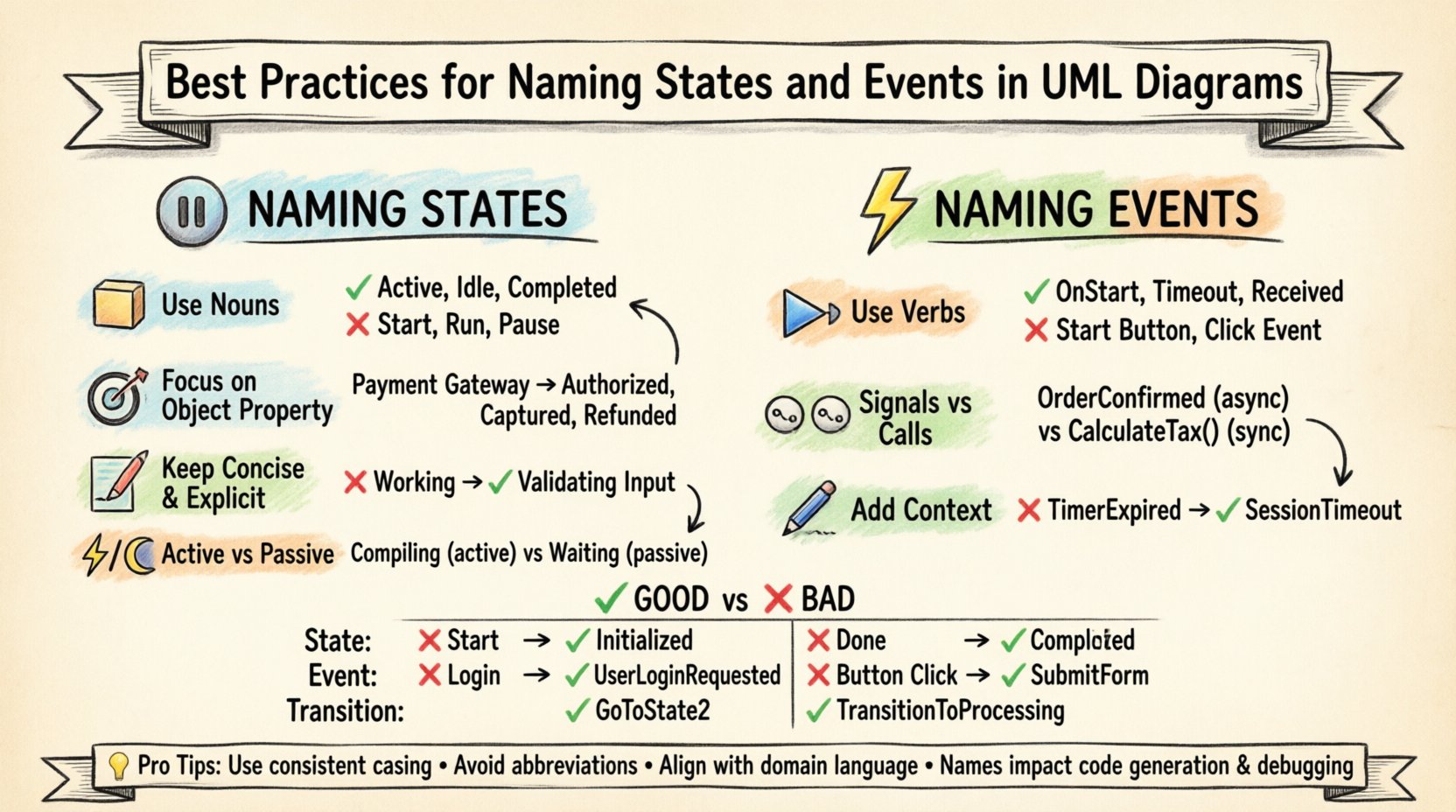
🧠 The Role of Naming in State Machine Diagrams
A state machine diagram models the dynamic behavior of an object or system. It describes how the system responds to external stimuli over time. Unlike a static structure diagram, a state machine is temporal. It captures the history and the future of a component’s operation. Because this diagram often serves as a blueprint for code generation or manual implementation, precision in naming is critical.
When a stakeholder reviews a diagram, they rely on the text to understand the flow. If the text is ambiguous, the resulting logic will likely be flawed. Clear naming reduces the cognitive load required to trace a path from one state to another. It allows team members to discuss the system without constantly referring to the visual layout.
⚙️ Principles for Naming States
States represent conditions under which an object satisfies some condition, performs some activity, or waits for some event. A state name should reflect the status of the object, not the action taken to enter it. Below are the core principles for constructing effective state names.
1. Use Nouns or Noun Phrases
States are conditions. Therefore, names should be nouns. This distinguishes them from events, which are typically verbs or verb phrases. Consider the difference between “Processing” and “Processed”. “Processing” sounds like an action, whereas “Processed” describes a state of being.
- Good: Active, Inactive, Idle, Suspended, Completed
- Poor: Start, Stop, Run, Pause
Using verbs for states implies activity rather than condition. While some activity is performed within a state, the state itself is a label for the context in which that activity occurs.
2. Focus on the Property of the Object
A state name should describe the property of the entity being modeled. If the state machine represents a User Account, the states should reflect the account status, not the user’s current action.
- Context: Payment Gateway
- State: Authorized, Captured, Refunded, Failed
Avoid names that depend on the specific moment of transition. For instance, “Just Entered” is not a valid state. A state must persist for a duration.
3. Keep It Concise and Explicit
Labels on a diagram have limited space. Long names clutter the visual representation and make transitions harder to follow. However, brevity should not sacrifice clarity. Find the balance between a short acronym and a descriptive phrase.
- Too Vague: Working
- Better: Processing Request
- Best: Validating Input
4. Distinguish Between Active and Passive States
Some state machines distinguish between states where the system is actively doing work versus states where it is waiting. While standard UML does not always enforce this visually, naming can help. A state named “Waiting” implies a passive condition. A state named “Compiling” implies active processing.
📡 Principles for Naming Events
Events are stimuli that trigger a transition from one state to another. They are the moments of change. Naming events requires a different focus than naming states. Events are temporal and usually involve an interaction with the outside world or an internal signal.
1. Use Verbs or Verb Phrases
Since events represent something happening, they should be named with action words. This aligns with the natural language description of the system’s behavior.
- Good: OnStart, OnStop, Clicked, Timeout, Received
- Poor: Start Button, Stop Signal, Click Event
Avoid naming the event after the UI element (e.g., “Button Clicked”). Name the event after the logical action (e.g., “Submit Form”). This keeps the diagram decoupled from the user interface implementation details.
2. Differentiate Signals from Calls
UML distinguishes between signal events (asynchronous) and call events (synchronous). While the naming convention might be similar, the context matters.
- Signal: Often implies a broadcast or a message that the system does not control the timing of. Example: OrderConfirmed.
- Call: Often implies a method invocation where the caller waits for a response. Example: CalculateTax().
Consistency in naming helps developers distinguish between these types of interactions in the generated code.
3. Include Contextual Information
Events often require parameters. While the diagram does not always list parameters, the name should imply the nature of the trigger. If an event is time-based, the name should reflect that.
- Generic: TimerExpired
- Specific: SessionTimeout
Specificity reduces the likelihood of implementing the wrong logic when translating the diagram to code.
📝 Naming Conventions and Standards
Establishing a standard naming convention for your project is essential for team alignment. There is no single correct syntax, but there are widely accepted patterns that improve readability.
1. Case Sensitivity
Choose a case style and stick to it. Inconsistent casing makes scanning the diagram difficult. Common choices include:
- CamelCase: stateStart, eventLogin
- PascalCase: StateStart, EventLogin
- snake_case: state_start, event_login
Ensure the style matches the programming language conventions used for implementation. If the backend is Java, PascalCase for states might align well with Class names. If it is Python, snake_case might be preferred.
2. Prefixes and Suffixes
Using prefixes can help visually separate states from events in the diagram text, especially when labels are crowded.
- Prefixes: st_ for states, evt_ for events.
- Suffixes: _State, _Event.
Example: st_LoggedIn vs evt_LoginRequest. While some purists argue this is redundant, it aids in rapid scanning during code reviews or architectural walkthroughs.
3. Avoiding Abbreviations
Abbreviations are acceptable only if they are universally understood within the specific domain. Avoid internal acronyms that new team members will not recognize.
- Avoid: Qry, Idx, Auth
- Prefer: Query, Index, Authentication
🚫 Common Mistakes to Avoid
Even experienced designers make naming errors. Recognizing these pitfalls early can save significant time during the development phase.
1. Naming States After Transitions
A common error is naming a state based on the event that leads into it. For example, naming a state “AfterPayment”. A state should be defined by what it *is*, not what happened before it.
- Correction: Rename to PaymentComplete.
2. Using Generic Terms
Terms like “Process”, “Work”, or “Done” are too vague. They do not convey the specific status of the object.
- Correction: Use domain-specific terms like OrderProcessing or OrderShipped.
3. Confusing Internal and External Events
Internal events trigger actions within a state without causing a transition. External events cause transitions. If the names are too similar, it is easy to confuse the logic flow.
- External: ReceiveRequest
- Internal: LogRequestReceived
📊 Comparison Table: Good vs. Bad Naming
The following table illustrates the impact of naming choices on diagram clarity.
| Component Type | ❌ Poor Name | ✅ Good Name | Reason |
|---|---|---|---|
| State | Start | Initialized | “Start” is an action. “Initialized” is a condition. |
| State | Done | Completed | “Done” is colloquial. “Completed” is professional and precise. |
| Event | Login | UserLoginRequested | “Login” is ambiguous. Is it a success or a request? |
| Event | Button Click | SubmitForm | UI details should be abstracted away from logic. |
| Transition | GoToState2 | TransitionToProcessing | State references should not be used in transition labels. |
| State | Waiting | WaitingForConfirmation | “Waiting” implies inactivity. “WaitingForConfirmation” specifies the trigger. |
🏗️ Handling Complex State Structures
As systems grow, simple state machines become insufficient. Composite states, history states, and orthogonal regions add complexity. Naming must adapt to maintain readability.
1. Composite States
A composite state contains other states. The parent name should represent the high-level phase. The child states should represent sub-phases.
- Parent: Configuration
- Children: NetworkSetup, UserPreferences, SecuritySettings
Do not repeat the parent name in the child state names unless necessary for disambiguation. For example, use UserPreferences instead of ConfigurationUserPreferences.
2. History States
History states allow a composite state to return to a previously active sub-state. Naming these states clearly is vital to understand the flow logic.
- Deep History: ~* (shallow history)
- Shallow History: * (deep history)
In labels, use descriptive text like RestorePreviousState to explain the behavior for those who are not familiar with the specific UML symbol.
3. Orthogonal Regions
When a state has multiple regions running in parallel, names must indicate which region a state belongs to.
- Region 1: StatusLight
- Region 2: ConnectionManager
Avoid generic names like “Region1State”. Use semantic names that imply the function of that specific parallel behavior.
🔄 Maintaining Consistency Across Models
State machines rarely exist in isolation. They are part of a larger system model. Consistency across different diagrams is crucial for a coherent system architecture.
1. Align with Domain Language
Use the same terminology found in the business requirements. If the business calls it a “Subscription”, do not name the state “AccountTier”. Consistency between the domain model and the state model prevents translation errors.
2. Coordinate with Class Diagrams
States often map to fields or properties in the class diagram. Event names often map to methods. Ensure that the names in the state machine diagram align with the identifiers used in the class structure.
- Class Property:
isAuthenticated - State Name: Authenticated
This alignment makes code review easier. The developer can trace the state name directly to the boolean flag or property.
3. Version Control and Refactoring
Naming conventions should be documented in the project’s style guide. When refactoring, rename all instances of a state or event simultaneously. Do not leave legacy names that might confuse the logic.
- Strategy: Perform a global search and replace across all diagram files.
- Check: Verify that transition guards still reference the correct event names.
💻 Impact on Implementation
The ultimate goal of a state machine diagram is often implementation. The names chosen directly influence the generated code structure.
1. Code Generation
Many tools generate state machine code based on the diagram. If names contain spaces or special characters, the generator may fail or create invalid variable names. Use alphanumeric characters and underscores only.
- Valid:
state_login_success - Invalid:
state login successorstate@login
2. Debugging and Logging
When a system is running, logs will often record the current state. If the state name is “State 1”, debugging is difficult. If it is “PaymentProcessing”, the log is immediately useful.
- Log Output: State changed to: PaymentProcessing
- Benefit: Operations teams can understand system behavior without tracing the code.
3. Testing Scenarios
Automated tests for state machines often iterate through states. Clear names make test case descriptions readable.
- Test Case:
test_Transition_From_Invalid_State_To_Valid_State - Readable:
test_Transition_From_Pending_To_Completed
📈 Final Thoughts on Readability
Creating a UML State Machine Diagram is an act of modeling reality. The quality of the model depends heavily on the quality of the language used to describe it. By adhering to these naming practices, you ensure that the diagram serves its purpose: communication.
Take the time to refine labels. Ask yourself: “If I were a developer looking at this for the first time, would I know exactly what happens here?” If the answer is no, simplify the name. Remove ambiguity. Focus on the state of the object and the trigger of the event.
Consistency, precision, and clarity are the pillars of effective system design. When these are applied to naming conventions, the resulting diagrams become reliable documentation that stands the test of time and change.
Remember that a diagram is a living document. As requirements evolve, so might the names. Treat renaming as a necessary part of maintenance. Do not be afraid to refactor labels to improve understanding. A well-named state machine is a well-architected system.