

Are you spending hours manually sifting through meeting notes, stakeholder emails, or fragmented problem statements just to identify a few key requirements? As a business analyst or software engineer, you know that the “blank page syndrome” is real. But what if you could turn that raw text into a structured model in seconds? Enter the AI Textual Analysis Generation feature within Visual Paradigm.
In this tutorial, we are going to walk through a specific, real-world scenario: taking a messy problem description about an e-commerce inventory issue and using this professional AI-powered design tool to instantly generate a candidate Class Diagram. This isn’t just about saving time; it’s about accuracy, consistency, and getting to the “modeling” part of your job faster!
Quick Summary: What You Will Learn
-
How to input unstructured text into Visual Paradigm’s AI engine.
-
Understanding the analysis: How the AI identifies functional requirements, actors, and candidate classes.
-
The conversion process: Turning a text list into visual model elements with one click.
-
The result: Generating a structured Class Diagram automatically.
Step 1: Defining the Problem with AI Diagram Generation
Let’s dive right in! Imagine you are consulting for a retail e-commerce company. They are struggling with stockouts because their sales channels aren’t talking to each other. Usually, you would grab a highlighter and start reading printouts. Not today!
First, open Visual Paradigm Desktop. Navigate to Tools > AI Diagram Generation. This is your command center for automated visual creation. In the dialog box, select Textual Analysis as your diagram type. Now, simply paste your problem description into the “Topic” field. As you can see in our example, we’ve described a scenario where inaccurate inventory tracking is causing customer dissatisfaction.
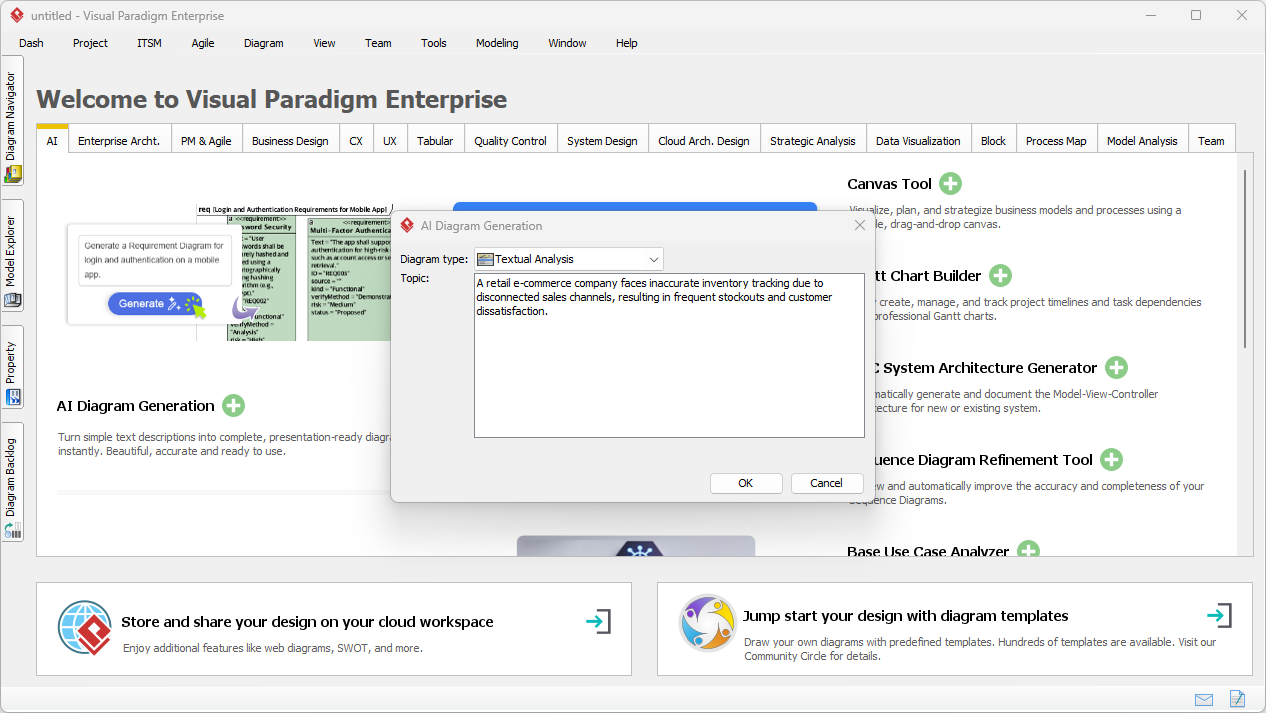
Once you click OK, the AI engine kicks into high gear. It performs complex natural language processing to understand not just the words, but the intent behind them. It looks for entities, behaviors, and relationships buried in your sentences.
Step 2: Reviewing the Intelligent Analysis
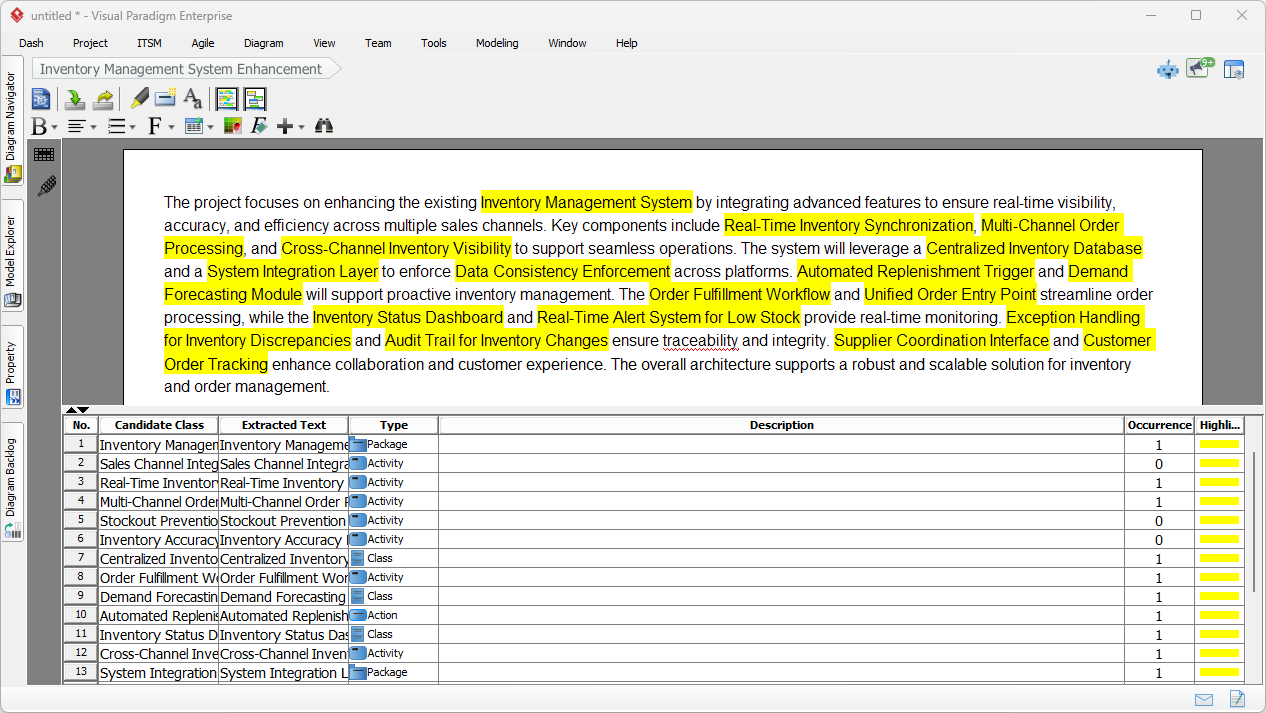
This is where the magic happens! Look at the result below. The tool hasn’t just summarized the text; it has performed a deep structural analysis. The text editor view highlights key terms in yellow—identifying potential requirements, system components, and workflows.
But wait, look at the bottom half of the screen. This is the Candidate Item List. The AI has automatically extracted items like “Inventory Manager” (Package), “Real-Time Inventory Synchronization” (Activity), and “Demand Forecasting” (Class). It classifies them for you! This creates a powerful traceability matrix right from the start, ensuring no requirement is left behind during the elicitation phase.
Step 3: Converting Candidates to Model Elements
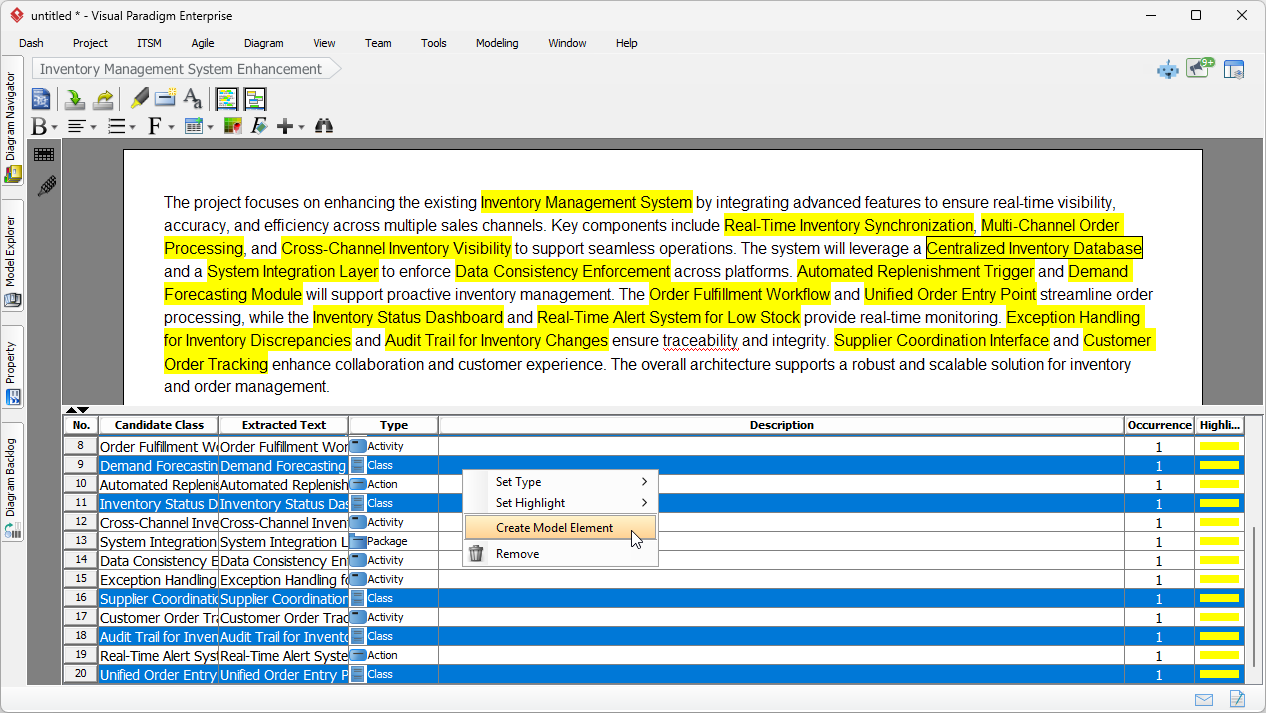
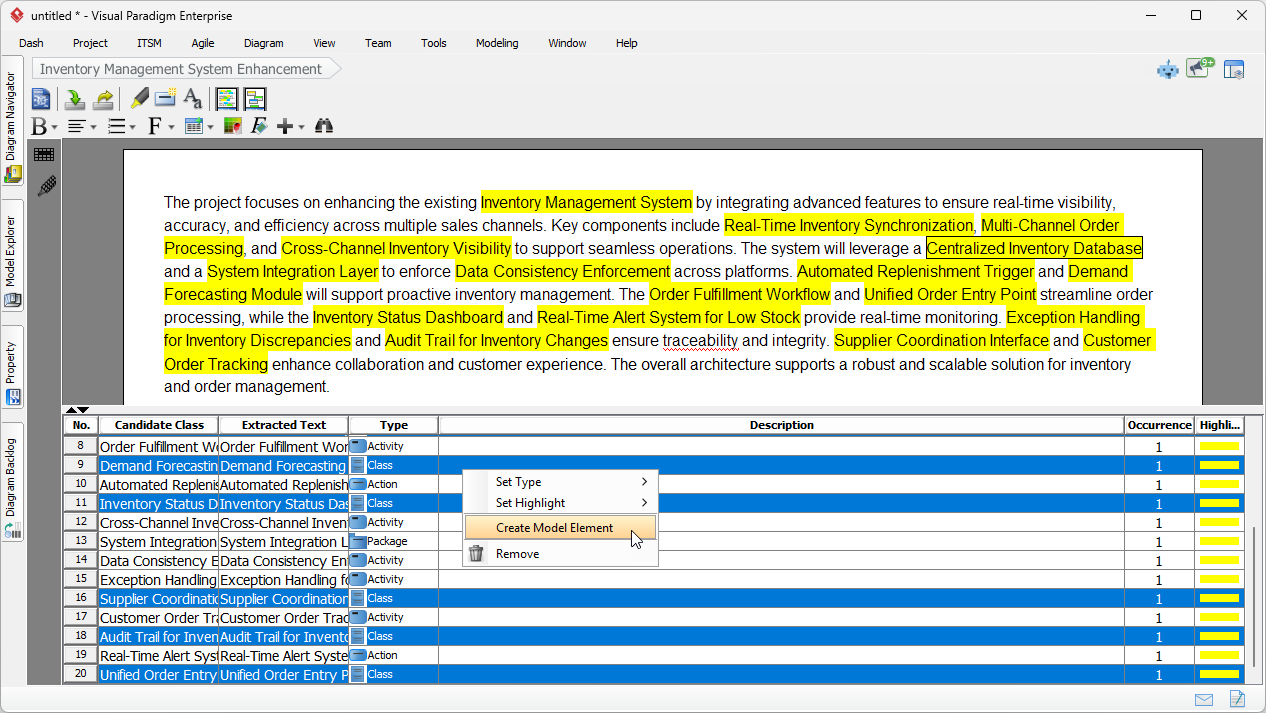
Now, as a savvy analyst, you want to move from text to a visual model. You don’t need to redraw these boxes manually. In the candidate list, you can simply select the rows that are relevant to the structure you want to build.
In our example, we’ve identified several candidate classes such as “Demand Forecasting,” “Centralized Inventory Database,” and “Supplier Coordination Interface.” Simply select these rows, right-click, and choose Create Model Element. It is that seamless! You are effectively telling the system, “I approve these AI suggestions; let’s make them real.”
Step 4: Visualizing the Inventory System
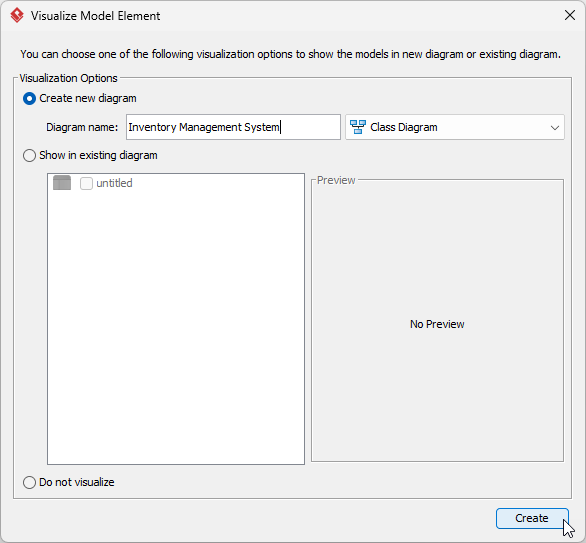
After selecting “Create Model Element,” Visual Paradigm asks how you want to visualize these new assets. This is fantastic for keeping your project organized. You can add them to an existing diagram or create a fresh one.
Let’s choose Create new diagram and name it “Inventory Management System.” Ensure the type is set to Class Diagram, as we want to see the structural relationship between these domain entities.
Step 5: The Final Result – A Structured Foundation
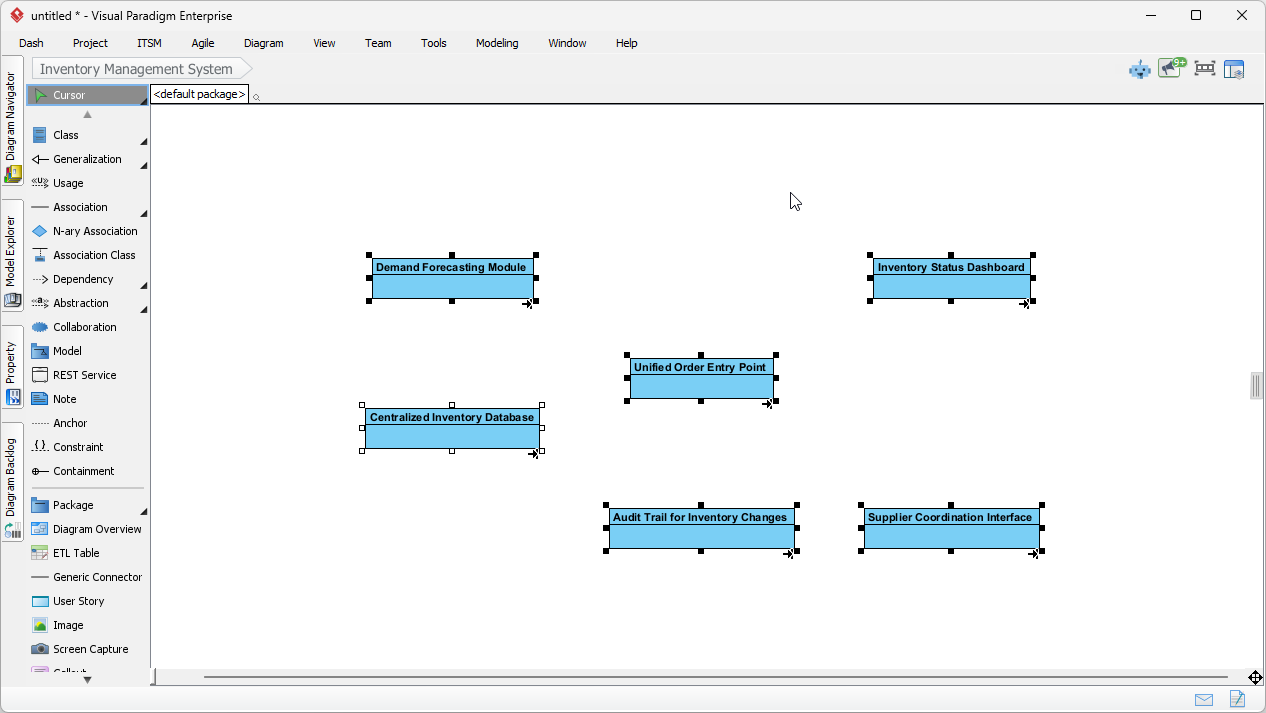
And there you have it! In a matter of clicks, the text description has been transformed into a visual Class Diagram. The elements “Demand Forecasting Module,” “Unified Order Entry Point,” and “Audit Trail” are now dropped onto your canvas as proper classes.
Think about how much productivity this unlocks. You skipped the tedious data entry and jumped straight to the refinement phase. Now, your job is to simply add attributes, define operations, and draw the relationships between these classes. The AI Textual Analysis provided the heavy lifting, giving you a robust, error-free foundation to build your software architecture.
Why This Matters for Your Workflow
By using Visual Paradigm’s AI features, you bridge the gap between business needs and technical design instantly. This workflow helps you:
-
Reduce Human Error: The AI catches terms you might skim over.
-
Accelerate Elicitation: Move from interview notes to diagrams in a single workshop session.
-
Enhance Traceability: Every class on your diagram can be traced back to the original text source.
Ready to boost your requirements engineering productivity? Stop highlighting paper and start modeling intelligently.
Download Visual Paradigm today and experience the power of AI Textual Analysis!
Related Links
Textual analysis in Visual Paradigm provides a robust method for transforming unstructured written descriptions into structured visual models, including UML, BPMN, and ERD diagrams. These tools leverage AI-driven automation and natural language processing to extract system requirements, identify candidate patterns, and improve documentation traceability. Advanced techniques within the suite support sentiment analysis and keyword extraction, allowing architects to quickly identify domain classes and relationships directly from problem descriptions.
-
AI Textual Analysis – Transform Text into Visual Models Automatically: An overview of the AI feature that analyzes documents to automatically generate various diagram types for faster modeling.
-
From Problem Description to Class Diagram: AI-Powered Textual Analysis: A specialized tutorial on converting natural language text into accurate class diagrams using AI.
-
Textual Analysis in Visual Paradigm: From Text to Diagram: The official user guide detailing how to transform written descriptions into structured UML and use case diagrams.
-
AI Textual Analysis Tool by Visual Paradigm: A dedicated tool interface for turning natural language inputs into structured software design components.
-
How to Use Textual Analysis in Visual Paradigm: A practical tutorial on identifying patterns and extracting insights from unstructured text using analytical tools.
-
Visual Paradigm Textual Analysis Tool Features: A comprehensive list of capabilities that enable users to derive meaningful insights from large volumes of textual data.
-
Documenting Requirements Using Textual Analysis: Explains the process of extracting and organizing requirements from existing documents to enhance project clarity.
-
What is Textual Analysis? – Visual Paradigm Circle: A foundational resource covering the purpose and benefits of textual analysis in professional project workflows.
-
AI-Powered Textual Analysis Tutorial for Software Design: A hands-on guide for using AI to extract design elements directly from natural language requirements.
-
Visual Paradigm AI Toolbox: Textual Analysis Tool: An application within the AI Toolbox that transforms unstructured text into structured models by identifying entities and relationships.
Related posts:
 Building the Ultimate Restaurant Reservation App: Accelerate Requirements Engineering with Visual Paradigm’s AI-Powered Use Case Modeling Studio
 Mastering System Design with the AI-Powered Use Case Modeling Studio: A Comprehensive Guide
The Comprehensive Guide to the AI-Powered Use Case Modeling Studio
Visual Paradigm’s AI UML Generator: Revolutionizing E-Commerce Architecture Design
Mastering System Design with the AI-Powered Use Case Modeling Studio: A Comprehensive Guide
The Comprehensive Guide to the AI-Powered Use Case Modeling Studio
Visual Paradigm’s AI UML Generator: Revolutionizing E-Commerce Architecture Design