

In the intricate architecture of modern software systems, documentation often becomes a casualty of momentum. When building complex APIs, the pressure to document every edge case, every retry logic, and every internal handshake can lead to diagrams that are more confusing than the code itself. This phenomenon is known as scope creep. It is not merely an issue of time management; it is a design failure where the visualization becomes heavier than the value it provides.
Sequence diagrams are a powerful tool for mapping interactions between system components. They show the flow of data over time. However, when applied to intricate API ecosystems without discipline, they can quickly devolve into unreadable tangles of messages. The goal is not to simplify for the sake of simplicity, but to clarify for the sake of comprehension. This guide explores how to maintain clarity, manage complexity, and prevent documentation bloat.
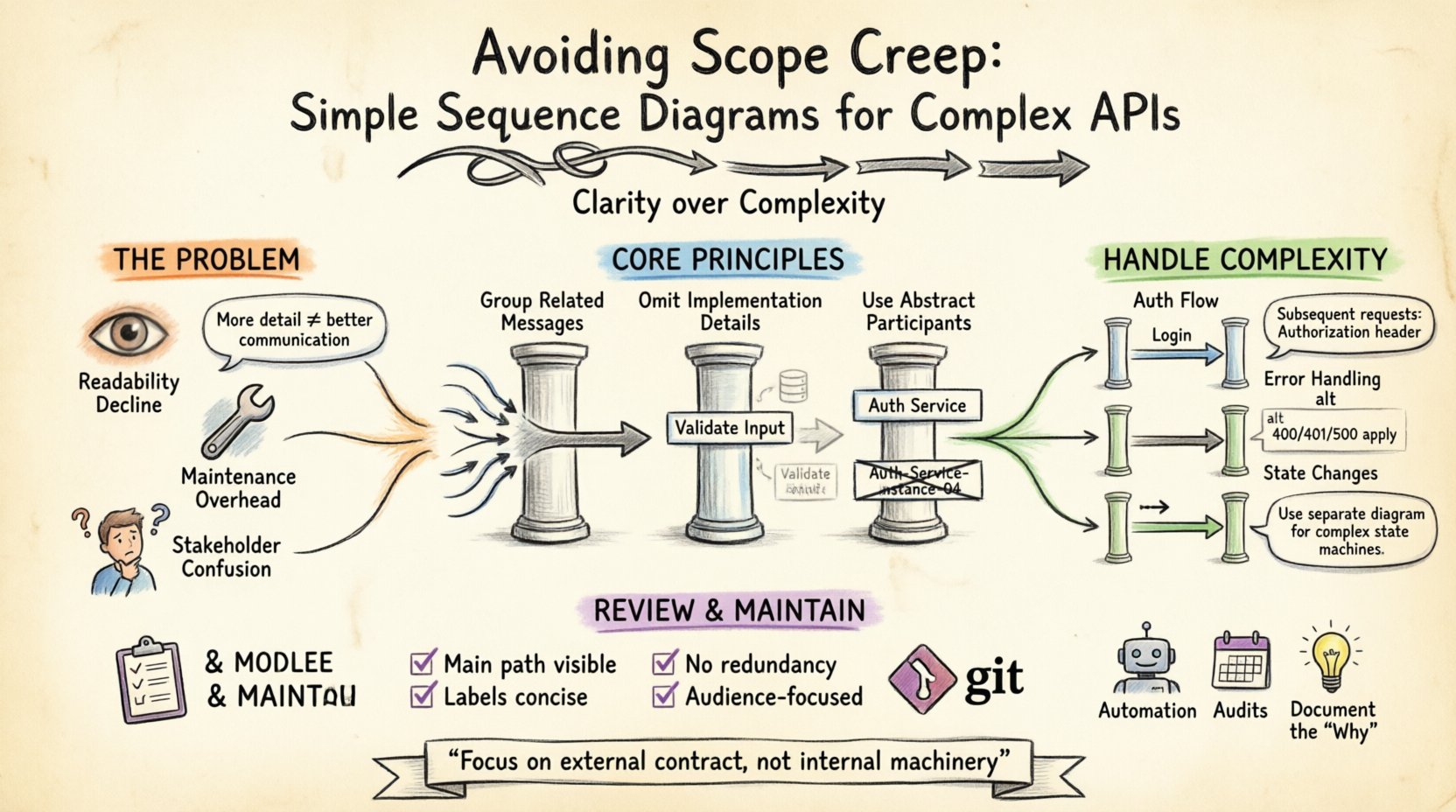
🧩 The Hidden Cost of Over-Designed Diagrams
Technical documentation often suffers from the same trap as software development: the belief that more detail equals better quality. In the context of sequence diagrams, this translates to showing every single HTTP request, every response header, and every internal validation step. While technically accurate, such diagrams fail their primary purpose: communication.
- Readability Decline: When a diagram fills the screen with hundreds of messages, the critical path becomes invisible.
- Maintenance Overhead: Every API change requires a diagram update. If the diagram is too granular, updates become frequent and burdensome.
- Confusion for Stakeholders: Product managers and clients do not need to see internal validation logic. They need to see the contract between the client and the service.
Over-designing diagrams creates a barrier between the documentation and the audience. It shifts the focus from the “what” and “why” to the “how”. By resisting the urge to document everything, you preserve the integrity of the visual narrative.
🚧 Defining Scope Creep in Visual Documentation
Scope creep usually refers to uncontrolled changes or continuous growth in a project’s scope. In documentation, it manifests as the gradual addition of elements that were not part of the original intent. For sequence diagrams, this often happens incrementally.
A typical scenario begins with a high-level flow. Then, a developer adds a timeout message. Next, an authentication step is inserted. Finally, error handling for every possible status code is layered on top. The diagram grows, but the signal-to-noise ratio drops.
To identify scope creep, ask these questions:
- Is this step necessary for the user to understand the API?
- Does this detail belong in a technical specification rather than a diagram?
- Will this diagram still be useful if the internal implementation changes?
If the answer to the last question is “no”, the diagram is likely tied too closely to implementation details. Scope creep in diagrams often stems from treating the visual as a literal transcript of code execution rather than a conceptual model of interaction.
🎯 Principles of Abstraction for API Flows
The key to preventing scope creep is abstraction. Abstraction allows you to represent complex systems using simplified representations. In sequence diagrams, this means grouping messages, omitting internal logic, and focusing on the contract.
1. Group Related Messages
Instead of drawing individual HTTP requests for a single logical operation, group them. If an API endpoint requires fetching related data from three different internal services before responding, represent this as a single composite interaction or a sub-process. This keeps the main timeline clean.
2. Omit Implementation Details
Do not draw the internal database queries or the specific validation libraries used. Focus on the input and the output. For example, instead of showing a “Validate Email Regex” message, simply show “Validate Input”. The validation logic belongs in the API specification, not the flow diagram.
3. Use Abstract Participants
When diagrams become too specific, they break quickly. Use generic participants like “Authentication Service” or “Payment Gateway” rather than naming specific microservices like “Auth-Service-Instance-04”. This allows the diagram to remain valid even if the underlying infrastructure is refactored.
🧱 Handling Complexity Without Clutter
Complex APIs inherently have complex flows. Authentication, pagination, error handling, and retries are standard requirements that can clutter a diagram. The strategy is to handle these patterns consistently without drawing them repeatedly for every single endpoint.
Authentication Flows
Authentication is often the most verbose part of an API diagram. Instead of showing the token exchange for every request:
- Define a standard “Login” sequence at the top of the diagram.
- Indicate that subsequent requests require an Authorization header.
- Use notes to specify token expiration or refresh logic rather than drawing the refresh cycle for every interaction.
Error Handling
Every endpoint can fail. Drawing a failure path for every success path creates a combinatorial explosion of lines. Use the following approach:
- Highlight Critical Errors: Only show the error flow for unique or complex error scenarios.
- Standardize Common Errors: Add a note stating that standard HTTP status codes (400, 401, 500) apply to all endpoints.
- Use Frames: Group alternative paths using combined fragments (alt/opt loops) to show variance without breaking the main flow.
State Changes
APIs that manage state (like order processing) are prone to long, winding diagrams. To keep this simple:
- Focus on the trigger and the result.
- Avoid showing every internal state transition unless it impacts the external response.
- Use a separate diagram for complex state machines if the sequence diagram becomes too crowded.
🛠️ The Review Protocol
A robust review process is essential to catch scope creep before it solidifies. Documentation review should not just be about correctness; it should be about clarity and scope.
The Editor’s Checklist
Before finalizing a diagram, run it through this checklist:
- Is the main path visible? Can you trace the request from start to finish without getting lost in side branches?
- Are labels concise? Can a message label be shortened without losing meaning?
- Is there redundancy? Are there multiple diagrams showing the same flow with minor variations?
- Is the audience addressed? Does this diagram answer the questions a developer needs to answer to use the API?
Version Control for Diagrams
Treat diagrams like code. They should be versioned and tracked. When a diagram changes significantly, it should be reviewed by a peer who understands the context. This peer review acts as a gatekeeper against scope creep. If a reviewer sees unnecessary detail, they should request abstraction.
📊 Common Traps and Fixes
Below is a structured breakdown of common pitfalls encountered when designing sequence diagrams for APIs, along with practical solutions to maintain simplicity.
| Common Trap | Why It Happens | The Fix |
|---|---|---|
| Showing every HTTP Header | Assuming headers are critical for understanding flow. | List headers in the API contract text; show only critical headers in the diagram. |
| Detailing Internal DB Calls | Trying to prove the system works technically. | Replace with a generic “Data Access” message or omit entirely. |
| Repeating Auth Flow | Ensuring security is documented for every call. | Document auth once in a preamble section or note. |
| Long Async Wait Times | Showing the exact duration of background processing. | Use a time-break symbol or simply note “Processing”. |
| Overusing Combined Fragments | Trying to fit too many alternatives on one line. | Split into separate diagrams for distinct complex flows. |
🔄 Long-Term Maintenance
A diagram that is too complex is a diagram that will be abandoned. Maintenance is the silent killer of documentation quality. If updating the diagram requires significant effort, developers will stop updating it, and it will become obsolete.
Automation and Synchronization
Where possible, link diagrams to the API definition. If you can generate diagrams from the API schema, you reduce the manual effort. However, even generated diagrams can suffer from scope creep if the generation logic is too verbose. Configure the generation rules to prioritize high-level flows over low-level details.
Regular Audits
Schedule periodic audits of your documentation. Look for diagrams that have not been updated in six months. Ask if they still reflect the current system. If a diagram is rarely viewed, it may be too dense or too niche. Simplify it or archive it.
Documenting the “Why”
Include brief textual explanations alongside diagrams. Why is this flow necessary? Why does this error occur? This context reduces the need for the diagram to carry the entire burden of explanation. Text is better for logic; diagrams are better for flow.
🧭 Final Thoughts
Creating sequence diagrams for complex APIs is an exercise in restraint. It requires the discipline to say “no” to details that do not serve the primary purpose of communication. By focusing on abstraction, standardizing complex patterns, and enforcing a strict review process, you can create documentation that remains valuable over time.
Remember that the goal is not to show how the system works internally. The goal is to show how the system behaves externally. When you prioritize the external contract over the internal machinery, you avoid scope creep and create diagrams that truly serve the development team and the users of your API.
Keep the lines clear. Keep the messages meaningful. Keep the complexity hidden where it belongs.