

Requirements engineering stands at a critical inflection point. For decades, the discipline has relied on manual elicitation, documentation, and static modeling techniques to bridge the gap between stakeholder intent and system behavior. Among these techniques, the Unified Modeling Language (UML) Use Case Diagram has remained a cornerstone for visualizing system functionality. However, the integration of Artificial Intelligence (AI) into the software development lifecycle introduces a new dynamic. This shift does not render traditional modeling obsolete; rather, it demands an evolution in how these diagrams are constructed, validated, and maintained.
This guide examines the trajectory of UML Use Case Diagrams within the context of AI-driven requirement analysis. We explore how automated systems assist in capturing functional needs, the challenges of maintaining semantic integrity, and the practical workflows that combine human insight with machine efficiency. The goal is to provide a clear, authoritative perspective on where modeling stands today and where it is heading.
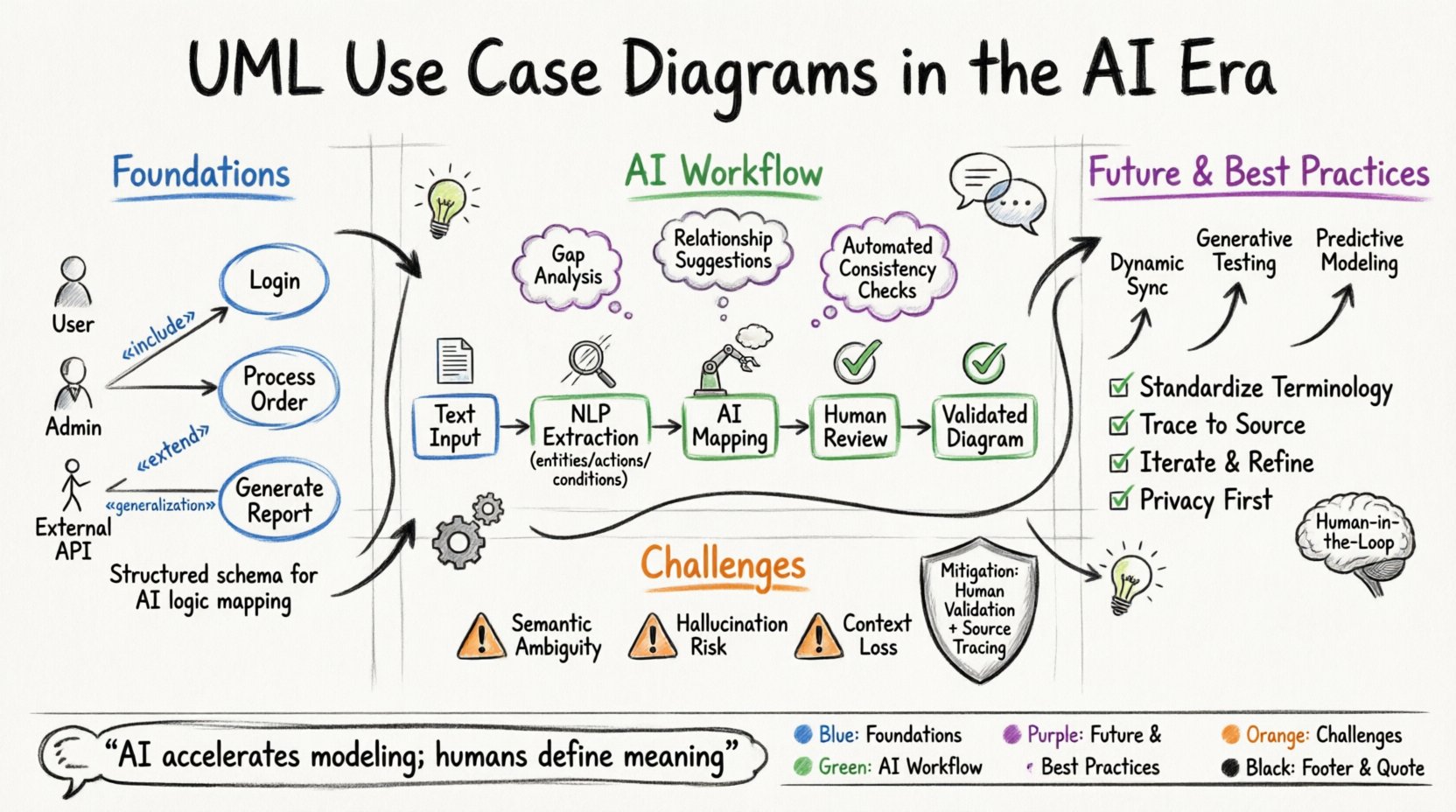
Foundations: Why Use Case Diagrams Remain Relevant 📊
Before analyzing the future, it is necessary to reaffirm the value of the present. A Use Case Diagram is not merely a drawing; it is a formal representation of the interactions between actors and the system. It defines the scope of the system and identifies the external entities that interact with it.
In the context of AI-driven analysis, these diagrams serve a critical structural purpose. AI models, particularly Large Language Models (LLMs), excel at processing unstructured text. However, they require structured schemas to map logic accurately. The Use Case Diagram provides this schema.
- Actors: Represent roles (e.g., User, Admin, External API) rather than specific individuals. This abstraction is vital for AI to understand permission levels and interaction boundaries.
- Use Cases: Specific functional goals achieved within the system. These map directly to the functional requirements that AI can later validate against code or test cases.
- Relationships: Connections such as Association, Include, Extend, and Generalization define the logic flow. These relationships are the “rules” that AI must understand to generate valid system behavior.
Without this visual and logical structure, AI-generated requirements risk becoming a disconnected list of features. The diagram anchors the AI’s output to a coherent system architecture.
AI in Requirement Elicitation: The Current State 🤖
Artificial Intelligence is currently transforming how requirements are gathered. Traditional methods involve workshops, interviews, and surveys. AI augments this by analyzing existing documentation, ticket histories, and communication logs to identify potential gaps.
Natural Language Processing for Requirements
Natural Language Processing (NLP) models can parse thousands of pages of text to extract entities and actions. This process identifies:
- Entities: Nouns that represent data objects or actors (e.g., “Customer”, “Invoice”, “Login Module”).
- Actions: Verbs that represent system behaviors (e.g., “Generate Report”, “Approve Transaction”, “Reset Password”).
- Conditions: Contextual triggers that dictate when an action occurs (e.g., “If balance is zero”, “When user is logged in”).
Once these elements are extracted, they must be organized. This is where the Use Case Diagram becomes the target schema. The AI attempts to map extracted actions to Use Cases and entities to Actors.
Automated Gap Analysis
AI systems can compare current Use Case Diagrams against new textual requirements. If a text mentions a “Refund” process but the diagram only shows “Cancel Order,” the AI flags a missing Use Case. This capability significantly reduces the risk of scope creep or missed functionality during the development phase.
The Intersection: AI-Assisted Diagram Generation 🛠️
The most significant shift is moving from manual drawing to AI-assisted generation. Instead of starting with a blank canvas, engineers can feed natural language descriptions into a system that proposes a diagram structure.
From Text to Graph
Generative AI models are increasingly capable of converting text specifications into UML syntax. The workflow typically involves:
- Ingestion: The system ingests requirement documents, user stories, or meeting transcripts.
- Extraction: The AI identifies actors, use cases, and potential relationships.
- Rendering: The AI outputs a standard UML representation (often in XMI or PlantUML format).
- Refinement: Human engineers review the output for semantic accuracy.
This approach does not replace the engineer. It shifts the effort from syntax to semantics. The engineer spends less time drawing lines and more time verifying if the logic holds true.
Validating Relationships
One of the hardest parts of Use Case modeling is defining the correct relationships. AI can assist here by analyzing the semantic weight of the text.
- Include: If the text suggests “Login is always required to Checkout,” the AI suggests an Include relationship.
- Extend: If the text suggests “Error Handling occurs only if validation fails,” the AI suggests an Extend relationship.
- Generalization: If the text distinguishes between “Admin User” and “Standard User” with specific overrides, the AI suggests a Generalization hierarchy.
Challenges in AI-Driven Modeling ⚠️
Despite the potential, significant hurdles remain. The integration of AI into modeling processes introduces specific risks that require careful management.
Semantic Ambiguity
Natural language is inherently ambiguous. A requirement stating “The system must process payments securely” does not explicitly define the actor or the specific use case. AI might interpret “securely” as a separate use case rather than a quality attribute constraint. Engineers must ensure the AI understands the difference between functional behavior and non-functional constraints.
The Hallucination Risk
Generative models can produce plausible-sounding but incorrect logic. An AI might invent an actor or a relationship that does not exist in the business reality. This is known as hallucination. In modeling, this leads to a diagram that looks correct but fails to represent the actual system needs.
To mitigate this, human-in-the-loop validation is essential. Every diagram generated by AI must undergo a review process where the logic is traced back to source documentation.
Context Loss
AI models often process text in chunks. Complex systems with thousands of use cases may exceed the context window of the model. This can lead to fragmented diagrams where the relationship between a high-level actor and a specific sub-function is lost. Strategies must be implemented to chunk data logically and merge results accurately.
Comparative Workflow: Traditional vs. AI-Assisted 📋
To understand the impact, we must compare the traditional workflow with the AI-assisted approach. The table below outlines the differences in process, time, and output quality.
| Aspect | Traditional Workflow | AI-Assisted Workflow |
|---|---|---|
| Input Source | Manual notes, whiteboard sketches, interviews | Structured documents, chat logs, historical tickets |
| Diagram Creation | Manual drawing of nodes and edges | AI generates draft based on text ingestion |
| Consistency Check | Manual review for duplicates or missing links | Automated cross-reference against requirement database |
| Update Speed | High friction; changes often require redrawing | Fast iteration; text changes trigger diagram updates |
| Human Role | Creator and Validator | Validator and Logic Auditor |
| Primary Risk | Human error, fatigue, inconsistency | Model hallucination, loss of nuance |
Future Trends: Where Modeling is Heading 🔮
Looking ahead, the role of the Use Case Diagram will expand beyond static documentation. It will become a living component of the development pipeline.
Dynamic Model Synchronization
Future systems will likely maintain a live link between the Use Case Diagram and the actual codebase. If a developer modifies a function, the diagram updates automatically to reflect the change. Conversely, if the diagram changes, the code scaffolding can be regenerated. This synchronization ensures that documentation never drifts from reality.
Generative Testing
Use Cases are the basis for testing. In the future, AI will not just generate the diagram but also generate the test cases associated with it. Each Use Case will have a set of positive and negative test scenarios derived from the AI’s understanding of the interaction. This creates a self-documenting system where the diagram drives the quality assurance process.
Predictive Modeling
AI can analyze historical project data to predict where requirements are likely to be ambiguous or incomplete. Before a diagram is finalized, the AI can highlight areas that historically lead to rework. For example, if a new actor is introduced without clear permission levels, the system flags it as a high-risk area for future bugs.
Best Practices for Integration 🎯
To successfully adopt AI-driven requirement analysis, teams must follow specific guidelines. These practices ensure that the technology serves the engineering goals rather than dictating them.
- Standardize Terminology: AI models perform better with consistent vocabulary. Establish a controlled glossary for actors and use cases before feeding data to the system.
- Maintain Source Traceability: Always link diagram elements back to the original text requirement. This allows engineers to verify if the AI’s interpretation matches the stakeholder’s intent.
- Iterative Refinement: Treat AI output as a first draft. Do not assume the first generation is final. Use the AI to speed up the initial iteration, then apply human logic to refine the relationships.
- Focus on Logic over Layout: AI tools often struggle with the aesthetic positioning of nodes. Focus on the correctness of the relationships (Include, Extend) rather than the visual placement of the boxes.
- Privacy and Security: Ensure that requirement data fed into AI systems does not violate data privacy regulations. Sensitive business logic should be anonymized where necessary.
The Human Element: Why Engineers Still Matter 👤
As AI capabilities grow, the fear of replacement arises. However, in requirements engineering, the human element remains irreplaceable. AI can process syntax and pattern match text, but it cannot understand business value or political constraints.
Stakeholders often express needs in terms of business value, not system functions. An AI might suggest a “Delete Account” Use Case based on text, but a human engineer knows that regulatory compliance requires a “Soft Delete” with a recovery period. This nuance is not in the text; it is in the context.
The Use Case Diagram serves as a communication tool between humans. While AI can generate the visual, the negotiation of what is in scope is a human activity. The diagram is the canvas upon which this negotiation happens.
Technical Considerations for Implementation 🛡️
When integrating AI into the modeling process, technical constraints must be acknowledged.
Data Formats
Ensure that the AI system supports standard interchange formats like XMI (XML Metadata Interchange). This allows the generated diagrams to be imported into any modeling environment without data loss. Proprietary formats can lock teams into specific ecosystems.
Model Training
General-purpose AI models are not trained on UML specifically. Fine-tuning a model on historical project data (past Use Cases and their corresponding requirements) can significantly improve accuracy. This creates an institutional memory within the AI tool.
Version Control
Just as code is version-controlled, diagrams must be tracked. AI-generated changes can be subtle. A version control system for models allows teams to roll back if a new AI iteration introduces logical errors. Commit messages should reference the AI prompt or input data used for that version.
Conclusion on the Evolution of Modeling 📝
The integration of AI into UML Use Case Diagrams is not a replacement for modeling; it is an acceleration of it. By automating the extraction of entities and relationships, teams can focus on the higher-order logic of system design. The diagram remains the central artifact for understanding system behavior, but the path to creating it has changed.
Success in this new landscape requires a balance. Leverage AI for speed, data processing, and consistency checks. Rely on human expertise for business logic, ethical considerations, and stakeholder negotiation. As the technology matures, the boundary between the requirement document and the system design will blur, making the Use Case Diagram an even more powerful tool for system architects.
Organizations that adopt this hybrid approach will find themselves better equipped to handle the complexity of modern software systems. The future of requirement analysis is not about choosing between human or machine; it is about orchestrating both to build systems that are robust, understood, and aligned with business goals.