

When modeling complex business processes or software systems, clarity is paramount. Activity diagrams serve as the blueprint for workflow, illustrating the sequence of actions and decisions. However, a simple flow chart is often insufficient for capturing the nuanced logic required in real-world scenarios. This is where guard conditions enter the picture. These small yet powerful annotations determine the path of execution based on specific criteria. Without them, a diagram remains static and unable to represent the dynamic nature of decision-making.
Understanding guard conditions is essential for anyone involved in system analysis, software design, or business process modeling. They act as the gatekeepers of control flow, ensuring that actions only occur when the necessary conditions are met. This guide explores the mechanics, syntax, and strategic application of guard conditions within activity diagrams. We will delve into how they differ from standard decision nodes, how to avoid common logical pitfalls, and why precision in this area prevents costly errors during implementation.
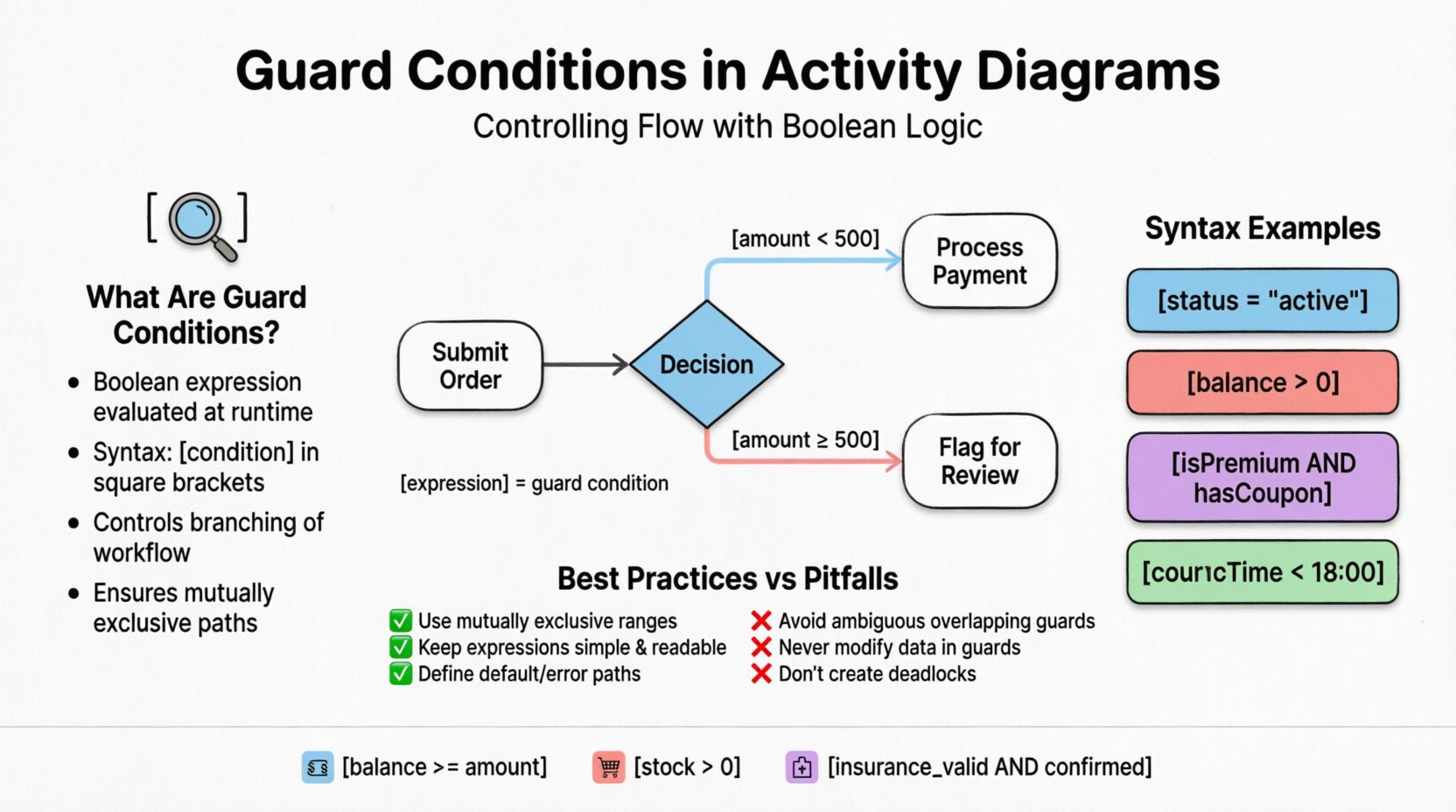
🧩 What Are Guard Conditions?
A guard condition is a boolean expression evaluated at runtime to determine whether a specific transition or action is permissible. In the context of Unified Modeling Language (UML) activity diagrams, they appear as labels on edges connecting nodes. The expression evaluates to either true or false. If true, the transition proceeds. If false, the system looks for an alternative path or waits for a state change.
Think of a guard condition as a security checkpoint at an airport. You cannot pass through unless you present the correct credentials. In an activity diagram, the “credentials” are the data states or variables within the system. The guard checks these variables against a rule.
- Primary Function: To control the branching of control flow.
- Syntax: Typically enclosed in square brackets, e.g., [quantity > 10].
- Placement: Found on outgoing edges from decision nodes or directly on transitions between actions.
- Outcome: Determines the next step in the workflow.
Without guard conditions, every path from a decision node would be assumed to be valid simultaneously, leading to ambiguity. A system cannot execute two contradictory actions at the exact same instant. Guards resolve this by making paths mutually exclusive or conditional.
📐 Visual Syntax and Representation
Visual clarity is a core tenet of effective modeling. Guard conditions must be readable to stakeholders, ranging from technical developers to non-technical business analysts. The standard notation is concise, placing the expression directly on the arrow line.
Consider a scenario where a user submits an order. The system must decide whether to process the payment immediately or flag it for review. The decision point splits into two paths:
- Path A: The payment is processed.
- Path B: The order is flagged.
Each path requires a guard condition to define when it triggers. The visual representation looks like this:
- Edge to Path A: [amount < 500]
- Edge to Path B: [amount ≥ 500]
This notation ensures that anyone reading the diagram understands the exact threshold required to change the flow. It eliminates the need for external documentation to explain basic logic.
📊 Guard Condition Syntax Comparison
Below is a table comparing different types of guard expressions and their typical use cases. This helps in selecting the appropriate level of complexity for your model.
| Type | Example Syntax | Use Case |
|---|---|---|
| Simple Comparison | [status = "active"] |
Checking specific string states or enums. |
| Numeric Range | [balance > 0] |
Validating financial thresholds or inventory levels. |
| Boolean Logic | [isPremium AND hasCoupon] |
Requiring multiple conditions to be met simultaneously. |
| Null Check | [customer != null] |
Ensuring data exists before proceeding with operations. |
| Time-Based | [currentTime < 18:00] |
Restricting actions to specific operational hours. |
⚖️ Decision Nodes vs. Guard Conditions
A common point of confusion lies in the distinction between a decision node and a guard condition. While they are often used together, they serve different purposes in the diagrammatic logic.
A Decision Node is the diamond-shaped symbol that represents a point where the flow branches. It is the physical structure in the diagram. A Guard Condition is the logical rule attached to the outgoing edge from that node. You can have a decision node without explicit guard conditions on every edge if the context implies a default path, but relying on implicit logic is generally discouraged.
- Decision Node: The junction point. It asks, "Which way do we go?"
- Guard Condition: The answer key. It says, "Go this way if X is true."
In some modeling standards, a decision node might have a single output with no guard, implying that all other paths are guarded. However, explicit is always better than implicit. Clarity reduces the risk of misinterpretation during the development phase.
🌀 Complex Logic and Nested Conditions
Real-world systems rarely operate on simple binary choices. Often, logic involves multiple layers of decision-making. This is where nested conditions or complex boolean expressions come into play. While activity diagrams can handle this, over-complication can lead to diagrams that are difficult to maintain.
Consider a loan approval process. The logic might require checking credit score, debt-to-income ratio, and employment history. Instead of creating a cascade of decision nodes, you can use a compound guard condition.
Example:
- Condition:
[creditScore > 700 AND incomeStable]
However, there is a trade-off. While a single complex guard is concise, it can be hard to debug. If the loan is denied, the developer needs to know which part of the compound expression failed. Splitting complex logic into sequential decision nodes often improves traceability.
🚦 When to Split Logic
Use the following criteria to decide whether to keep a guard simple or split it:
- Readability: If the expression exceeds 20 characters, consider splitting it.
- Maintenance: If one part of the logic changes frequently (e.g., tax thresholds), isolate it in its own node.
- Debugging: If you need to log specific failure reasons, separate nodes provide clearer logging points.
- Performance: In high-frequency systems, simpler guards can be faster to evaluate, though this is rarely a bottleneck in modeling.
⚠️ Common Pitfalls and Logical Errors
Designing activity diagrams with guard conditions requires vigilance. Several common mistakes can render a model invalid or lead to runtime errors. Recognizing these pitfalls early saves significant time during the coding phase.
1. Deadlocks and Infinite Loops
If no guard condition evaluates to true, the control flow may stall. This is known as a deadlock. Conversely, if a condition always evaluates to true without changing state, it creates an infinite loop.
- Prevention: Ensure that for every decision node, there is at least one path that is always available unless a specific error state is reached.
- Prevention: Ensure that guards do not reference variables that are not modified by the preceding actions.
2. Ambiguous Guards
Ambiguity occurs when multiple guards could evaluate to true simultaneously. For example, if one path is guarded by [age > 18] and another by [age > 21], a user aged 25 satisfies both. The system must define priority or ensure mutual exclusivity.
- Best Practice: Use mutually exclusive ranges. For example:
[age < 18]and[age ≥ 18]. - Best Practice: Define a default path for any case not explicitly covered by guards.
3. Side Effects in Guards
A guard condition should be a read-only evaluation. It should not trigger actions or modify data. It is merely a check. If a guard modifies a variable, it changes the state of the system unpredictably, making the model hard to reason about.
- Rule: Guards are observers, not actors.
- Rule: If logic needs to update a variable, place an action node before the decision node.
✅ Best Practices for Clear Modeling
To ensure that your activity diagrams remain useful artifacts throughout the project lifecycle, adhere to these best practices regarding guard conditions.
- Consistency: Use a standard naming convention for variables. Do not mix
user_idanduserIDin the same diagram. - Context: If a variable name is not self-explanatory, add a comment or legend to the diagram.
- Simplicity: Avoid deep nesting. Flatten the diagram where possible.
- Validation: Review the diagram with the logic to ensure all possible outcomes are covered.
- Documentation: Keep the logic separate if it is extremely complex. The diagram should show the flow, not the implementation details of the algorithm.
🏢 Real-World Application Scenarios
Guard conditions are ubiquitous in modern software architecture. Here are a few industry-specific examples of how they function in practice.
Banking and Finance
In transaction processing, guards prevent overdrafts. A withdrawal action is guarded by [balance >= amount]. If the guard fails, the system routes the request to a rejection handler. This logic is critical for compliance and financial integrity.
E-Commerce Workflows
Order fulfillment often depends on inventory levels. A fulfillment node might be guarded by [stock_quantity > 0]. If stock is depleted, the guard fails, and the flow moves to a "Backorder" or "Notify Customer" path. This ensures customer expectations are managed accurately.
Healthcare Systems
Patient admission workflows use guards to verify eligibility. A path to "Admit Patient" is guarded by [insurance_valid AND appointment_confirmed]. If either condition is false, the system triggers a "Verify Insurance" sub-process. This prevents administrative errors and ensures patient data is accurate.
🔗 Integration with Other UML Elements
Activity diagrams do not exist in isolation. They interact with other modeling elements, such as state machines and sequence diagrams. Guard conditions play a role in these integrations.
- With State Machines: Transitions in state machines often use guard conditions to trigger state changes. The logic in an activity diagram might feed into the state of an object used in a state machine.
- With Sequence Diagrams: The logic flow in an activity diagram can be mapped to interaction sequences. Guard conditions correspond to conditional fragments in sequence diagrams (alt/opt blocks).
- With Object Flows: Data objects flow between actions. Guards determine if these objects are passed along. This creates a link between control flow and data flow.
📝 Implementation Considerations
When translating a modeled diagram into code, guard conditions become conditional statements. While the model uses syntax like [x > 5], the implementation might use if (x > 5). The mapping should be direct, but developers must account for language-specific nuances.
Here is a mapping of common modeling concepts to programming constructs:
- Guard Condition:
iforcasestatement. - Decision Node: The point of branching in code.
- False Path: The
elseblock or a separateifchain. - True Path: The body of the
ifstatement.
One critical consideration is the handling of undefined values. In a diagram, a variable might appear null. In code, accessing a null variable can crash the application. The guard condition should explicitly check for nullability before proceeding with calculations.
🚀 Performance and Scalability
While modeling focuses on logic, the resulting code impacts performance. Complex guard conditions can slow down execution if they involve expensive operations, such as database queries or external API calls.
- Optimization: Keep guard conditions lightweight. Use simple variable checks.
- Caching: If a guard relies on data that changes slowly, cache the result to avoid repeated checks.
- Parallelism: If multiple guards can be evaluated independently, consider parallel execution paths, provided the diagram supports this abstraction.
Designers must balance logic completeness with runtime efficiency. A model that is logically perfect but computationally expensive is not a successful design. Refactor complex guards into separate helper functions or actions to improve maintainability.
❓ Frequently Asked Questions
Addressing common queries helps solidify understanding of the topic.
Can I have multiple guards on a single edge?
No. A single edge can only have one guard condition. If you need multiple conditions, combine them using boolean operators (AND, OR) within the single expression, or split them into sequential decision nodes.
What happens if no guard is true?
The flow halts. This is a critical error state. You must define a default path or an error handling path to ensure the process can terminate gracefully.
Are guard conditions the same as triggers?
No. Triggers initiate an action. Guard conditions filter the flow of an action. A trigger asks "Start now?" A guard asks "Is it safe to proceed?"
Can guard conditions reference external data?
Yes. They can reference variables, database states, or system clocks. However, the source of that data must be clear in the data flow of the diagram.
🛠️ Final Thoughts on Modeling Precision
The accuracy of your activity diagrams directly influences the quality of the final system. Guard conditions are the mechanism that brings precision to these diagrams. They transform a static picture into a dynamic representation of logic.
By adhering to strict syntax rules, avoiding ambiguity, and prioritizing readability, you create a blueprint that developers can trust. This reduces the gap between design and implementation. It minimizes the need for constant clarification and ensures that the system behaves as intended under all conditions.
Remember that a diagram is a communication tool. If the guard conditions are obscure, the communication has failed. Keep them simple, explicit, and consistent. This approach fosters better collaboration between analysts, architects, and developers, leading to more robust and reliable software solutions.
Mastering the nuance of control flow is not about memorizing rules; it is about understanding the flow of data and logic through a system. When you grasp how guard conditions dictate the path of execution, you gain the ability to model complex behaviors with clarity and confidence.