

Sequence diagrams serve as a critical communication tool in software architecture, particularly for those working with Application Programming Interfaces (APIs). While often treated as simple sketches, the specific syntax used to represent interactions dictates the clarity of the system design. Misunderstanding these visual rules can lead to implementation errors, misaligned expectations between frontend and backend teams, and brittle documentation. This guide explores the structural nuances of sequence diagrams, focusing on the elements that define robust API interaction flows.
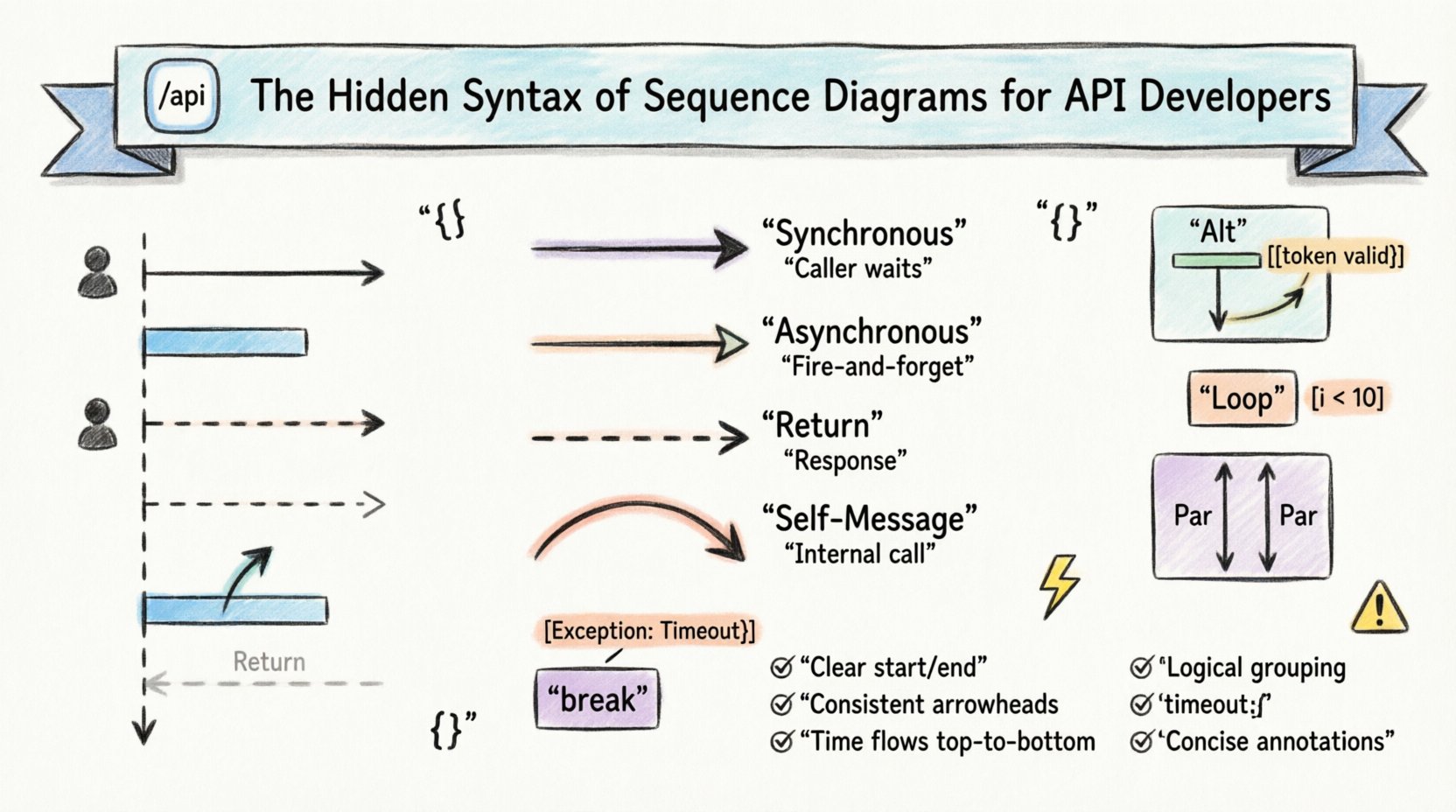
Understanding the Core Components 🛠️
Before diving into complex interactions, it is essential to establish a firm grasp of the foundational elements. Each component carries specific semantic weight that informs the reader about the system’s behavior.
- Lifelines: These vertical dashed lines represent the existence of an object, actor, or system component over time. In API development, lifelines typically map to specific services, database instances, or client applications.
- Messages: Horizontal arrows indicate communication between lifelines. The direction and style of the arrow define the type of request or response.
- Activation Bars: Rectangular boxes placed on a lifeline indicate the period during which an object is performing an action or is actively engaged in the process.
- Return Messages: These arrows point back towards the original caller, signaling the completion of a task or the transmission of data.
When designing API flows, precision in these elements prevents ambiguity. For instance, failing to distinguish between a request and a return message can confuse developers about whether the operation is synchronous or asynchronous.
Decoding Message Syntax 📩
The arrow types used in sequence diagrams are not arbitrary. They carry distinct meanings regarding the execution flow and the nature of the API call.
Synchronous vs. Asynchronous Calls
API interactions generally fall into two categories: blocking and non-blocking. Visualizing these correctly is vital for understanding system latency and user experience.
| Message Type | Arrow Style | Meaning | Common Use Case |
|---|---|---|---|
| Synchronous | Filled Arrowhead | Caller waits for response | Standard REST GET/POST requests |
| Asynchronous | Open Arrowhead | Caller does not wait | Background job triggers, Webhooks |
| Return | Dashed Line | Response sent back | HTTP 200 OK, JSON payload |
| Self-Message | Curved Arrow | Object calls itself | Internal method processing |
Using the correct arrow style ensures that engineers reading the diagram understand the timing implications. A synchronous call implies a thread is blocked, whereas an asynchronous call suggests a fire-and-forget mechanism.
Activation Bars and Control Flow ⏱️
Activation bars (also known as focus of control) indicate when a specific component is busy. In the context of API development, these bars help identify bottlenecks.
- Duration: The length of the bar represents the time taken to process the request.
- Stacking: When a service calls another service, the activation bar of the callee is nested within the caller’s timeline.
- Nesting: Deep nesting indicates complex dependency chains which may require optimization.
Consider a scenario where a user request hits an API Gateway, which then queries a User Service, which subsequently calls a Database. The activation bar of the Database will be inside the User Service bar, which is inside the API Gateway bar. This visual nesting helps developers quickly identify the depth of the call stack.
Advanced Interaction Frames 🔄
Real-world API flows are rarely linear. They involve loops, alternatives, and parallel processes. Sequence diagrams utilize combined frames to represent these complex logic structures.
Alternative (Alt) Fragments
Use the alt frame to represent conditional logic, such as if-else statements. This is common in authentication flows where a valid token leads to one path, and an invalid token leads to another.
- Condition: The condition is written in a guard box at the top of the frame (e.g., [token valid]).
- Separation: Different conditions are separated by horizontal lines within the frame.
- Completeness: Ensure all logical outcomes are represented to avoid ambiguity.
Loop (Loop) Fragments
When an API endpoint processes a collection of items, a loop frame is appropriate. This indicates that the interaction repeats for each item in a set.
- Iteration Count: You can specify the number of iterations (e.g., [i < 10]).
- Condition: Loops often depend on a condition (e.g., [while items remain]).
Parallel (Par) Fragments
Modern systems often handle multiple tasks simultaneously. The par frame indicates that operations occur concurrently.
- Independence: The operations within the parallel frame do not depend on each other’s completion.
- Resource Usage: This highlights where the system might be utilizing multiple threads or connections.
Representing Errors and Exceptions 🚨
Success flows are only half the story. Robust API documentation must visualize how the system handles failure. Ignoring error paths in diagrams leads to fragile implementations.
Exception Frames
Use the opt (optional) or break frames to depict error scenarios. A break frame is particularly useful for representing an exception that terminates the current flow.
- Exception Message: Clearly label the frame as [Exception: Timeout].
- Recovery: Show if the system retries the request or returns a 500 error.
- Logging: Indicate if the error is logged internally before propagating.
Timeout Indicators
Timing constraints are crucial for distributed systems. You can annotate messages with time constraints using brackets.
- Format: [timeout: 5s].
- Implication: If the response is not received within 5 seconds, the interaction is considered failed.
Naming Conventions and Readability 🏷️
A diagram that is difficult to read defeats its purpose. Consistent naming conventions ensure that the diagram remains understandable as the system evolves.
- Message Names: Use verbs for requests (e.g.,
fetchUser) and nouns for responses (e.g.,UserRecord). - Lifeline Names: Use specific service names (e.g.,
AuthService) rather than generic terms likeService. - Abbreviations: Avoid obscure abbreviations. If used, define them in a legend.
- Consistency: Ensure the terminology matches the codebase and API documentation.
Connecting Diagrams to API Specifications 🔗
Sequence diagrams should align with formal API specifications, such as OpenAPI or Swagger documents. This alignment ensures that the visual representation matches the technical contract.
Endpoint Mapping
Each message arrow should correspond to a defined endpoint in the API specification. This mapping allows developers to trace the visual flow directly to the code implementation.
- Method: The HTTP method (GET, POST, PUT, DELETE) should be clear.
- Path: The resource path should be referenced in the message label.
- Version: Include API versioning if applicable to avoid confusion between legacy and current endpoints.
Data Structures
The payload sent and received should match the schema defined in the specification. While sequence diagrams do not show every field, they should represent the key data entities involved in the interaction.
Common Pitfalls to Avoid ⚠️
Even experienced developers make mistakes when creating sequence diagrams. Being aware of common errors helps maintain high-quality documentation.
| Pitfall | Impact | Mitigation |
|---|---|---|
| Mixed Synchronous/Asynchronous | Confusion on blocking behavior | Use distinct arrow styles and labels |
| Missing Return Messages | Implies one-way communication | Always include dashed return arrows |
| Overcrowding | Diagram becomes unreadable | Split into multiple diagrams for complex flows |
| Ambiguous Lifelines | Unclear ownership | Use specific component names |
| Ignoring Time | Performance expectations mismatch | Add timing constraints where critical |
The Role of Diagrams in DevOps 🚀
In modern development environments, sequence diagrams are not just design artifacts; they are living documents used in CI/CD pipelines. Automated tools can validate that the deployed system matches the intended interaction flow.
- Version Control: Store diagram files alongside code repositories to track changes over time.
- Code Generation: Some frameworks allow generating skeleton code from sequence diagram specifications.
- Onboarding: New team members can use these diagrams to understand the system architecture quickly.
Best Practices for Maintenance 📝
Diagrams degrade if not maintained. As the system changes, the diagrams must evolve to reflect the current state.
- Review Cycle: Schedule regular reviews of diagrams during sprint planning or retrospectives.
- Update Triggers: Update diagrams whenever a new microservice is added or a major API contract change occurs.
- Automation: Use tools that can parse API specs to update diagrams automatically where possible.
- Clarity over Detail: Focus on the high-level flow rather than every single data field. Details belong in the API specification.
Summary of Syntax Rules ✅
To ensure clarity and consistency across the development team, adhere to the following checklist when creating sequence diagrams.
- Start and End: Every diagram should have a clear start point (actor initiation) and end point (response or termination).
- Orthogonal Layout: Arrange lifelines horizontally to minimize crossing lines.
- Consistent Arrowheads: Use filled heads for requests and open heads for replies or async messages.
- Time Direction: Time always flows from top to bottom.
- Logical Grouping: Use frames to group related interactions (e.g., all authentication steps).
- Text Annotations: Use notes for clarifying comments, but keep them concise.
By mastering these syntax rules, API developers can create diagrams that serve as reliable blueprints. These visuals reduce the cognitive load on the team and facilitate smoother handoffs between design and implementation phases. The investment in clear diagramming pays off in reduced debugging time and fewer integration errors.
Remember that the goal is communication. A diagram that looks perfect but is understood by no one is useless. Prioritize readability and adherence to standard conventions to ensure the sequence diagram fulfills its role as a shared language for the team.