

Large-scale software systems require precision. In enterprise environments, where millions of dollars and critical operations hang in the balance, ambiguity is a liability. Unified Modeling Language (UML) offers a standardized way to visualize, specify, construct, and document the artifacts of software systems. However, theory often differs from practice. This guide examines how major organizations leverage UML to solve complex architectural challenges without relying on hype.
When implemented correctly, UML bridges the gap between business requirements and technical execution. It serves as a common language for stakeholders, developers, and architects. Below, we explore practical applications, specific diagram types used in production, and the tangible benefits observed in mature engineering cultures.
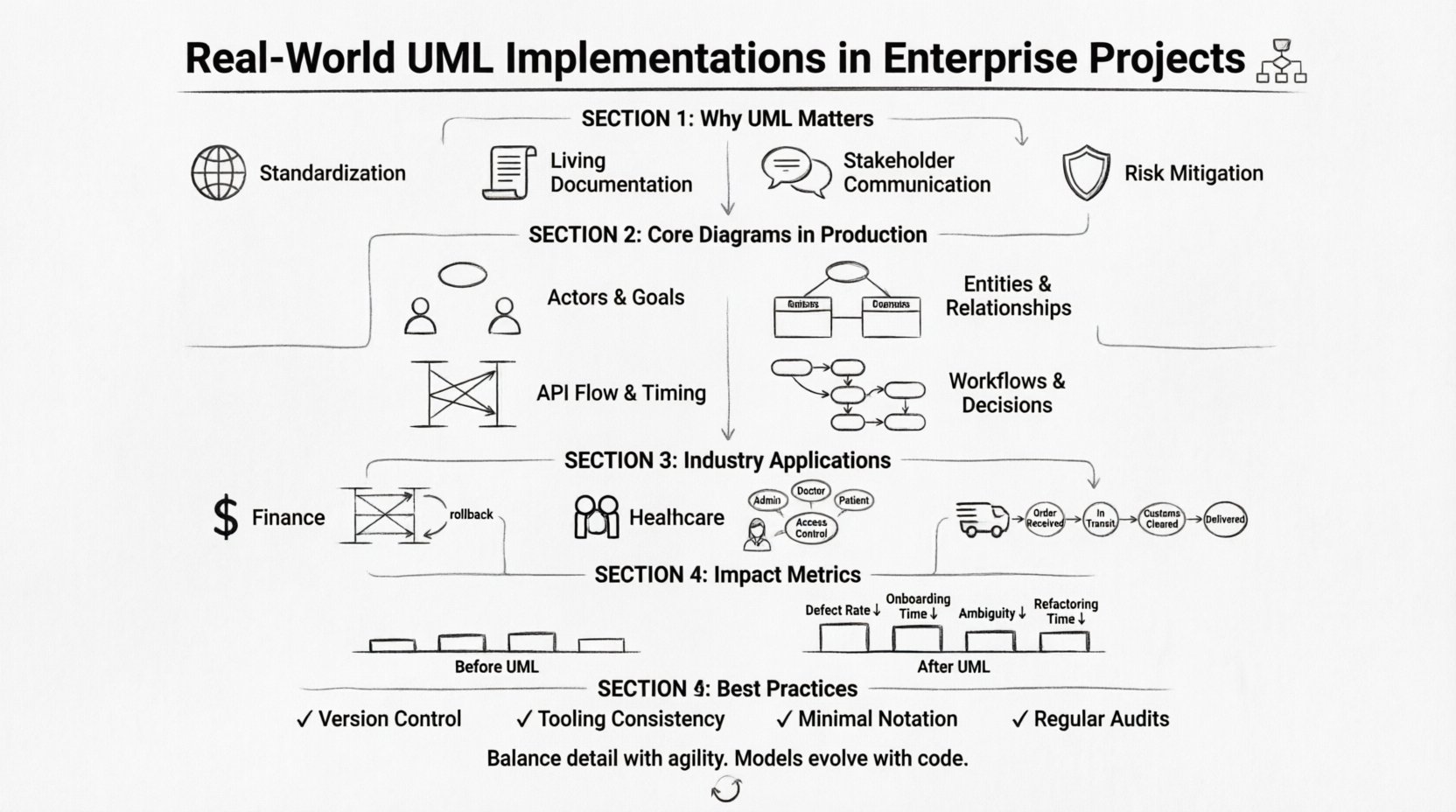
Why UML Matters in Enterprise Architecture 🏗️
Enterprises operate with distinct constraints. Legacy systems, regulatory compliance, and the need for scalability create a complex landscape. UML provides structure in this chaos.
- Standardization: Teams across different locations speak the same visual language. A sequence diagram drawn in one department is understood by another.
- Documentation: Code evolves rapidly, but static documentation often decays. UML models provide a living reference for system behavior that persists beyond code commits.
- Communication: Non-technical stakeholders can review architecture diagrams to validate business logic before a single line of code is written.
- Risk Mitigation: Identifying logical flaws in a model is significantly cheaper than fixing them in production.
Core Diagrams in Production Environments 📊
Not all diagram types are created equal. In enterprise projects, specific models are selected based on the phase of development and the audience.
1. Use Case Diagrams 🎯
These define the functional requirements from the user’s perspective. They do not show how a system works internally, but rather what it does.
- Scenario: Defining access control in a banking application.
- Benefit: Clarifies who can perform which actions (Actors vs. System). Ensures no feature is built without a defined user need.
2. Class Diagrams 🧱
The backbone of object-oriented design. They map out the static structure of the system.
- Scenario: Designing a complex inventory management database.
- Benefit: Visualizes relationships between entities (inheritance, association, aggregation). Helps database architects normalize data schemas before implementation.
3. Sequence Diagrams 📅
Focus on the dynamic behavior of the system over time. They show how objects interact to achieve a specific goal.
- Scenario: Mapping the data flow during a secure login process.
- Benefit: Reveals bottlenecks in message passing. Essential for API design and microservice communication patterns.
4. Activity Diagrams ⚙️
Similar to flowcharts, these depict the flow of control from activity to activity.
- Scenario: Visualizing a multi-step approval workflow for loan applications.
- Benefit: Highlights decision points, parallel processing, and concurrency issues early in the design phase.
Industry-Specific Implementations 🌍
Different sectors face unique challenges. Here is how UML adapts to specific enterprise needs.
Financial Services: Security and Transactions 💰
In banking, accuracy is paramount. A UML sequence diagram is often used to model transaction workflows.
- Challenge: Ensuring atomicity across multiple services (debit, credit, log).
- Implementation: Architects create detailed interaction diagrams to verify that every service call has a corresponding rollback mechanism.
- Outcome: Reduced transaction failures and clearer audit trails for compliance teams.
Healthcare: Data Integrity and Privacy 🏥
Health systems must adhere to strict privacy regulations while maintaining data availability.
- Challenge: Managing patient data access across different departments (lab, billing, clinical).
- Implementation: Use Case diagrams map out role-based access control (RBAC). Class diagrams define the data schema to ensure sensitive fields are encrypted at the model level.
- Outcome: A system architecture that inherently supports compliance without requiring post-hoc security patches.
Logistics: Real-Time Tracking 🚚
Supply chains require real-time data synchronization across a distributed network.
- Challenge: Handling high concurrency of location updates from thousands of vehicles.
- Implementation: Activity diagrams model the state machine of a shipment (e.g., Picked, In Transit, Delivered). Class diagrams handle the payload structure for IoT devices.
- Outcome: Improved visibility for customers and reduced operational errors in warehouse management.
Structuring Information with Tables 📋
When comparing methodologies or tracking implementation status, tables offer superior readability compared to paragraphs.
| Diagram Type | Primary Focus | Best Used For | Target Audience |
|---|---|---|---|
| Use Case | Functionality | Requirements Gathering | Product Managers, Stakeholders |
| Class | Structure | Database Design, OOP Architecture | Backend Engineers, Architects |
| Sequence | Interaction | API Integration, Logic Flow | Developers, QA Engineers |
| State Machine | Lifecycle | Workflow Engines, State Logic | System Architects |
| Component | Physical Deployment | Server Configuration, Dependencies | DevOps, Infrastructure Teams |
Common Pitfalls and How to Avoid Them ⚠️
Even with the best intentions, UML implementation can fail if not managed correctly. Experience shows that these specific issues arise most frequently.
1. The “Big Design Up Front” Trap
Attempting to model the entire system before coding begins leads to documentation that becomes obsolete immediately.
- Solution: Adopt an iterative approach. Model only the critical paths for the current sprint or release cycle.
2. Over-Modeling
Creating 20 different diagrams for a simple CRUD application wastes time and confuses the team.
- Solution: Follow the principle of least power. Create diagrams only when the complexity exceeds the mental capacity of the developers.
3. Disconnect from Code
When the model and the code diverge, trust in the documentation vanishes.
- Solution: Treat diagrams as code. Update them during the code review process, not just during the design phase.
Integration with Modern Workflows 🔄
UML does not have to conflict with Agile or DevOps methodologies. When integrated thoughtfully, it enhances these practices.
- Agile Sprints: Use UML to refine User Stories. A sequence diagram can serve as the “Definition of Done” for a story involving complex logic.
- CI/CD Pipelines: Automated tools can validate that deployed code matches the architectural model. If the model changes, the pipeline flags potential risks.
- Knowledge Transfer: When team members rotate off a project, UML diagrams provide the fastest onboarding path for new engineers.
Measuring the Impact of UML 📈
Organizations need to justify the time spent modeling. Success is measured through specific engineering metrics.
| Metric | Baseline | With UML Implementation |
|---|---|---|
| Defect Rate in Production | High (Logic Errors) | Reduced (Flaws caught early) |
| Time to Onboard New Developers | Months | Weeks |
| Requirement Ambiguity | Frequent Disputes | Resolved in Design Phase |
| System Refactoring Time | High (Unknown Dependencies) | Lower (Mapped Dependencies) |
Deep Dive: A Complex Enterprise Scenario 🔍
To illustrate the depth of application, consider a scenario involving a global e-commerce platform migrating to a microservices architecture.
The Challenge
The legacy monolith handled orders, inventory, and payments in a single database. Splitting these services introduced data consistency issues. The team needed a way to visualize how data flowed between the new services without a central transaction manager.
The UML Approach
- Component Diagram: Defined the boundaries of each microservice (Order Service, Inventory Service, Payment Service).
- Deployment Diagram: Mapped how these services would be hosted across different cloud regions for latency optimization.
- Sequence Diagram: Modeled the asynchronous communication (message queues) between services to ensure eventual consistency.
- State Machine Diagram: Defined the lifecycle of an order (Pending, Processing, Shipped, Cancelled) to handle edge cases like payment failures.
The Result
Before writing code, the team identified a race condition where inventory could be oversold. The sequence diagram revealed that two services were attempting to update stock simultaneously. By adjusting the logic in the model, they implemented a locking mechanism in the design phase.
This prevented a potential revenue loss event. The documentation served as the source of truth for the distributed system, reducing the burden on senior engineers to explain the architecture repeatedly.
Best Practices for Maintenance 🛠️
Models degrade. To keep them useful, specific maintenance protocols are required.
- Version Control: Store model files in the same repository as the source code. This ensures that changes to the design are reviewed alongside changes to the implementation.
- Tooling Consistency: Ensure all team members use the same notation standards. Avoid mixing different tool syntaxes that produce incompatible files.
- Minimal Notation: Stick to the standard UML notation. Custom icons or non-standard shapes confuse external stakeholders and new team members.
- Regular Audits: Schedule quarterly reviews to identify diagrams that no longer match the codebase. Remove or archive outdated models.
Conclusion on Enterprise Modeling 🎯
UML is not a silver bullet, but it is a powerful tool for clarity. In enterprise projects, where the cost of error is high, the investment in modeling pays dividends in stability and maintainability.
Success comes from balancing detail with agility. Use diagrams to clarify complexity, not to create bureaucracy. When teams treat models as living documents that evolve with the software, the architecture remains robust. The goal is not perfection in the diagram, but alignment between the business intent and the technical reality.
By following these guidelines and learning from real-world implementations, organizations can build systems that are not only functional but also understandable and adaptable for the long term.