

In complex software ecosystems, communication is the backbone of success. Visualizing interactions between system components is essential for clarity, yet inconsistent documentation often leads to confusion and technical debt. Sequence diagrams offer a precise way to map out object interactions over time, but without standardization, they become scattered artifacts that fail to serve their purpose. This guide explores sequence diagram best practices, focusing on creating reusable templates that streamline your team’s workflow and enhance technical documentation.
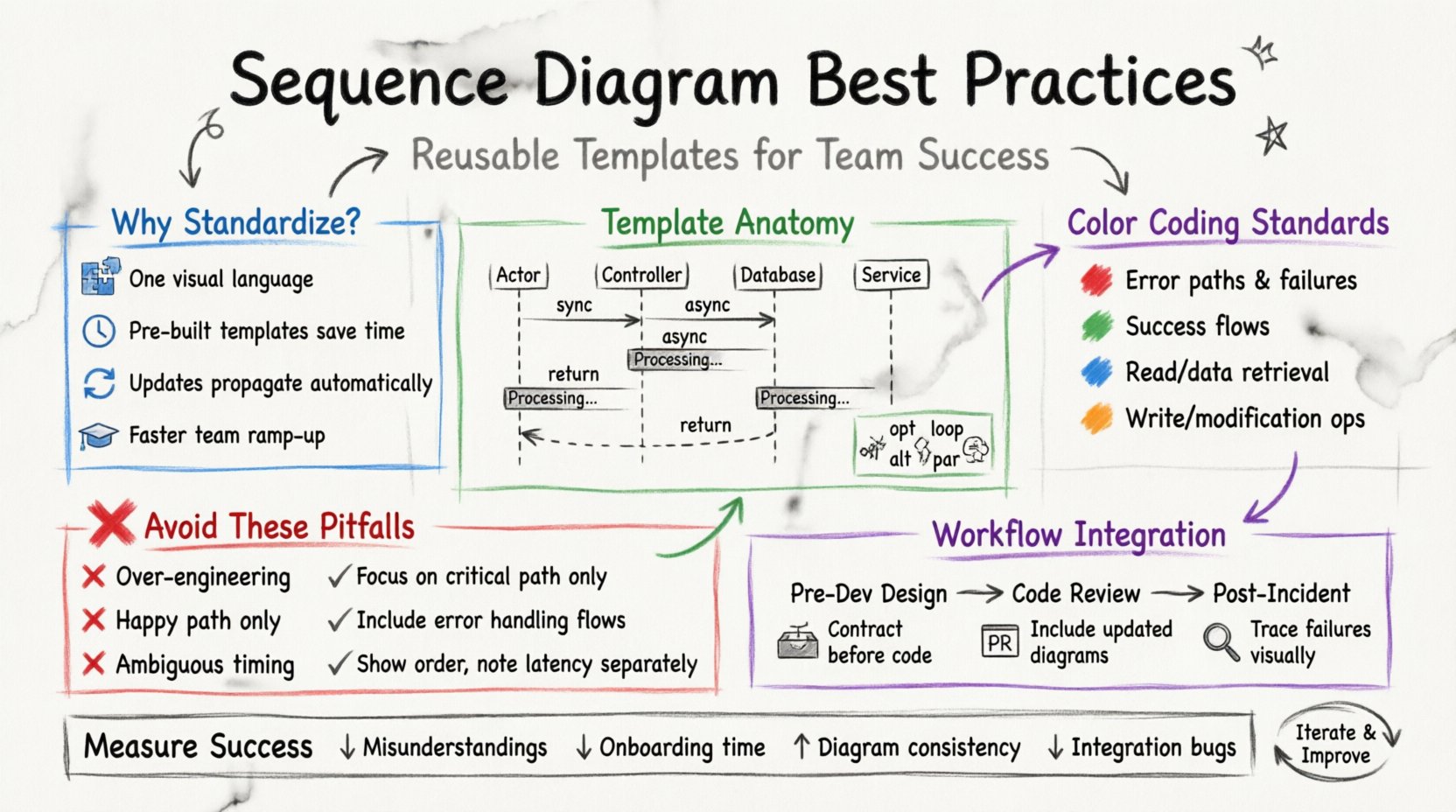
🛠️ Why Standardization Matters in System Design
When multiple engineers contribute to a single codebase, the expectation is that everyone speaks the same language. Visual languages, such as Unified Modeling Language (UML), provide this common ground. However, if one developer draws a diagram with vertical lifelines on the left, and another places them on the right, the cognitive load increases significantly. Standardization reduces friction.
- Consistency: A unified approach ensures that any team member can interpret a diagram without needing context from the creator.
- Efficiency: Pre-built templates save time. Engineers can focus on the specific logic of the interaction rather than the layout.
- Maintainability: When templates are reused, updates to the standard format propagate across all diagrams, keeping documentation fresh.
- Onboarding: New hires can understand system architecture faster when visual patterns are familiar.
Without a template-driven approach, diagrams often suffer from clutter. Critical messages get lost among decorative elements. A standardized template enforces a clean layout, ensuring the focus remains on the flow of data and control.
🧩 Anatomy of a Reusable Template
A robust template is not just a blank canvas with grid lines. It is a structured foundation containing predefined elements that align with your organization’s architectural patterns. Below is a breakdown of the essential components that should be included in every sequence diagram template.
1. Defined Lifelines and Participants
Lifelines represent the objects or systems involved in the interaction. In a template, these should be categorized by their role. Avoid generic names like “Object A” or “System 1”. Instead, use standard roles that reflect your architecture.
- External Actors: Users, APIs, or third-party services.
- Controller/Orchestrator: The component responsible for initiating the flow.
- Data Layer: Repositories, databases, or caches.
- Infrastructure: Message queues, logging services, or authentication providers.
2. Message Conventions
Messages define the interaction. A template should establish rules for how messages are drawn and labeled. This includes the type of arrow used for synchronous versus asynchronous calls.
- Synchronous Calls: Represented by solid lines with filled arrowheads. The caller waits for a response.
- Asynchronous Calls: Represented by solid lines with open arrowheads. The caller does not wait.
- Return Messages: Dashed lines with open arrowheads. Essential for showing data returning to the source.
- Self-Invocations: Loops where an object calls its own methods.
3. Activation Bars and Focus
Activation bars (rectangles on lifelines) indicate when an object is actively performing work. A good template includes guidelines for when to start and end these bars. This visual cue helps readers understand the duration of operations and identify bottlenecks.
4. Control Structures
p>Complex flows often involve loops, conditions, or parallel processes. Standardizing these fragments prevents ambiguity.- Optional (opt): A condition where a message might not occur.
- Loop (loop): Repeated actions.
- Alternative (alt): Different paths based on conditions.
- Parallel (par): Concurrent processes.
📋 Template Component Checklist
| Component | Standard Format | Purpose |
|---|---|---|
| Lifeline Label | Uppercase, Bold, Centered | Identify the participant clearly |
| Message Type | Solid Arrow (Sync), Dashed (Return) | Distinguish blocking from non-blocking |
| Activation Box | Thin Rectangle on Lifeline | Show processing time |
| Fragment Type | Box with Operator (opt, alt, loop) | Define control flow logic |
| Notes | Cornered Rectangle attached to Lifeline | Provide context or warnings |
🔄 Designing for Flexibility and Reuse
Creating a template is only the first step. The design must allow for flexibility. A rigid template might stifle the representation of unique scenarios. The goal is a balance between standardization and adaptability.
1. Modular Sections
Consider dividing the template into logical sections. For instance, the top section could be reserved for high-level orchestration, while the bottom section handles data persistence. This modular approach allows teams to copy-paste sections for similar use cases without redrawing the entire structure.
2. Color Coding Standards
While black and white diagrams are classic, color can aid understanding. Establish a strict palette for your team.
- Red: Error handling or failure paths.
- Green: Successful execution paths.
- Blue: Data retrieval or read operations.
- Orange: Data modification or write operations.
Apply these colors consistently. If a message fails, the line turns red. If a database write occurs, the message is blue. This visual shorthand allows stakeholders to scan a diagram and grasp the health of the flow instantly.
3. Versioning Documentation
Templates evolve. As architecture changes, the diagramming standards must change with them. Maintain a version number for your template standard. This ensures that when a diagram is created, it is clear which standard it adheres to. If a team member references an old diagram, they can see it was built under an older set of rules.
👥 Integrating Diagrams into the Workflow
Diagrams often sit in a vacuum, created during a design session and never seen again. To make them useful, they must be integrated into the development lifecycle. Here is how to embed sequence diagrams into your team’s daily operations.
1. Pre-Development Design
Before writing code, the team should agree on the sequence of events. The sequence diagram serves as the contract. If the code does not follow the diagram, the diagram is updated. This “diagram-first” approach helps identify logic gaps before implementation begins.
2. Code Review Context
When reviewing pull requests, include the updated sequence diagram if the logic changed. This forces the reviewer to consider the flow of data, not just the syntax. It highlights if a new API call was introduced without proper error handling.
3. Post-Incident Analysis
During a retrospective, use the diagram to trace the failure. Did the message reach the destination? Was the timeout correct? Visualizing the timeline of the incident helps pinpoint where the process broke down.
❌ Common Pitfalls to Avoid
Even with a template, mistakes happen. Being aware of common errors helps maintain quality.
1. Over-Engineering
A sequence diagram should not be a complete specification of the code. It should focus on the interaction. Do not include every single method call. Focus on the critical path. If a diagram has 50 lifelines, it is likely too complex.
2. Ignoring Error Flows
Most diagrams only show the “Happy Path”. This is misleading. A production system must handle exceptions. Include a section in the template dedicated to error handling. Show what happens when a service is down or data is invalid.
3. Ambiguous Timeframes
Sequence diagrams imply time, but they do not always show duration. Avoid labeling messages with specific time units unless critical. Instead, focus on the order. If latency is a concern, use notes to highlight performance requirements.
📝 Mistakes vs. Recommended Fixes
| Mistake | Recommended Fix |
|---|---|
| Crowded Lifelines | Break the diagram into multiple levels or use “Include” fragments. |
| Missing Return Messages | Always draw return arrows for clarity, even if implied. |
| Inconsistent Naming | Use a glossary for all participant and message names. |
| Static Structure Only | Focus on dynamic behavior, not static class relationships. |
| Ignoring Asynchronous Events | Clearly distinguish between blocking and non-blocking calls. |
🔧 Maintenance and Versioning
Documentation rot is a real issue. A diagram created six months ago might not reflect the current system state. To combat this, implement a maintenance schedule.
- Quarterly Review: Designate time to review major diagrams and update them if the architecture has shifted.
- Automated Checks: If your modeling tool supports it, validate diagrams against the template rules. Flag diagrams that deviate from the standard.
- Owner Assignment: Every diagram should have a designated owner. If the team grows, there is always one person responsible for the accuracy of specific flows.
🚀 Checklist for Team Adoption
Before rolling out a new template, ensure the following steps are taken to ensure team alignment.
- Define the Scope: Decide which diagrams are mandatory (e.g., API integrations) and which are optional (e.g., internal utility flows).
- Create a Library: Store the templates in a central repository accessible to all engineers.
- Training Session: Conduct a workshop to walk through the template. Show examples of good diagrams and bad ones.
- Gather Feedback: After a month of usage, ask the team what is difficult. Adjust the template accordingly.
- Link to Code: If possible, link the diagram to the specific feature branch or ticket ID. This keeps the documentation traceable.
📈 Measuring Success
How do you know if the new templates are working? Look for these indicators.
- Fewer Misunderstandings: During reviews, questions about “how does this flow work” should decrease.
- Faster Onboarding: New hires spend less time asking for architectural context.
- Consistent Output: Audits of diagrams show a uniform style across different teams.
- Reduced Technical Debt: Fewer bugs related to integration errors or timing issues.
🌐 Final Thoughts on Documentation Quality
Building a reusable template is an investment in the team’s long-term health. It requires upfront effort to define standards, but the return on investment is seen in the reduction of cognitive load and the increase in code quality. By focusing on clarity, consistency, and maintainability, sequence diagrams become powerful tools rather than bureaucratic hurdles.
Remember, the goal is not perfection in every drawing, but progress in communication. A standard template provides a foundation upon which teams can build better understanding. As your system evolves, your templates should evolve with it. Regularly revisit the standards, update the examples, and ensure the documentation remains a living asset of your engineering culture.
Start small. Pick one critical service, draft a template for its interactions, and share it with your immediate peers. Gather feedback, refine the layout, and then expand the standard to the wider organization. This iterative approach ensures that the documentation serves the engineers, rather than the other way around.