

Unified Modeling Language (UML) serves as the universal blueprint for software architecture. Among its many diagram types, the Use Case Diagram stands out for its ability to visualize system functionality from an end-user perspective. However, a diagram is only as effective as its clarity. Ambiguous labels lead to misinterpretation, scope creep, and development errors. This guide provides a detailed examination of labeling standards for actors and use cases. We will explore the semantic implications of naming conventions, the structural integrity of the system boundary, and the specific syntax required for professional-grade documentation.
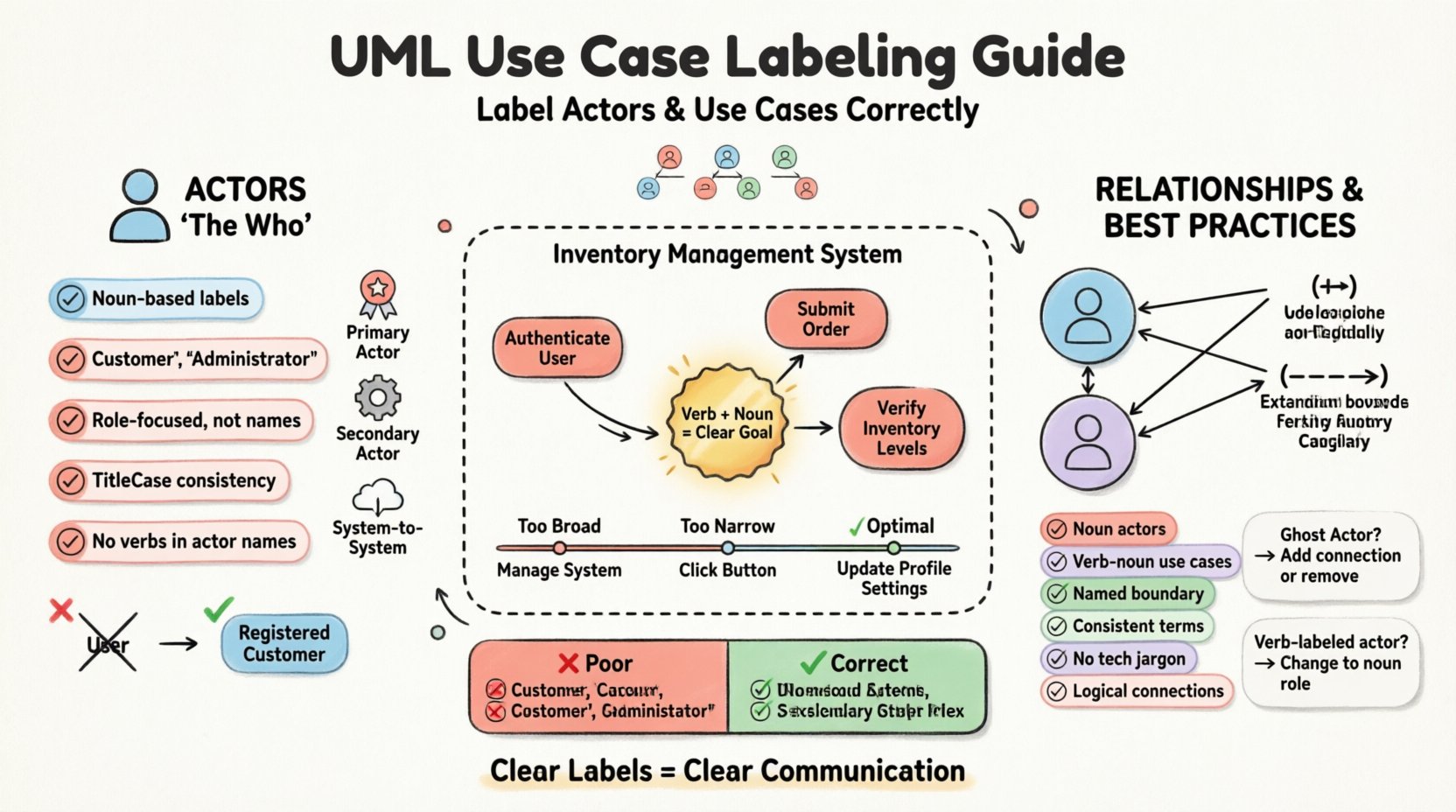
🔍 Understanding the Actor: The Who in Your System
An actor represents a role played by an external entity that interacts with the system. It is crucial to understand that an actor is not necessarily a specific person. It can be another system, a device, or a process. The label assigned to an actor must reflect this role, not the individual occupying it.
1. Naming Conventions for Actors
Consistency in naming prevents confusion during the development lifecycle. When labeling an actor, adhere to the following principles:
- Noun-Based: Actors should be labeled with a noun or noun phrase. This distinguishes them from use cases, which are actions.
- Role-Focused: Use the role name (e.g., “Customer”) rather than a specific name (e.g., “John Doe”). This ensures the diagram remains valid even if the personnel changes.
- Case Sensitivity: Maintain consistency in capitalization. CamelCase or TitleCase is recommended for readability.
- No Verbs: Avoid starting actor names with verbs. An actor does not act; a use case does.
2. Types of Actors
Identifying the type of actor helps in defining the scope of interactions. You should categorize actors during the labeling phase:
- Primary Actors: These initiate the use case. They have a specific goal that the system helps them achieve.
- Secondary Actors: These are invoked by the use case to perform a specific task, often delegating work to another system.
- System-to-System: In complex architectures, one software system may act as an actor for another. Label these clearly to indicate the integration point.
3. Common Actor Labeling Errors
Even experienced modelers make mistakes. Below are frequent pitfalls to avoid:
- Confusing Actor with User: “User” is too generic. Is it an Administrator? A Guest? A Manager? Specify the role.
- Using Technical Jargon: Avoid internal class names or database table names in actor labels. The diagram is for stakeholders, not just developers.
- Over-fragmentation: Do not create an actor for every single user. Group them by shared functional requirements.
📝 Defining the Use Case: The What in Your System
A use case describes a specific goal or task that the system performs for an actor. The label is the name of this task. Unlike the actor, the use case label must describe an action.
1. The Verb-Noun Structure
The gold standard for use case naming is the Verb-Noun phrase. This structure immediately communicates both the action being performed and the object of that action.
- Verb: Indicates the action (e.g., “Generate”, “Submit”, “Calculate”).
- Noun: Indicates the result or target (e.g., “Report”, “Order”, “Invoice”).
Example: Instead of “Login”, use “Authenticate User”. Instead of “View Page”, use “Display Dashboard”.
2. Granularity and Scope
The level of detail in a use case label is as important as the wording itself. A use case should represent a single, coherent goal from the actor’s perspective.
- Too Broad: “Manage System” is too vague. It encompasses too many distinct actions.
- Too Narrow: “Click Button” is too technical. It describes an interface element, not a goal.
- Optimal: “Update Profile Settings” strikes the right balance between action and scope.
3. Distinction from Functional Requirements
Use cases are not requirements documents. They are high-level abstractions. While a requirement might state “The system shall allow the user to reset their password,” the use case label should simply be “Reset Password”. Keep the label concise and goal-oriented.
🏗️ The System Boundary: The Where
The system boundary is a rectangle that encloses the use cases. Everything inside belongs to the system; everything outside belongs to the environment or actors. The labeling of the boundary itself is often overlooked but critical for context.
1. Naming the System
Do not leave the system boundary unnamed. A blank box provides no context. Label the boundary with the system name (e.g., “Inventory Management System”). This clarifies what is being modeled.
2. Inclusion and Exclusion
The boundary dictates what functionality is visible. If a use case is outside the box, it is an external actor or a dependency. If it is inside, it is a responsibility of the system. Ensure your labels align with this scope.
- Internal Use Cases: Labeled functions that the system performs autonomously or in response to an actor.
- External Interactions: Labeled actors that initiate or receive data from the system.
🔗 Relationships and Associations
Labels are not isolated. They exist in a network of relationships. The lines connecting actors to use cases (associations) describe the flow of information. While the line itself doesn’t have a label in standard UML, the nature of the connection is implied by the participants.
1. Association Lines
These lines represent communication. An actor must be able to interact with a use case. If a line exists, the label on the actor must make sense in the context of the use case label.
- Directionality: Associations are bidirectional. The actor initiates the use case, but the use case may return data to the actor.
- Multiplicity: While not always labeled on the diagram, understanding that one actor can trigger multiple use cases is vital for the mental model.
2. Include and Extend Relationships
These relationships refine the use case structure. They do not change the actor labels but affect the use case hierarchy.
- Include (⟹): Indicates that the base use case always involves the included use case. This often reduces redundancy in labels.
- Extend (−−−−>): Indicates optional behavior that occurs under specific conditions. The label of the extending use case should describe the exception or variation.
🛠️ Best Practices Checklist
Before finalizing your diagram, run through this checklist to ensure compliance with industry standards.
- ✅ Are all actor labels nouns representing roles?
- ✅ Are all use case labels verb-noun phrases representing goals?
- ✅ Is the system boundary clearly named?
- ✅ Is the terminology consistent across the entire diagram?
- ✅ Have you avoided technical implementation details in the labels?
- ✅ Are relationships logically valid (e.g., no actor connected to a use case outside its boundary)?
📊 Comparison: Good vs. Bad Labeling
To visualize the difference between effective and ineffective labeling, review the following table. This comparison highlights how subtle changes in wording impact clarity.
| Component | ❌ Poor Labeling | ✅ Correct Labeling | Reasoning |
|---|---|---|---|
| Actor | User | Registered Customer | “User” is ambiguous. “Registered Customer” defines scope and permissions. |
| Use Case | Login | Authenticate User | “Login” is a system action. “Authenticate User” is the goal. |
| Use Case | Save Data | Submit Order | “Save Data” is internal. “Submit Order” is the business value. |
| Actor | Admin | System Administrator | “Admin” is slang. Full title adds professionalism and clarity. |
| Use Case | Check Stock | Verify Inventory Levels | “Check” is weak. “Verify” implies accuracy and validation. |
⚠️ Troubleshooting Common Labeling Issues
When reviewing a diagram, you may encounter specific labeling problems. Here is how to resolve them.
1. The “Ghost” Actor
Problem: An actor is drawn but has no connections to any use cases.
Solution: Remove the actor. If it is necessary for the system context, ensure it has at least one interaction path. An isolated actor adds noise to the diagram.
2. The “Action” Actor
Problem: An actor is labeled with a verb, such as “Process Payment”.
Solution: Change the label to a noun. The system processes the payment. The actor requests it. Rename to “Payment Gateway” or “External Bank”.
3. The “Function” Use Case
Problem: A use case is labeled with a database table name, such as “Update Customers Table”.
Solution: Shift to the business goal. Rename to “Update Customer Details”. The database implementation is invisible to the actor.
4. The “Infinite” Use Case
Problem: A use case is labeled “Manage System”.
Solution: Decompose this into specific use cases. “Manage System” is too large. Break it down into “Manage User Accounts”, “Manage Reports”, and “Manage Settings”.
🧩 Advanced Considerations for Complex Systems
In large-scale enterprise environments, the labeling requirements become more stringent. The following sections address advanced scenarios.
1. Subsystems and Packages
When using packages to group use cases, ensure the package names do not conflict with use case names. A use case should not share a name with the package containing it. Use the package name to denote a module, and the use case name to denote the action.
2. Inheritance and Generalization
Actors can inherit from other actors (e.g., “Employee” inherits from “Person”). Use cases can also inherit (e.g., “View Report” inherits from “View Data”). When using inheritance, keep the parent labels generic and the child labels specific. This maintains the hierarchy without redundancy.
3. Internationalization
If the system targets multiple regions, ensure labels are translatable. Avoid idioms or slang in use case names. Use standard, neutral language that can be easily localized. For example, “Checkout” is better than “Buy Stuff”.
📝 Impact on Maintenance and Documentation
Proper labeling is not just about aesthetics; it is a maintenance strategy. A well-labeled diagram serves as living documentation.
- Onboarding: New developers can understand system functionality without reading code comments.
- Testing: Test cases can be derived directly from use case labels. “Verify Inventory Levels” becomes a test script step.
- Communication: Stakeholders can review the diagram without needing technical training. Clear labels bridge the gap between business and IT.
🔎 Final Considerations for UML Modeling
Adhering to these labeling standards requires discipline. It is easy to take shortcuts when a diagram is rushed. However, the cost of ambiguity in the design phase is significantly higher than the effort required to label correctly.
Remember that UML is a language. Just as grammar rules ensure your written text is understood, syntax rules for actors and use cases ensure your diagram is understood. Treat the diagram as a contract between the analyst, the developer, and the stakeholder.
By focusing on the noun-based roles for actors and the verb-noun goals for use cases, you create a robust foundation for system design. The system boundary acts as the stage, and the labels act as the script. When these elements align, the result is a clear, actionable, and professional model that stands the test of time.
Consistency is the key to longevity. Review your diagrams regularly. As requirements evolve, update the labels to reflect the current state of the system. A diagram that is out of date is worse than no diagram at all, as it leads to incorrect assumptions.
Apply these principles to your next modeling task. The clarity you gain in the design phase will translate into efficiency during implementation and reduced errors during deployment.