

Modeling software behavior requires precision. When designing system interactions, clarity is paramount. Use Case Diagrams offer a visual representation of functional requirements, connecting actors to specific actions. Within this framework, relationships define how behaviors interact. Two critical relationships govern these interactions: include and extend. Understanding the distinction between them is fundamental for robust system architecture.
This guide explores the mechanics of these relationships. We will examine when to apply each pattern. We will analyze the implications for maintenance and testing. By the end, you will have a clear understanding of how to structure your models for scalability and clarity.
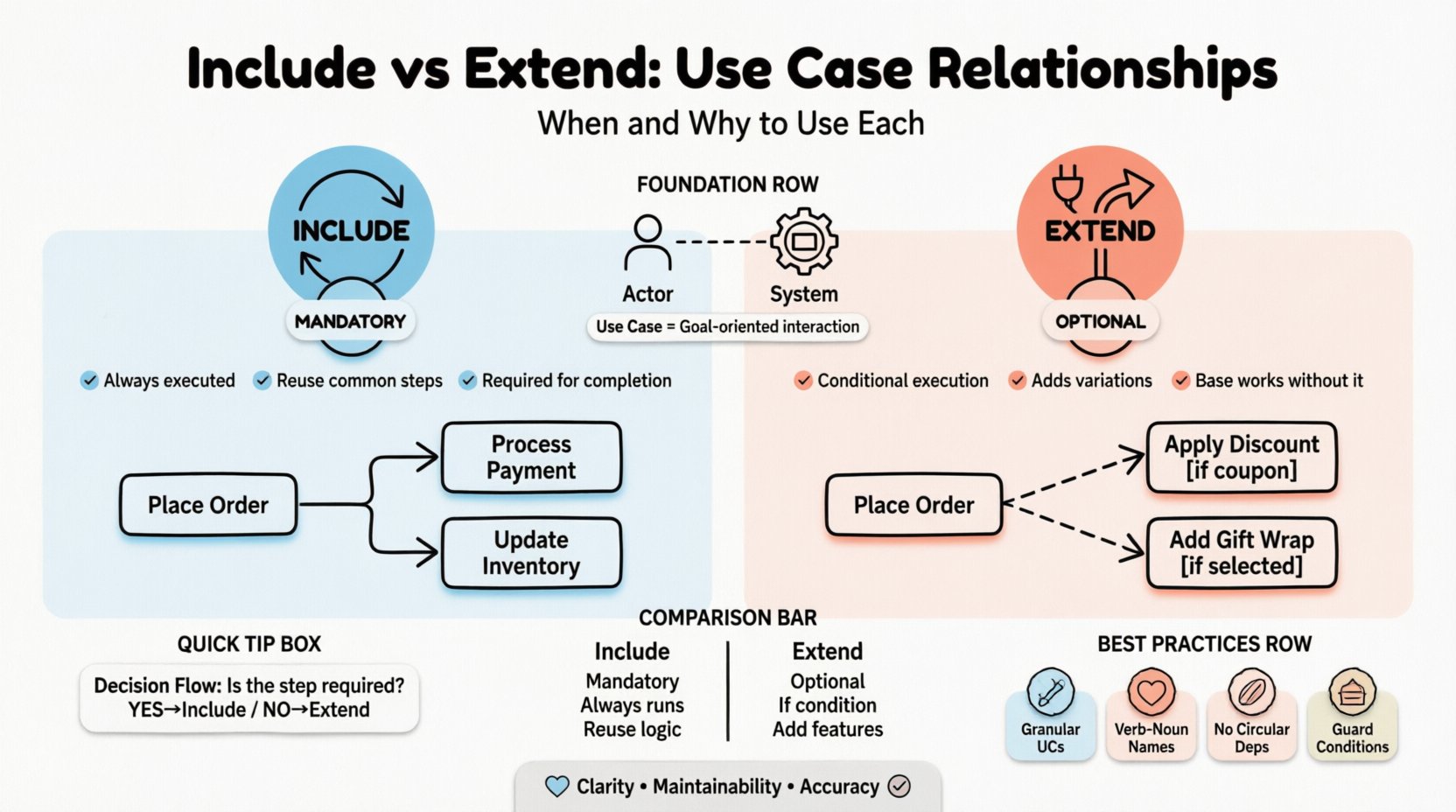
Foundations of Use Case Relationships 🧱
Before diving into specific relationships, it is necessary to establish what a use case represents. A use case describes a goal-oriented interaction between an actor and the system. It captures a sequence of actions that yields an observable result of value. However, real-world systems are complex. A single use case often relies on shared behaviors or contains optional variations.
Relationships allow us to decompose these complex behaviors without creating clutter. They promote reuse and modularity. The two primary mechanisms for organizing these behaviors are include and extend.
- Base Use Case: The primary scenario being modeled.
- Related Use Case: The secondary scenario being linked.
- Directionality: The arrow points from the related use case to the base use case.
Confusion often arises regarding the direction of the arrow. Remember, the arrow indicates the dependency. The base use case depends on the included or extended behavior.
The Include Relationship: Mandatory Behavior 🔄
The include relationship represents a mandatory dependency. It signifies that the base use case must invoke the included use case to complete its execution. This is not optional. It is a required step within the flow of events.
When to Use Include
Consider using the include relationship when:
- Common Behavior Exists: Multiple use cases share a sequence of steps.
- Modularity is Required: Breaking down a large use case improves readability.
- Reusability is Key: The behavior is needed in different contexts.
- Standardization is Needed: Certain processes, like authentication, are standard across the system.
Examples of Include Usage
Imagine an Online Shopping System. The Place Order use case requires payment processing. It also requires inventory checking. Both of these are mandatory. You would model them as included use cases.
- Base: Place Order
- Include: Process Payment
- Include: Update Inventory
If Process Payment fails, the Place Order cannot complete. This mandatory nature defines the include relationship.
Benefits of Include
- Reduced Redundancy: Write the logic once, reference it multiple times.
- Clarity: Keeps the main use case diagram less crowded.
- Maintainability: Changing the included logic updates all base use cases automatically.
The Extend Relationship: Optional Behavior 🔌
The extend relationship represents an optional dependency. It signifies that the base use case may invoke the extended use case under specific conditions. The base use case functions correctly without the extension. The extension adds functionality only when triggered.
When to Use Extend
Consider using the extend relationship when:
- Behavior is Optional: The step is not required for the main goal.
- Conditional Logic Exists: The behavior happens only if a condition is met.
- Error Handling: Exception flows that do not stop the main process.
- Variations: Different user types may trigger different flows.
Examples of Extend Usage
Consider the Place Order use case again. A user might choose to apply a discount code. This is not mandatory. The order can proceed without it. Alternatively, a user might receive a gift wrap option. This is also optional.
- Base: Place Order
- Extend: Apply Discount
- Extend: Add Gift Wrap
Another example is Error Handling. If a payment fails during Place Order, the system might trigger a Notify User of Failure use case. This extends the main flow to handle the exception.
Benefits of Extend
- Flexibility: Allows for variations without modifying the base logic.
- Focus: Keeps the main diagram focused on the happy path.
- Scalability: New optional features can be added without changing existing models.
Comparing Include vs. Extend 📊
Distinguishing between these two relationships is often the source of modeling errors. The table below outlines the key differences to aid your decision-making process.
| Feature | Include Relationship | Extend Relationship |
|---|---|---|
| Dependency Type | Mandatory | Optional |
| Execution Flow | Always executed | Executed only under conditions |
| Direction of Arrow | From Include to Base | From Extend to Base |
| Primary Goal | Reuse common steps | Add special behaviors |
| Example | Login, Payment | Discount, Error Message |
Strategic Implementation: Best Practices 🛠️
Correctly applying these relationships impacts the longevity of your system design. Follow these guidelines to ensure your models remain effective.
1. Granularity Matters
Use cases should be granular. If a use case contains too many steps, split it. If a step is used everywhere, extract it into an include. If a step is rare, move it to an extend.
- Too Broad: “Manage System”
- Too Narrow: “Click Button A”
- Just Right: “Update User Profile”
2. Naming Conventions
Clear naming reduces ambiguity. Use verb-noun pairs for use cases. Name the relationship point explicitly if needed.
- Base: Withdraw Cash
- Include: Validate PIN
- Extend: Show Insufficient Funds
3. Avoid Circular Dependencies
Ensure relationships do not create loops. Use Case A includes Use Case B, which includes Use Case A. This creates infinite recursion in logic and confusion in diagrams. Always check the dependency graph.
4. Guard Conditions for Extend
For every extend relationship, define a guard condition. This condition explains when the extension activates. Without a guard, the relationship is ambiguous.
- Example: [VIP Member]
- Example: [Payment Failed]
Common Pitfalls to Avoid 🚫
Even experienced modelers make mistakes. Be aware of these common errors to maintain diagram integrity.
1. Misusing Include for Optional Steps
Do not use include for optional steps. If a user can skip a step, it is not mandatory. Using include here forces the step in every scenario, which contradicts the requirements.
2. Misusing Extend for Mandatory Logic
Do not use extend for logic that must happen. If the system crashes without this step, it is mandatory. Use include instead. Extend implies the base system works fine without it.
3. Over-Abstraction
Do not create generic use cases just to use include. If a use case is only used once, do not extract it. This creates unnecessary complexity and navigation overhead.
4. Ignoring Actor Context
Remember that actors influence use cases. An extend relationship might only apply to specific actors. Ensure your guard conditions reflect actor permissions or capabilities.
Testing and Validation Implications 🧪
The choice of relationship affects how you test the system. Understanding this link ensures quality assurance aligns with design.
Testing Include Relationships
Since included steps are mandatory, they must be tested in every scenario involving the base use case. However, you do not need to test the included use case in isolation for the base scenario. You can test the base use case and verify the included behavior executes correctly.
- Strategy: Test the base use case.
- Check: Did the included steps run?
Testing Extend Relationships
Extended steps are conditional. You must test the base use case without the extension. You must also test the specific conditions that trigger the extension.
- Strategy: Test base path.
- Strategy: Test extension path with guard conditions.
- Check: Does the extension trigger correctly?
Advanced Scenarios and Edge Cases 🔍
Real-world systems often present complex scenarios. Here is how to handle them.
Multiple Extends
A single base use case can have multiple extend relationships. For example, a Checkout use case might extend to Apply Coupon and Apply Loyalty Points. These are independent optional behaviors.
- Base: Checkout
- Extend 1: Apply Coupon [Condition: Coupon Code Entered]
- Extend 2: Apply Loyalty [Condition: Loyalty Account Active]
Includes within Extends
You can nest relationships. An extended use case might include another use case. For instance, Apply Coupon might Include Validate Coupon. This maintains modularity within the optional flow.
Inheritance vs. Extend
Do not confuse generalization (inheritance) with extension. Generalization is an “Is-A” relationship (e.g., Manager is an Employee). Extension is a “Can-Do” or “Has-Option” relationship. Use generalization for hierarchy, use extend for optional behavior.
Maintenance and Evolution 🔄
Software evolves. Requirements change. A well-structured use case model accommodates this change.
Adding New Features
If a new optional feature is introduced, add it as an extend. If a new mandatory requirement is introduced, add it as an include. This keeps the base diagram stable while allowing the model to grow.
Refactoring Logic
If you find yourself repeating the same logic across multiple includes, consider extracting it further. Consolidate common behaviors to reduce the total number of use cases.
Final Thoughts on Modeling 🎯
Building a use case diagram is more than drawing boxes and arrows. It is about communicating intent. The decisions you make regarding include and extend relationships dictate how developers understand the system.
- Clarity is the primary goal.
- Maintainability is the secondary goal.
- Accuracy is the foundation.
By adhering to the rules of mandatory and optional behavior, you create models that stand the test of time. Avoid over-complicating the diagram. Keep it focused on the user’s goals. Ensure every relationship serves a purpose.
Review your models regularly. As the system evolves, the relationships may need to shift. What was once optional may become mandatory. What was mandatory may become optional. Stay flexible, but remain disciplined in your modeling practices.
Remember, the diagram is a tool for communication, not just documentation. It should help stakeholders understand the flow. It should help developers implement the logic. And it should help testers verify the requirements. Proper use of include and extend relationships achieves all three.