

Designing a robust software system requires precision. When multiple services communicate, the cost of ambiguity is high. A sequence diagram provides a visual contract between components before a single line of code is written. This guide outlines a comprehensive checklist to validate API interactions, ensuring data integrity, security, and reliability from the start. By following these steps, teams can identify edge cases early, reducing technical debt and rework later.
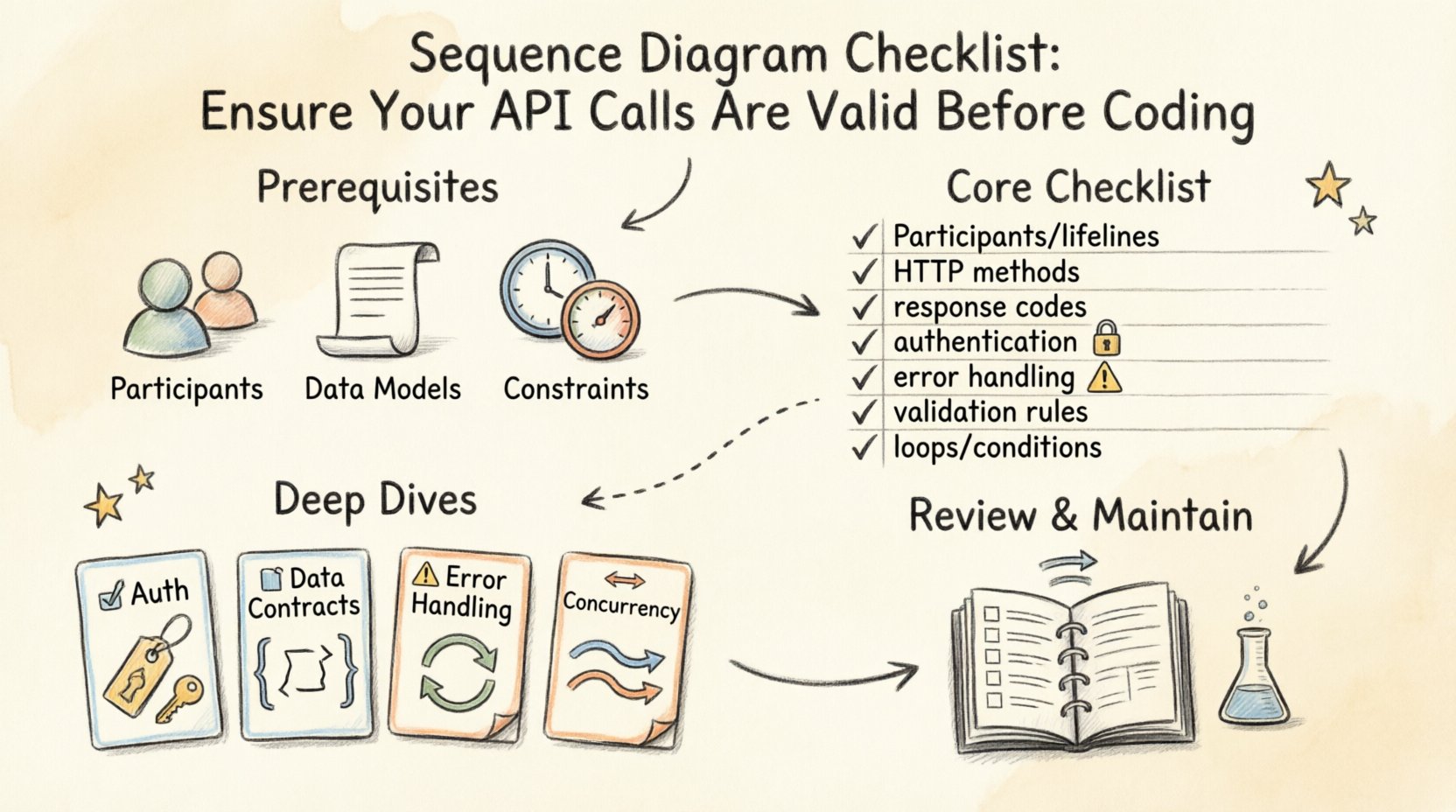
🔍 Why Visualize API Flows?
Code is the implementation, but the diagram is the blueprint. Relying solely on code to understand how services talk creates a disconnect between design and execution. Visualizing the sequence of events allows stakeholders to spot logical gaps.
- Clarity: Complex logic becomes a linear flow.
- Communication: Developers and business analysts share a common visual language.
- Validation: Catching logic errors before the build phase saves significant time.
When API calls are validated early, the development process shifts from reactive debugging to proactive engineering. This approach minimizes the risk of broken integrations in production environments.
🛠️ Pre-Diagramming Prerequisites
Before drawing lines between boxes, certain foundational elements must exist. Attempting to diagram without these leads to incomplete models.
1. Define Participants
Identify every actor and system involved in the transaction. This includes:
- External clients (mobile apps, browsers, third-party services).
- Internal services (authentication, database, caching layers).
- Human actors (administrators, users).
2. Establish Data Models
Understand the structure of the data being exchanged. Without a clear schema, the diagram lacks context. Ensure the following are defined:
- Request payload structures.
- Response payload structures.
- Enumeration values for status indicators.
3. Identify Constraints
What limits the interaction? Note constraints such as:
- Rate limits per user.
- Timeout durations for external dependencies.
- Memory limits for processing large payloads.
✅ The Core Sequence Diagram Checklist
The following table details the essential elements to verify. Use this matrix during your design review phase.
| Category | Checklist Item | Priority | Reason for Validation |
|---|---|---|---|
| Participants | Are all lifelines labeled clearly? | High | Avoids confusion during implementation. |
| Messages | Are HTTP methods (GET, POST, etc.) specified? | High | Defines the action performed on resources. |
| Messages | Are response codes included? | High | Ensures clients handle success and failure states. |
| Security | Is authentication shown for protected routes? | Critical | Prevents unauthorized access vulnerabilities. |
| Errors | Are exceptions and timeouts represented? | Medium | Ensures graceful degradation. |
| Data | Are input validation rules noted? | Medium | Prevents invalid data entry. |
| Flow | Are loops and conditions defined? | Medium | Clarifies iterative processes. |
🔐 Deep Dive: Authentication & Authorization
Security is not an afterthought. It must be visible in the flow. Every API call that accesses sensitive data requires verification.
1. Token Transmission
Ensure the diagram indicates how credentials are passed. Common patterns include:
- Header Injection: Showing the Authorization header in the request message.
- Query Parameters: Rarely used for security, but must be noted if applicable.
- Cookies: If session-based, show the cookie scope.
2. Refresh Logic
What happens when a token expires? The diagram should show the flow for token renewal. If a client receives a 401 Unauthorized, the sequence must depict the subsequent request to the identity provider to obtain a new token.
3. Role-Based Access
If different users see different data, the diagram should reflect the authorization check. Indicate where the service verifies the user’s role before processing the request.
📦 Deep Dive: Data Contracts & Serialization
Data integrity relies on agreed-upon formats. Mismatches here cause parsing errors in production.
1. Content Types
Explicitly mark the media type for every message.
application/jsonfor standard REST.application/xmlfor legacy systems.multipart/form-datafor file uploads.
2. Field Validation
Document constraints on the data itself. The diagram does not need the full schema, but it should reference validation rules.
- Required fields.
- Max length for strings.
- Range limits for numbers.
- Date format standards (e.g., ISO 8601).
3. Versioning Strategy
How does the API handle changes? Indicate versioning in the URL path or headers. If the system supports versioning, the diagram should show the path for a v1 request versus a v2 request to avoid breaking changes.
⚠️ Deep Dive: Error Handling & Timeouts
Happy paths are easy to diagram. The real value lies in mapping the unhappy paths. A sequence diagram without error handling is incomplete.
1. Network Failures
What happens if the downstream service is unreachable? Show a timeout message returning to the client. Define the duration of the wait. Is it 5 seconds? 30 seconds?
2. Service Errors
Map specific HTTP status codes to system states.
- 4xx: Client errors. Show the flow where the client receives invalid input and corrects it.
- 5xx: Server errors. Show the flow where the system retries or fails gracefully.
3. Retry Logic
If a transient error occurs, should the system retry? If yes, indicate the number of retries and the backoff strategy. This prevents cascading failures during high load.
🔄 Deep Dive: Concurrency & State
Systems rarely handle requests in perfect isolation. Concurrency affects how state is managed.
1. Race Conditions
Identify scenarios where two users modify the same resource simultaneously. The diagram should note if the system uses optimistic locking or pessimistic locking to manage this.
2. Idempotency
Can a request be sent twice without side effects? For POST requests, indicate if an idempotency key is used. This prevents duplicate transactions in payment or inventory systems.
3. Asynchronous Operations
Some tasks take time. If a process is long-running, show the asynchronous flow. The client sends a request, receives a 202 Accepted status, and polls for results later.
🔎 Reviewing the Diagram
Once the diagram is drafted, a review process ensures accuracy. Do not skip this step.
1. Stakeholder Walkthrough
Present the diagram to the product owner. Does the flow match the business requirement? Does it reflect the actual user journey?
2. Developer Walkthrough
Present the diagram to the engineering team. Is it implementable? Are there dependencies that are not obvious? Do the API signatures match the proposed models?
3. Consistency Check
Verify that terminology is consistent. Ensure “User” is not used interchangeably with “Client” if they represent different entities. Consistency aids in future maintenance.
🛡️ Maintenance & Versioning
A diagram is a living document. It requires updates as the system evolves.
1. Sync with Code
When the API changes, the diagram must change. Treat the diagram as code. If the code is updated, the visual representation should be reviewed.
2. Deprecation Paths
When an endpoint is retired, document the deprecation timeline. Show the path where a client migrates from the old endpoint to the new one.
3. Accessibility
Ensure the diagram is stored in a central repository. It should be accessible to all team members, not just the original author. This prevents knowledge silos.
📊 Integrating with Testing
The sequence diagram serves as a basis for contract testing. It defines the expected behavior.
- Pact/Consumer-Driven Contracts: Use the diagram to define the contract between provider and consumer.
- Mocking: Create mocks based on the message flows defined in the diagram.
- Integration Tests: Write tests that follow the sequence of events shown in the visual model.
This alignment ensures that the tests actually verify the intended design, rather than just the current code state.
🧠 Common Pitfalls to Avoid
Avoid these common mistakes when creating your sequence diagrams.
- Overcomplicating: Do not show every method call. Focus on the API layer and business logic boundaries.
- Ignoring Latency: Real-world systems have delays. Indicate where waiting occurs.
- Static Messages: Do not assume messages are always successful. Show the failure paths.
- Missing Actors: Don’t forget the database or cache. They are active participants in the flow.
🔗 Conclusion
Creating a sequence diagram checklist is an investment in quality. It forces the team to think about the system holistically. By validating API calls before coding begins, you establish a strong foundation. This reduces ambiguity, improves security, and streamlines the development lifecycle. Keep the diagrams updated, keep the reviews rigorous, and let the visual model guide your implementation.