

Introduction
As someone who has spent years navigating the complexities of database design—from academic projects to enterprise-level systems—I’ve tried countless tools for modeling relational databases. Recently, I decided to revisit Entity-Relationship Diagrams (ERDs) using Visual Paradigm, particularly after hearing about their new AI-powered features. What started as a simple tutorial follow-through turned into a genuine exploration of how modern tools can transform the way we approach data modeling. In this review, I’ll share my firsthand experience walking through their “Bus Route Management” tutorial, testing the AI capabilities, and evaluating whether this platform lives up to the hype for both beginners and seasoned database architects.
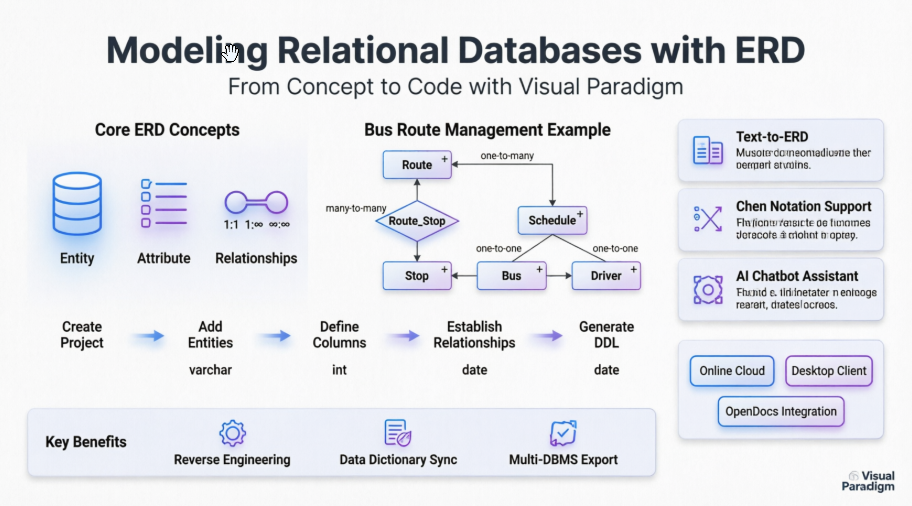
Getting Started: My First ERD Project
I began by creating a new project, following the intuitive path: Project > New from the application toolbar. Naming it Bus Route Management felt like setting the stage for a real-world scenario. The blank project canvas was clean and uncluttered—a refreshing start compared to tools that overwhelm you with options upfront.

Creating the ERD itself was straightforward: Diagram > New → Entity Relationship Diagram. Within seconds, I had a dedicated workspace labeled Bus Route Management. The interface felt responsive, and the diagram toolbar offered just the right amount of guidance without being prescriptive.
Building the Route Entity
My first entity was Route. Selecting Entity from the toolbar and clicking on the canvas felt natural. Naming it and confirming with Enter was seamless. What impressed me next was the column creation workflow:

Right-clicking the Route entity to add a New Column opened a simple input field. Entering +id : varchar(10) instantly recognized the + as a primary key indicator—a small but powerful detail that saved me from hunting through property panels. The visual feedback was immediate:

Adding the fare : float column was equally intuitive. Pressing Esc after entry to create another column felt like a thoughtful keyboard shortcut that respected power-user workflows.

Navigating Relationships: The Many-to-Many Challenge
Creating the Stop entity introduced me to the Resource Catalog feature—a game-changer for relationship modeling. Hovering over Route, dragging the catalog icon, and selecting Many-to-Many Relationship -> Entity automatically generated the junction entity Route_Stop with foreign keys pre-configured:


This automation eliminated the manual drudgery of creating associative entities—a common pain point in ERD tools I’ve used previously. Adding columns to Stop followed the same clean pattern:
| Key | Name | Type |
|---|---|---|
| PK | id | int(10) |
| name | varchar(255) | |
| terminus | blob |

Scaling the Model: One-to-Many and One-to-One Relationships
Expanding to Schedule with a one-to-many relationship from Route used the same Resource Catalog workflow. The consistency in interaction design reduced my learning curve significantly. Adding columns:
| Key | Name | Type |
|---|---|---|
| PK | id | int(10) |
| departure | date | |
| arrive | date |
Then came the Bus entity with a one-to-one relationship to Schedule. The tool maintained visual clarity even as the diagram grew more complex:

| Key | Name | Type |
|---|---|---|
| PK | vehicle_id | int(10) |
| fleet_id | varchar(10) | |
| last_main | date |

Finally, adding the Driver entity completed the model:
| Key | Name | Type |
|---|---|---|
| PK | id | int(10) |
| name | varchar(255) | |
| employ_date | date |

The final ERD was not just functional but visually coherent—a rarity in tools that prioritize features over presentation.
Discovering the AI-Powered Edge: A Skeptic’s Conversion
I’ll admit, I approached the AI features with caution. Having seen overhyped “AI” additions in other software, I expected gimmicks. What I found instead was genuinely useful augmentation:
-
Text-to-ERD Generation: Describing “a bus route system with stops, schedules, buses, and drivers” in plain language produced a normalized schema suggestion within seconds. The AI correctly identified primary keys and foreign relationships, though I still reviewed and tweaked the output—a responsible approach that kept me in control.
-
Notation Flexibility: Switching between standard ERD and Chen Notation for conceptual modeling was seamless. This mattered for my stakeholder presentations, where different audiences require different levels of abstraction.
-
AI Chatbot Assistance: When I was unsure about cardinality for a new relationship, the integrated chatbot offered context-aware suggestions without interrupting my workflow. It felt like having a junior database architect looking over my shoulder—helpful, not intrusive.
These features didn’t replace my expertise; they amplified it. For teams onboarding new members, this could significantly reduce the ramp-up time for data modeling tasks.
Platform Choices: What Worked for My Workflow
I tested multiple deployment options, and each served distinct needs:
-
Visual Paradigm Online: Perfect for quick prototyping and collaborative reviews. The cloud-based environment meant I could share diagrams with remote teammates without version control headaches. The AI tools felt most accessible here.
-
Visual Paradigm Desktop: When I needed advanced reverse engineering of an existing PostgreSQL database, the desktop client (connected to my Online workspace) delivered robust performance. The local processing handled large schemas smoothly.
-
OpenDocs Integration: Embedding generated ERDs directly into technical documentation was a time-saver I didn’t know I needed. Keeping diagrams and specs synchronized reduced maintenance overhead significantly.
The flexibility to choose based on project phase—ideation in the cloud, deep engineering on desktop, documentation in OpenDocs—made this ecosystem adaptable rather than restrictive.
Core Capabilities That Earned My Trust
Beyond the AI novelty, the foundational features proved their worth:
-
Database Engineering: Reverse engineering a legacy MySQL database into an ERD took minutes, not hours. The generated DDL for multiple DBMS platforms (PostgreSQL, SQL Server, Oracle) was clean and ready for review. This alone justified the tool for migration projects.
-
Data Dictionary Sync: As I updated entity attributes, the linked data dictionary refreshed automatically. No more manual cross-referencing or outdated documentation—a small feature with massive productivity implications.
-
Visual Clarity: The diagram rendering remained crisp even with 20+ entities. Auto-layout options respected relationship lines, reducing manual tweaking. Export options (PNG, PDF, SVG) maintained quality for both digital and print deliverables.
Areas for Growth: Honest Feedback
No tool is perfect. A few observations from my experience:
-
The AI suggestions, while impressive, occasionally over-normalized simple relationships. Human review remains essential.
-
The learning curve for advanced features (like custom constraint modeling) could be gentler. More interactive tooltips would help.
-
Pricing tiers are clear, but small teams might find the entry point steep compared to open-source alternatives—though the time savings may offset this.
These aren’t dealbreakers but considerations for prospective users evaluating fit.
Conclusion: Would I Recommend It?
After walking through the Bus Route Management tutorial, stress-testing the AI features, and integrating the output into a real project workflow, my verdict is clear: Visual Paradigm’s ERD tooling delivers substantial value for both learning and professional database design.
For beginners, the guided tutorials and intuitive interface lower the barrier to understanding relational modeling concepts. For experienced practitioners, the automation of repetitive tasks (junction entities, DDL generation, dictionary sync) frees mental bandwidth for higher-order design decisions. The AI features, when used as a collaborative aid rather than a black box, genuinely enhance productivity without compromising control.
If you’re evaluating ERD tools, I recommend starting with their free trial and replicating this tutorial. Pay attention to how the Resource Catalog handles relationships—it’s a microcosm of the tool’s philosophy: reduce friction, amplify intent. Whether you’re designing a startup’s first database or modernizing an enterprise system, this platform deserves a spot in your evaluation shortlist.
References
- Visual Paradigm ERD Tool Solution: Comprehensive overview of Visual Paradigm’s Entity Relationship Diagram capabilities for database design and modeling.
- Database Design with ERD Tools: Feature highlights for professional ERD creation, reverse engineering, and DDL generation.
- OpenDocs ERD AI Generation Release: Announcement of AI-powered ERD generation integrated into Visual Paradigm’s documentation platform.
- AI Diagram Generation Features: Details on text-to-diagram AI capabilities across multiple diagram types including ERDs.
- Visual Paradigm Taiwan ERD Solution: Regional resource for ERD tooling features and localization support.
- Chen Notation ERD Editor: Specialized support for Chen notation in conceptual data modeling.
- AI Diagram Generator New Types Release: Update on expanded AI support for DFD and ERD diagram types.
- Visual Paradigm China ERD Solution: Chinese-language resource for ERD tool features and enterprise deployment.
- Visual Paradigm Product Editions: Overview of available editions (Enterprise, Professional, Standard, Modeler) and feature comparisons.
- Click Start AI Technical Support Guide: Setup instructions for enabling AI features in Visual Paradigm Desktop via Online workspace connection.
- Archimetric Guide to Visual Paradigm OpenDocs: Third-party developer guide covering AI-powered documentation and ERD integration.
- AI Process Overview: Diagram Generator: Official guide detailing the workflow and best practices for AI-assisted diagram creation.
- What is an Entity Relationship Diagram?: Foundational guide explaining ERD concepts, notation, and use cases in data modeling.
- From Data Modeling to Data Dictionary Tutorial: Step-by-step tutorial on synchronizing ERD models with living data dictionaries.