Modern project management has evolved from static spreadsheets to dynamic, AI-driven ecosystems. Visual Paradigm has introduced a sophisticated workflow that bridges the gap between abstract planning and concrete execution. This system combines natural language processing, stateful AI agents, and “Diagram as Code” principles to streamline the creation of complex project schedules.
This tutorial explores the architecture of this AI-driven workflow, detailing how the Visual Paradigm Gantt Chat Tool, AI Chatbot Integration, and VPasCode engine work together to generate accurate, logical, and maintainable Gantt charts.
1. The Interface: Visual Paradigm Gantt Chat Tool
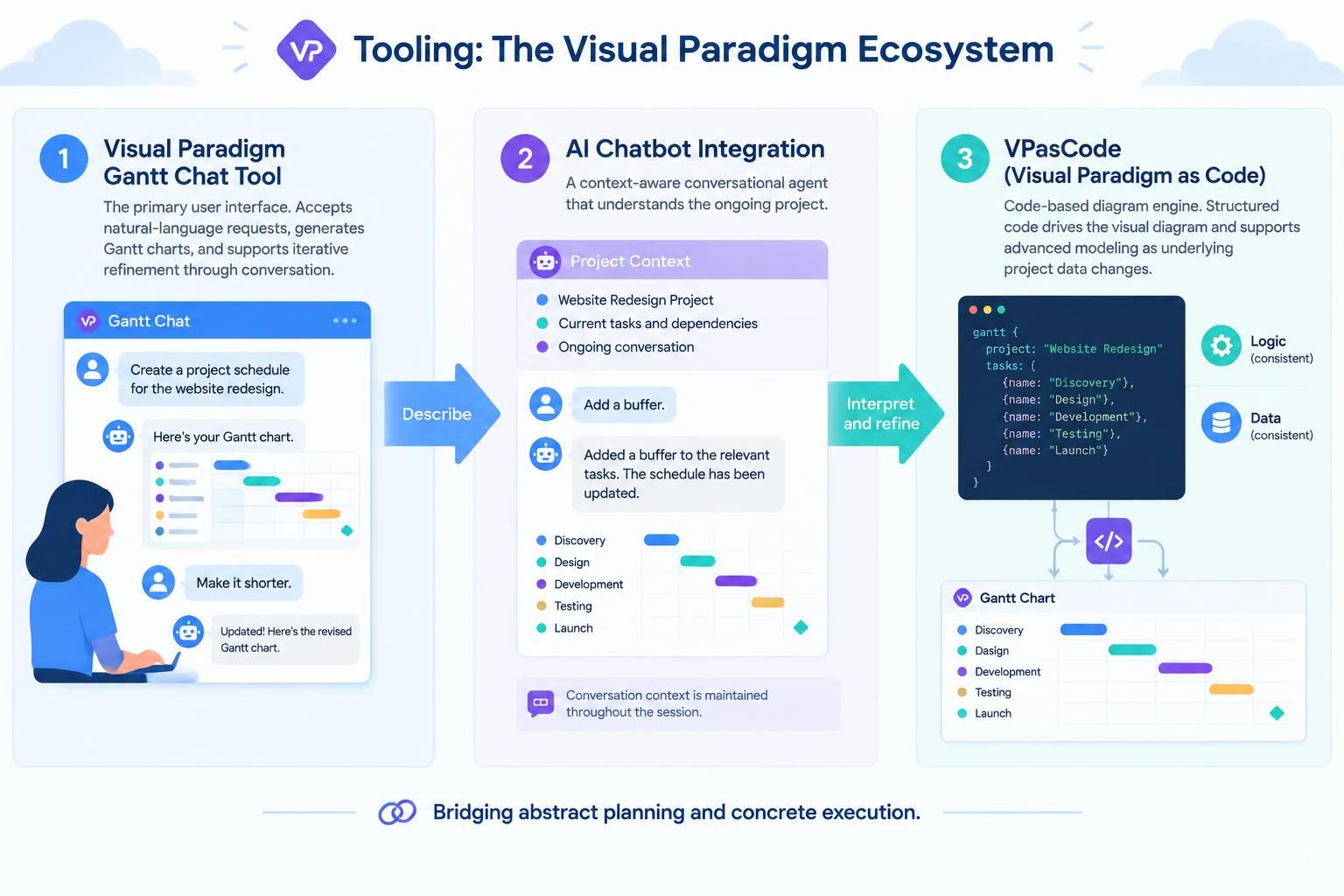
The journey begins with the user interface, which serves as the “brain” of the operation. Unlike traditional tools that require manual drag-and-drop or complex spreadsheet configuration, the Gantt Chat Tool acts as a conversational interface.
- Natural Language Input: Users can describe their project requirements in plain English. The system parses this input to understand intent.
- Primary Interface: It accepts natural-language requests (e.g., “Create a project schedule for the website redesign”) and executes the appropriate commands.
- Iterative Refinement: The tool supports a conversational flow, allowing users to refine the output. As shown in the workflow, a user can request a change like “Make it shorter,” and the system adjusts the schedule accordingly.
2. The Agent: AI Chatbot Integration
What sets this ecosystem apart is the nature of its AI agent. It is not merely a text generator; it is a stateful agent designed to understand the specific context of the project being built.
Understanding Project Context
The chatbot maintains a “Project Context” throughout the session. This includes:
- Project Definition: The overarching goal (e.g., “Website Redesign Project”).
- Current Tasks: A live list of tasks and their current dependencies.
- Ongoing Conversation: The history of the current session, which provides the necessary context for future commands.
Context-Aware Commands
Because the agent understands the context, it does not require users to specify every detail for every command. For example, if a user asks to “add a buffer”, the AI knows exactly which tasks to adjust and where to place the buffer without needing a specific date or task ID. This significantly reduces cognitive load and accelerates the planning process.
💡 Pro Tip: Context Persistence
The AI Chatbot retains the conversation context throughout the session. This allows for multi-step refinement; you can ask for a buffer, then immediately ask for a dependency update, and the system will apply both changes to the same underlying model without needing you to re-define the project structure.
3. The Engine: VPasCode (Visual Paradigm as Code)
At the core of this ecosystem lies the VPasCode Tool. This component transforms the conversational inputs into “Diagram as Code,” ensuring that the visual diagram is mathematically and logically sound.
Code Drives Visuals
In the VPasCode environment, the code is the source of truth. The diagram is merely a rendering of the code. This approach offers two critical benefits:
- Consistency: The logic (dependencies, dates) and the data are synchronized. If the underlying data changes, the diagram updates automatically to remain accurate.
- Advanced Modeling: Developers and architects can use structured code to model complex scenarios that might be difficult to draw manually.
PlantUML and Diagram Logic
VPasCode utilizes syntax similar to industry standards like PlantUML to define Gantt charts. This makes the output readable, version-controllable, and interoperable. The engine interprets the code to generate the visual bars and dependencies seen in the final Gantt chart.
gantt {
    project: "Website Redesign"
    tasks: {
        {name: "Discovery"},
        {name: "Design"},
        {name: "Development"},
        {name: "Testing"},
        {name: "Launch"}
    }
}
Why Visual Paradigm? Benefits and Standout Features
The integration of these three components creates a powerful synergy for project management:
- Bridging the Gap: It seamlessly connects abstract planning (chat) with concrete execution (code/diagram).
- AI-Friendly Workflow: By treating diagrams as code, the system becomes compatible with modern DevOps and CI/CD pipelines, allowing for automated testing of project schedules.
- Intelligent Refinement: The AI agent’s ability to handle context (like adding buffers) makes it a proactive partner rather than a passive drawing tool.
Summary
Visual Paradigm’s ecosystem represents a shift towards intelligent engineering. By combining the ease of natural language chat with the rigor of code-based modeling, it ensures that project schedules are not just visually appealing, but logically robust and easy to maintain.