
In the rapidly evolving landscape of modern software development, Enterprise Architecture (EA) teams face a unique challenge: how to maintain a high-level strategic view of the organization while simultaneously managing the granular details of individual software systems. The Common C4 model has emerged as a standard for visualizing software architecture, offering a scalable approach that spans from the enterprise level down to the code level. However, creating and maintaining these diagrams requires a robust ecosystem. This tutorial explores how Visual Paradigm and VPasCode provide a comprehensive solution for Agile EA teams, combining visual modeling with the precision of diagram-as-code and the speed of AI assistance.
1. The Strategic Necessity of the Landscape View
Before diving into the tools, it is crucial to understand the architectural artifact that drives this workflow: the System Landscape Diagram. Unlike a System Context diagram, which focuses on a single software system and its immediate surroundings, a landscape view steps back to provide a macro-perspective.
A landscape diagram acts as a map for the entire organizational scope—whether that is a specific department, a product portfolio, or the entire enterprise. It answers the question: “How do the systems in this area fit together?”
- Shared Understanding: It bridges the gap between technical and non-technical stakeholders by providing a common vocabulary and visual representation of the software portfolio.
- Dependency Visualization: It reveals critical connections, such as shared identity providers, payment gateways, or data dependencies between systems that might otherwise remain siloed.
- Onboarding & Modernization: For new team members or during modernization initiatives, the landscape view serves as the “entry point” to the architecture, guiding users to more detailed context or container views.
2. The Dual Approach: Visual Modeling vs. Diagram-as-Code
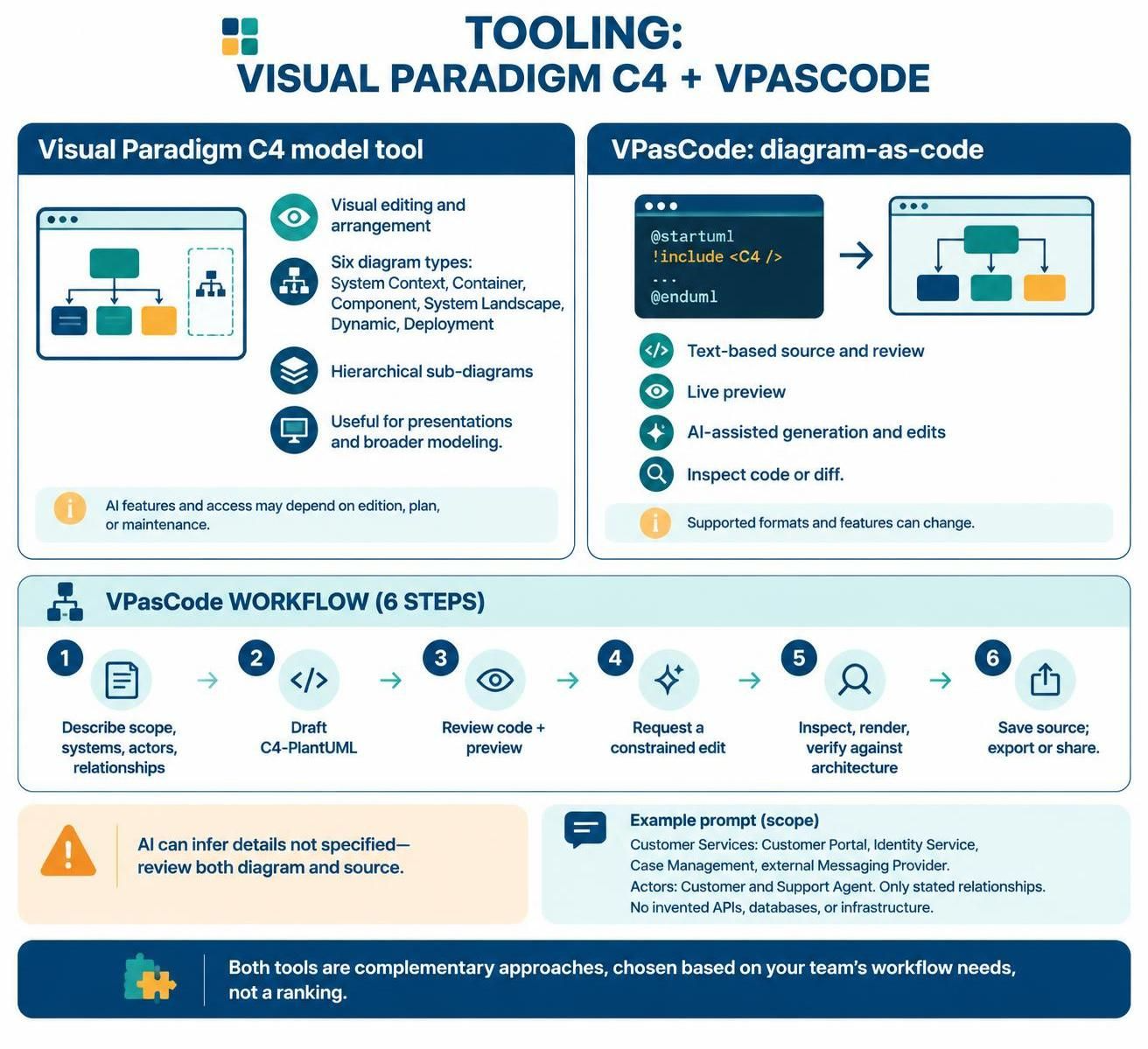
One size does not fit all when it comes to diagramming tools. Agile teams often require flexibility. The Visual Paradigm ecosystem addresses this by offering two distinct but complementary workflows: the Visual Paradigm C4 Model Tool and VPasCode.
Visual Paradigm C4 Model Tool
This approach is ideal for architects who prefer a graphical interface. It supports a wide range of diagram types, including System Context, Container, Component, Dynamic, and Deployment diagrams. Its strengths lie in:
- Visual Manipulation: Drag-and-drop interfaces allow for intuitive arrangement of elements.
- Hierarchical Decomposition: It supports a seamless path from a landscape view down to detailed container and component diagrams.
- Presentation: It is excellent for generating high-quality visuals for stakeholder reviews and architecture boards.
VPasCode: The Diagram-as-Code Revolution
For teams that value version control, code reviews, and automation, VPasCode offers a browser-based editor where diagrams are defined as text. This approach transforms the diagram into a “first-class” artifact of the software development lifecycle.
By using a text-based approach (specifically C4-PlantUML), teams can:
- Track Changes: Unlike binary image files, text files can be stored in Git, allowing teams to review diffs and manage history.
- Automate: Diagrams can be generated or updated programmatically.
- Leverage AI: The text format is perfectly suited for AI-assisted drafting and modification.
3. The VPasCode Workflow: From Concept to Code
The integration of AI and text-based editing creates a powerful loop for creating landscape diagrams. The following workflow outlines how an Agile EA team can utilize VPasCode to build a robust architecture map.
- Define the Scope: Start by writing a short, factual description of the organizational scope, the systems involved, the actors, and their key relationships.
Scope: Customer Services Department. Systems: Customer Portal, Identity Service, Case Management. External: Messaging Provider. Actors: Customer, Support Agent. - AI Drafting: Use an AI assistant to generate the initial C4-PlantUML source code based on the description. This provides a syntax-correct starting point.
Prompt: "Create a C4-PlantUML system landscape for the Customer Services department including the Customer Portal, Identity Service, and Case Management..." - Review and Refine: Inspect the rendered preview alongside the source code. Look for “hallucinations”—AI-inferred relationships that may not exist in reality.
- Constrained Editing: Use AI to make specific, constrained edits (e.g., “Add the External Identity Provider system and label the authentication relationship”) rather than asking for a full rebuild.
- Verification: Validate the diagram with system owners to ensure accuracy.
- Save and Share: Commit the source code to the repository and export the rendered diagram for documentation.
4. Best Practices for Landscape Diagrams
To ensure your landscape diagrams remain useful and maintainable, adhere to the following design principles:
- Consistent Abstraction: Keep all software systems at the same level of detail (System level). Do not mix containers, components, or infrastructure nodes on the same landscape view.
- Clear Boundaries: Explicitly define the scope (e.g., “Retail Operations Landscape”) and use boundaries to separate internal systems from external partners.
- Meaningful Labels: Describe relationships with active verbs. Instead of “uses,” say “submits orders” or “provides customer identity.”
- Link to Deep Views: A landscape diagram is a map, not the territory. Use links to connect each system box to its corresponding detailed context or container diagram.
5. Conclusion
The combination of Visual Paradigm’s visual modeling capabilities and VPasCode’s diagram-as-code approach offers the best of both worlds. It allows architects to design with precision using text and AI, while retaining the flexibility to visualize and present complex architectures to stakeholders. By adopting this holistic workflow, Agile EA teams can ensure their architecture documentation is not just a static picture, but a living, evolving asset that accurately reflects the dynamic nature of modern software systems.