

Use case diagrams are a cornerstone of modern software design, offering a clear, visual representation of how users interact with a system to achieve specific goals. These diagrams help define functional requirements and scope from an end-user perspective, making them essential in the early stages of system development.
Traditionally, creating use case diagrams required significant time and expertise in UML (Unified Modeling Language). But today, AI-powered tools are transforming this process—making it faster, more accurate, and accessible to non-experts.
This guide explores how AI tools like Visual Paradigm’s AI ecosystem streamline the creation and refinement of use case diagrams, enabling teams to move from concept to model in seconds.
What Is a Use Case Diagram?
A use case diagram is a high-level behavioral diagram in UML that illustrates the interactions between external users (actors) and a system. It identifies key functionalities (use cases) and how they relate to different user roles.
For example, in an ATM system, actors like “Customer” and “Bank Administrator” interact with use cases such as “Withdraw Cash” or “Manage Accounts.” These diagrams help stakeholders visualize system behavior without diving into implementation details.
Use case diagrams are not just visual aids—they serve as a foundation for requirement analysis, guiding the design of software systems and ensuring alignment between business needs and technical solutions.
The Role of AI in Use Case Modeling
Modern software design platforms are integrating AI to simplify the creation of UML diagrams. Visual Paradigm is one such platform that leverages AI to generate, refine, and maintain use case models efficiently.
Instead of manually drafting diagrams, users can describe a system in plain English and let AI do the heavy lifting.
How the AI Ecosystem Works
AI Chatbot
Users start by providing a system description—such as “An online shopping system”—to the AI chatbot or diagram generation tool. The system interprets the text and begins mapping out potential actors and use cases, forming a use case diagram. Users can refine the diagram through natural language commands. For instance, typing “Add an admin actor” or “Rename this use case” updates the model in real time—no manual re-drawing required.
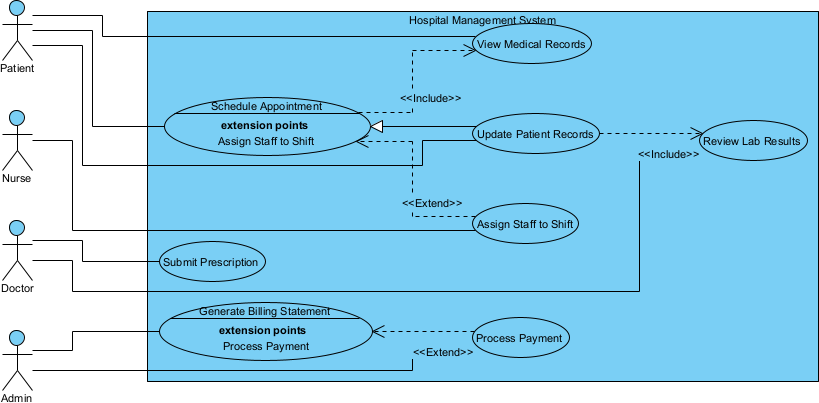
Visual Paradigm Desktop Diagram Generation
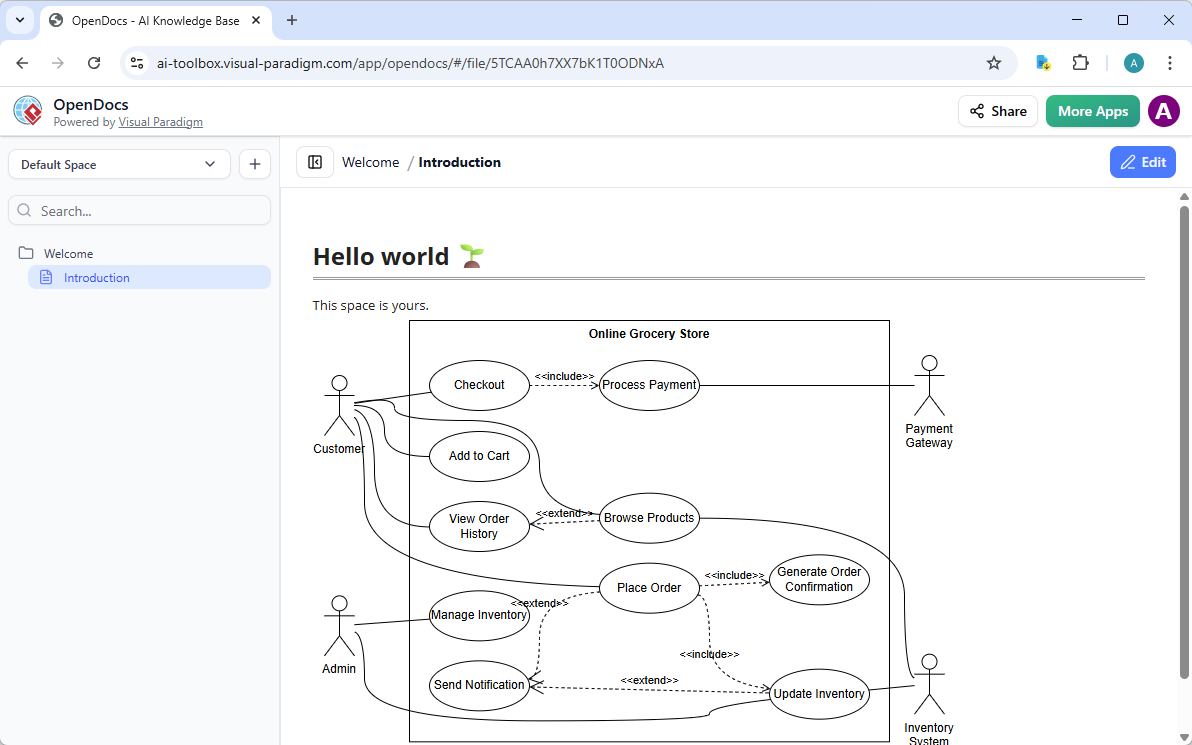
OpenDocs
Visual Paradigm OpenDocs is a web-based, AI-powered knowledge management and documentation platform designed for teams to create, organize, and share documents, diagrams, and project plans. It functions as a “living library,” integrating text with visual modeling tools like flowcharts, PERT charts, and mind maps.
Web Apps – Guided, Specialized Tools for Use Case Excellence
Visual Paradigm’s Web Apps deliver browser-based, step-by-step guided experiences with AI assistance. These specialized tools enforce best practices and ensure interconnected models.
Key Benefits of AI-Generated Use Case Diagrams
🚀 Rapid Prototyping
From a simple text prompt, a complete use case diagram emerges in seconds. This accelerates the early design phase, allowing teams to iterate quickly and align on system scope.
✅ UML Standards Compliance
AI ensures that generated diagrams follow formal UML best practices, minimizing the risk of syntax errors or misinterpretation.
🧠 Lower Barrier to Entry
Even users without formal UML training can create professional-grade models using plain English. This democratizes system modeling and enables broader team participation.
🔍 Improved Clarity
AI detects hidden complexities—such as exception flows or shared sub-processes—that might be missed during manual design. This leads to more robust and comprehensive models.
🔗 Model Consistency
Once a use case diagram is created, users can convert it into other UML diagrams—like Activity or Sequence diagrams—automatically. This maintains consistency across the design lifecycle.
Practical Example with AI Chatbot: Generating a Use Case Diagram
Let’s say you want to model a library management system. Here’s how you might use AI to generate a use case diagram:
- Input Prompt
Type: “A library management system where members can borrow books, return books, and check availability. Librarians can manage books, add new titles, and generate reports.” - AI Output
The system identifies:- Actors: Member, Librarian
- Use Cases: Borrow Book, Return Book, Check Book Availability, Add Book, Generate Reports
- Relationships:
<<include>>“Validate Membership” in “Borrow Book”<<extend>>“Apply Late Fee” in “Return Book”
- Refinement
You can refine the model by saying:- “Add a ‘Search Books’ use case”
- “Make ‘Generate Reports’ optional for members”
- “Rename ‘Add Book’ to ‘Add New Book Title’”
The diagram updates instantly, reflecting your changes.
Why Use AI for Use Case Modeling?
Manual diagram creation is time-consuming and error-prone. AI tools reduce the cognitive load by automating the most repetitive and technical aspects of modeling.
They also help teams:
- Identify missing use cases or actors early
- Maintain consistency across models
- Reduce the need for specialized training
- Accelerate the transition from idea to implementation
For organizations aiming to improve software design efficiency, AI-powered use case modeling is a practical and scalable solution.
Final Thoughts
Use case diagrams remain a vital tool in software development, helping teams define system behavior and align stakeholders. With AI, creating these diagrams has become faster, more accurate, and more inclusive.
By leveraging AI tools like those in Visual Paradigm’s ecosystem, teams can focus on innovation rather than diagramming mechanics—turning ideas into structured models with minimal effort.
Whether you’re a developer, business analyst, or project manager, AI-assisted use case modeling offers a modern, efficient path to better software design.
Related Links
- Use Case Modeling Studio – Visual Paradigm: An AI-powered web tool that transforms textual system goals into comprehensive use case descriptions, generates multiple diagram types (use case, activity, sequence, class, ERD), produces test cases, and supports interactive refinement for streamlined requirements analysis and design.
- AI Use Case Diagram Refinement Tool – Visual Paradigm: Automatically analyzes use case narratives or basic diagrams to detect and add precise <> and <> relationships, enhancing accuracy, uncovering hidden complexities, and ensuring UML-compliant models with minimal manual effort.
- Generate UML Class Diagrams from Text with AI – Visual Paradigm: Explains how Visual Paradigm’s AI converts natural language descriptions into structured UML class diagrams, with iterative refinement via prompts, automatic layout, and seamless export to the desktop app for further modeling and code generation.
- AI Use Case Description Generator – Visual Paradigm: Automates the creation of detailed, structured use case documentation—including problem statements, candidate use cases, actors, flows, and preconditions/postconditions—from high-level prompts, with optional diagram visualization and Markdown export.
- AI-Powered Use Case to Activity Diagram Conversion – Visual Paradigm: One-click AI feature that transforms textual use case descriptions into detailed UML activity diagrams, automatically detects flows/missing steps, suggests improvements, and supports deeper process visualization and analysis.
- AI-Assisted UML Class Diagram Generator – Visual Paradigm: Browser-based wizard that builds class diagrams step-by-step from natural language input, identifying classes, attributes, operations, relationships, and validations, with editable PlantUML code, SVG previews, AI critiques, and multiple export formats.
- What is a Use Case Diagram? – Visual Paradigm UML Guide: Comprehensive introduction to use case diagrams, covering purpose (capturing functional requirements from the user’s view), key elements (actors, use cases, system boundary), relationships (association, include, extend, generalization), notation, best practices, and practical examples.
- Use Case Description vs. Diagram: Differences and Synergy – Visual Paradigm AI: Explores how use case diagrams provide high-level visual overviews of actors and system goals, while textual descriptions detail flows and conditions—together forming a complete, synergistic model for effective requirements gathering and development.
- Comprehensive Review: Visual Paradigm’s AI Diagram Generation Features – Fliplify: Third-party evaluation praising the tool’s time-saving automation, standards compliance across UML/BPMN/ArchiMate/SysML, conversational refinement, accessibility for all skill levels, and integration for professional modeling workflows.
- The Evolution of UML: From Manual Drafting to AI-Powered Design – Diagrams AI: Traces UML’s transformation with AI tools like Visual Paradigm, shifting focus from syntax mechanics to strategic architecture through instant text-to-diagram generation, conversational editing, pattern suggestions, and standards adherence.
- Visual Paradigm AI Use Case Diagram Tutorial – YouTube: Step-by-step video demonstration showing how to use Visual Paradigm’s AI features to generate, refine, and enhance use case diagrams efficiently.