

In agile software development, teams live and die by iteration speed. User stories need rapid clarification, architectural decisions must emerge quickly in planning, and documentation can’t become a bottleneck. Manual UML diagramming—dragging elements, fixing layouts, version conflicts—often slows sprints and frustrates developers.
Visual Paradigm’s AI UML generator solves this by turning natural language descriptions (user stories, acceptance criteria, discussions) into precise, standards-compliant UML diagrams in seconds. This lets agile teams visualize ideas instantly, align faster, and focus on coding rather than drawing. Here’s how Visual Paradigm powers agile efficiency across real software projects.
Key Agile Pain Points Solved by Visual Paradigm’s AI UML Generator
Agile prioritizes working software, but clear visuals still accelerate delivery:
- Refining user stories without ambiguity
- Prototyping interactions before spikes
- Documenting microservices or component decisions
- Visualizing blockers in dailies or retros
- Creating living artifacts for reviews and onboarding
Visual Paradigm’s AI handles the heavy lifting: describe the flow, get an accurate diagram (use case, sequence, class, activity, etc.) that follows UML 2.x rules—no syntax knowledge required.
Integrating Visual Paradigm into Agile Ceremonies – AI Chatbot Case Study
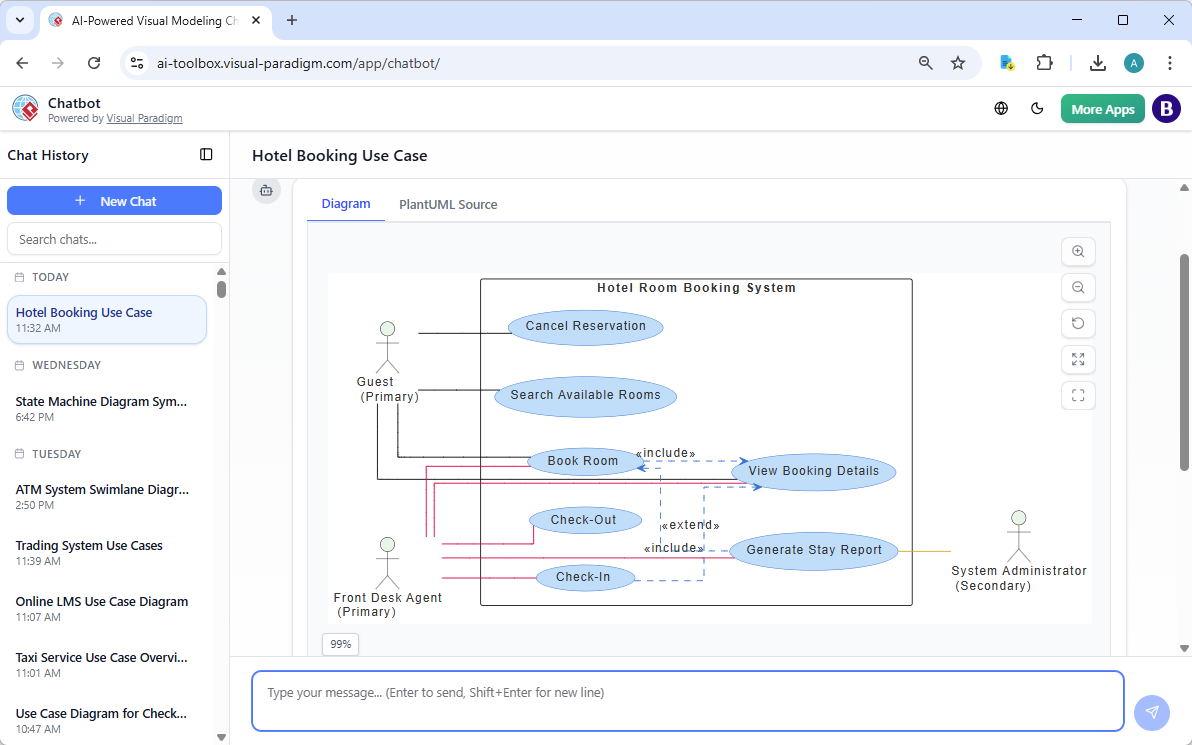
Backlog Refinement: Instant Clarity from Stories
Paste a user story: “Generate a use case diagram for a hotel room booking system.” Visual Paradigm’s AI generates a use case diagram with actors, extensions, and includes—highlighting edge cases teams might miss. Refine via chat or follow-up prompts for instant updates.
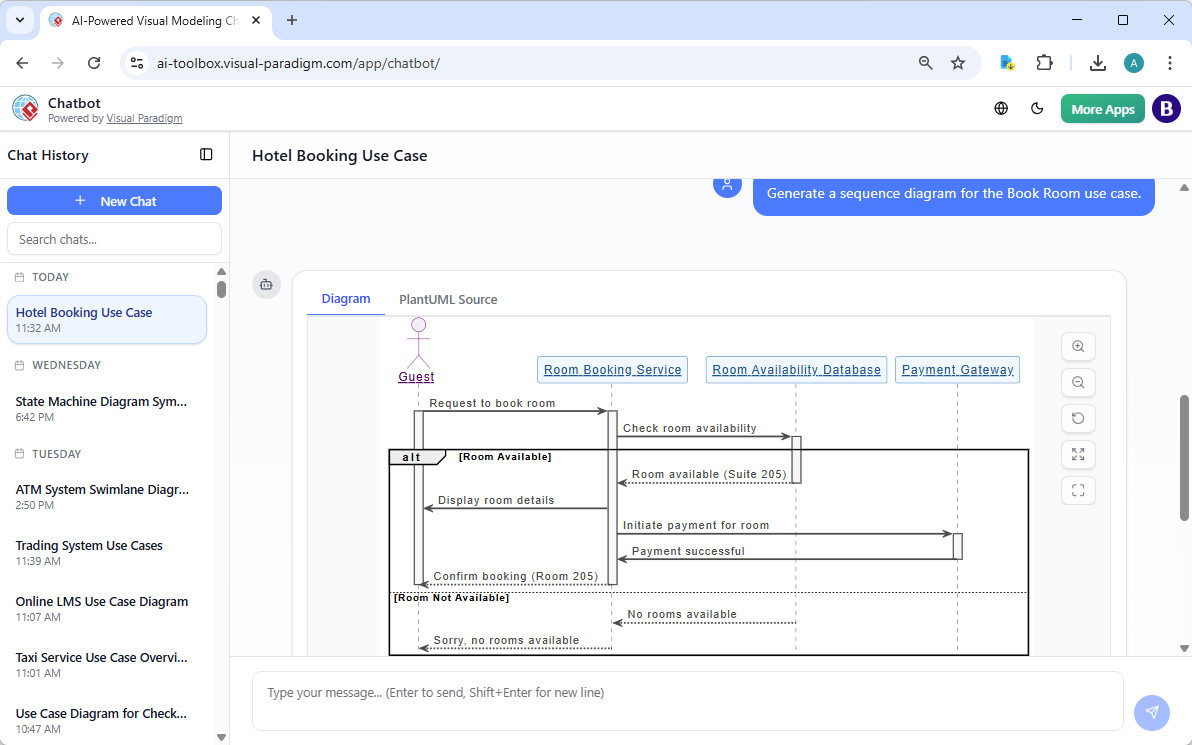
Sprint Planning: Architecture Spikes in Seconds
Before committing points, prompt: “Generate a sequence diagram for the Book Room use case.” Get a sequence or component diagram ready for discussion—helping estimate accurately and spot coupling early.
Daily Stand-ups: Quick Blocker Visuals
Stuck on an integration issue? Describe it conversationally; Visual Paradigm outputs a targeted sequence diagram to make the problem visible to the whole team—no drawing delay.
Sprint Review & Retrospective: Living Visuals
Show evolved diagrams (“before sprint vs. now”) to demonstrate progress. Update them live as stories complete—keeping artifacts current without extra effort.
Proven Gains for Software Teams Using Visual Paradigm
Teams adopting Visual Paradigm’s AI UML generators in agile report:
- 50–80% less time on visuals
- Fewer mid-sprint clarifications
- Better cross-role alignment (PO, devs, architects)
- More diagrams produced (not skipped due to time)
- Smoother onboarding with instant system overviews
Diagrams become lightweight, traceable assets—often stored in repos, wikis, or Confluence alongside code.
Why Visual Paradigm Stands Out for Agile Software Development
Visual Paradigm’s ecosystem is built for fast-moving dev teams, with four interconnected platforms tailored to agile needs:
- AI Visual Modeling Chatbot – Conversational entry: describe in stand-up chat style, iterate instantly—ideal for quick refinements during planning or dailies.
- Web Apps – No-install, guided flows for structured spikes or reviews—enforces best practices while staying browser-based for remote teams.
- OpenDocs – Embed dynamic, updatable diagrams in sprint docs, ADRs, or Confluence—perfect for living documentation that evolves with the backlog.
- VP Desktop – Full-power offline modeling for complex architecture, code gen/round-trip, and deep UML compliance when needed.
Start in chat during a refinement, refine in web/desktop, embed in OpenDocs for review—all synced seamlessly. This completeness sets Visual Paradigm apart as the go-to AI UML generator for professional agile software development. Explore the full ecosystem: Visual Paradigm AI Diagram Generator Ecosystem.
Practical Tips to Get Started in Your Agile Team
- Use user-story format in prompts for higher accuracy
- Tag diagrams with sprint/story IDs for versioning
- Treat them as discussion tools, not rigid specs
- Combine with code comments or wireframes for full context
- Review in retros: “Did Visual Paradigm visuals speed us up?”
Accelerate Your Next Sprint with Visual Paradigm
Visual Paradigm’s AI UML generator removes diagramming friction so agile teams can ship faster and with better alignment. It’s not about more docs—it’s about smarter, quicker understanding.
Try it in your next refinement: take one story, input it to Visual Paradigm’s chatbot or web app, and watch the diagram appear. The clarity boost is immediate.
Related Articles
Listed below are all the articles under the topic “AI UML Diagram Generator: Industry-Specific Applications”