
In modern software engineering and systems analysis, the gap between high-level business strategy and low-level technical code often creates friction. Teams struggle with disconnected tools, siloed documentation, and a lack of traceability. The Visual Paradigm Unified Platform addresses these challenges by integrating the entire software development lifecycle into a single, cohesive ecosystem. This tutorial explores the architectural philosophy behind this platform, guiding you through the transition from abstract business needs to concrete implementation.
1. The Core Philosophy: A Unified Project Workspace
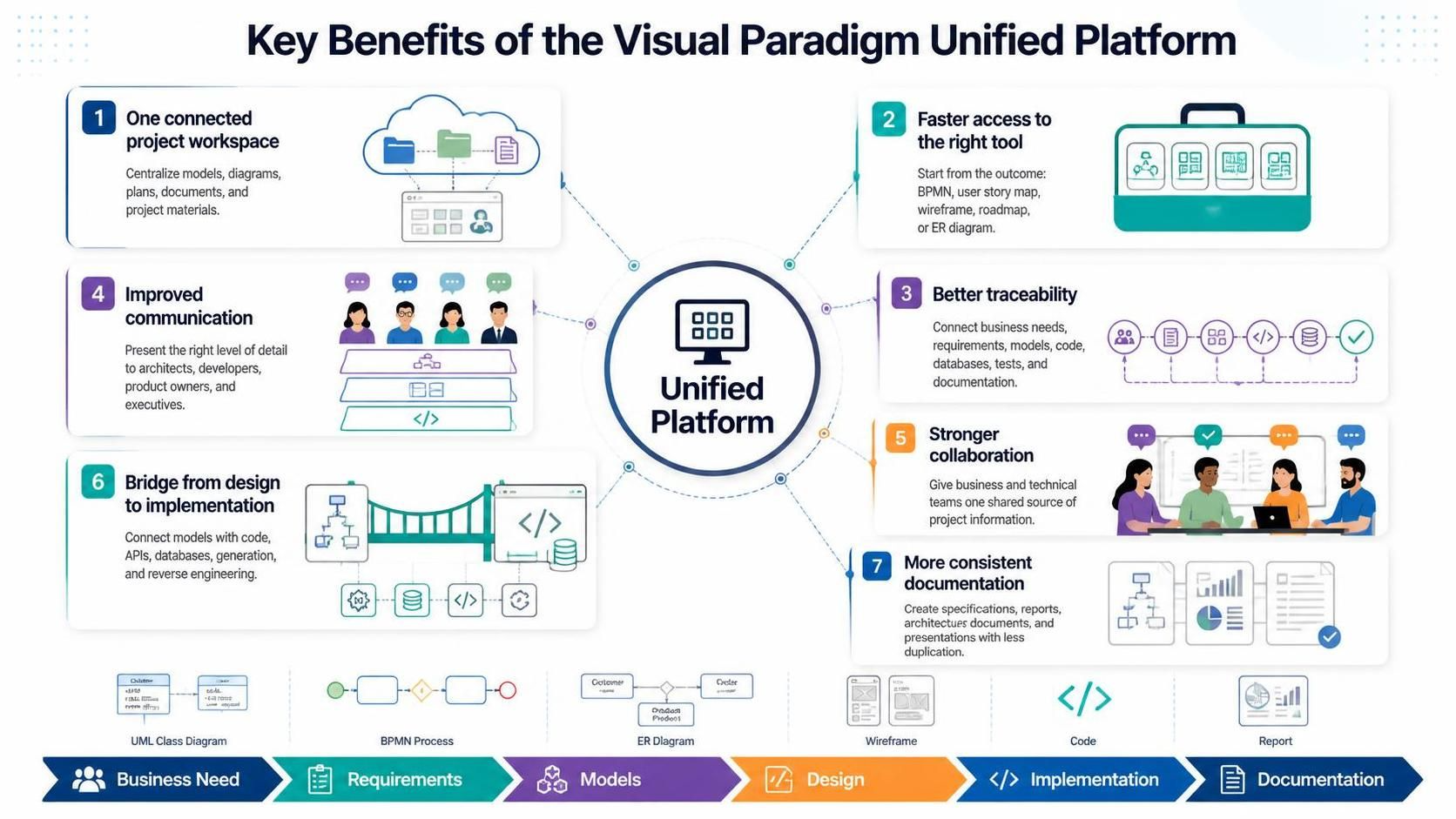
The fundamental shift offered by the Unified Platform is the move away from fragmented toolchains. Historically, a project might require separate applications for project management (like Excel or Jira), modeling (like Visio or Enterprise Architect), and coding (like IDEs). The Unified Platform collapses these silos into One Connected Project Workspace.
This centralized, drive-like environment allows teams to organize diagrams, documents, and related project materials in one location. Instead of searching across disconnected applications, stakeholders can access the “single source of truth.” This reduction in separation between desktop models, online diagrams, planning artifacts, and project documentation streamlines the workflow significantly.
Key Benefits of Centralization
- Organized Data: All project artifacts reside in a centralized repository.
- Reduced Context Switching: Teams do not need to jump between different software interfaces.
- Unified Search: Find any model, document, or requirement within the project context immediately.
2. Outcome-Driven Tool Access
One of the most common inefficiencies in software engineering is “tool fatigue”—the time spent deciding which application to open for a specific task. The Unified Platform introduces a paradigm of Faster Access to the Right Tool.
The platform provides a single entry point to a broad collection of specialized applications. The user experience is designed around the outcome you want to create, rather than the tool you need to use. Whether the goal is to create a BPMN diagram, a user story map, a wireframe, a roadmap, or an ER diagram, the platform allows you to start from the desired result.
3. The Architecture of Traceability
A critical challenge in software development is understanding the impact of change. If a requirement changes, how does it affect the database schema? If the database changes, what code needs to be regenerated? The platform solves this through Better Traceability.
The system architecture supports a continuous line of sight from the initial business need through to the final implementation. A project can progress through the following logical chain:
- Business Needs: The initial problem statement or opportunity.
- Requirements: Defined use cases and user stories.
- Models: Abstract representations (UML, BPMN) of the solution.
- Design: Detailed technical specifications.
- Code & Database: The actual implementation artifacts.
- Tests & Documentation: Validation and reporting.
This connectivity makes it easier to understand why a design decision was made and which implementation elements are affected when requirements change.
4. Bridging the Gap: Design to Implementation
The most technical aspect of the Unified Platform is its ability to act as a Bridge from Design to Implementation. This feature connects conceptual models with technical reality.
Through code engineering, database engineering, API design, and reverse engineering, the platform automates the translation of visual models into working code. For example:
- Forward Engineering: Generate database structures from ER models or generate code from UML class diagrams.
- Reverse Engineering: Import existing source code to generate visual diagrams for documentation and analysis.
5. Improved Communication and Collaboration
Different stakeholders require different views of the system. The Unified Platform supports Improved Communication by allowing teams to create and present information appropriate for each audience.
- Architects: Can work with formal models and detailed technical diagrams.
- Developers: Focus on class diagrams, sequence diagrams, and API definitions.
- Product Owners: Utilize roadmaps, user story maps, and backlog views.
- Executives: Require summary views and high-level strategic dashboards.
This differentiation allows for Stronger Collaboration between Technical and Business Teams. By working around shared project information rather than maintaining separate versions of the truth, business analysts, architects, developers, and stakeholders can align their efforts effectively.
6. Typical Usage Cases
The platform is versatile enough to support various methodologies and industries. Below are typical scenarios where the Unified Platform adds value:
Software Development
Capture requirements, create UML models, design APIs, generate code, and document architecture. This connects analysis directly with implementation.
Business Process Improvement
Map current processes in BPMN, identify bottlenecks, design future-state processes, and document procedures. This makes operational change easier to analyze.
Agile Product Development
Convert product ideas into epics, user stories, story maps, roadmaps, and sprint plans. This keeps agile planning connected to product design.
Enterprise Architecture
Model business, application, data, and technology layers using enterprise architecture views to support strategic alignment and impact analysis.
7. The End-to-End Workflow
To illustrate how these concepts come together, consider the typical workflow of a project moving from an idea to implementation:
- Capture the Idea: Record the business problem, stakeholder goals, or product opportunity.
- Define Requirements: Refine informal ideas into requirements, use cases, user stories, and acceptance criteria.
- Model the Processes: Use BPMN, activity diagrams, or customer journey maps to describe how work should happen.
- Design the Solution: Create wireframes, domain models, class diagrams, and deployment diagrams.
- Design Data and APIs: Develop ER diagrams, database structures, and REST API designs.
- Plan Delivery: Organize work into a product backlog, roadmap, and project schedule.
- Implement the Solution: Use code engineering and database generation to support development.
- Review and Validate: Check models, analyze dependencies, and review designs with stakeholders.
- Publish and Collaborate: Generate specifications, reports, and presentations for technical and non-technical audiences.
This hybrid workflow combines deep modeling in the desktop environment with browser-based access, online tools, planning, documentation, and collaboration. By adopting this Unified Platform approach, organizations can ensure that their business needs are accurately translated into robust technical solutions.