
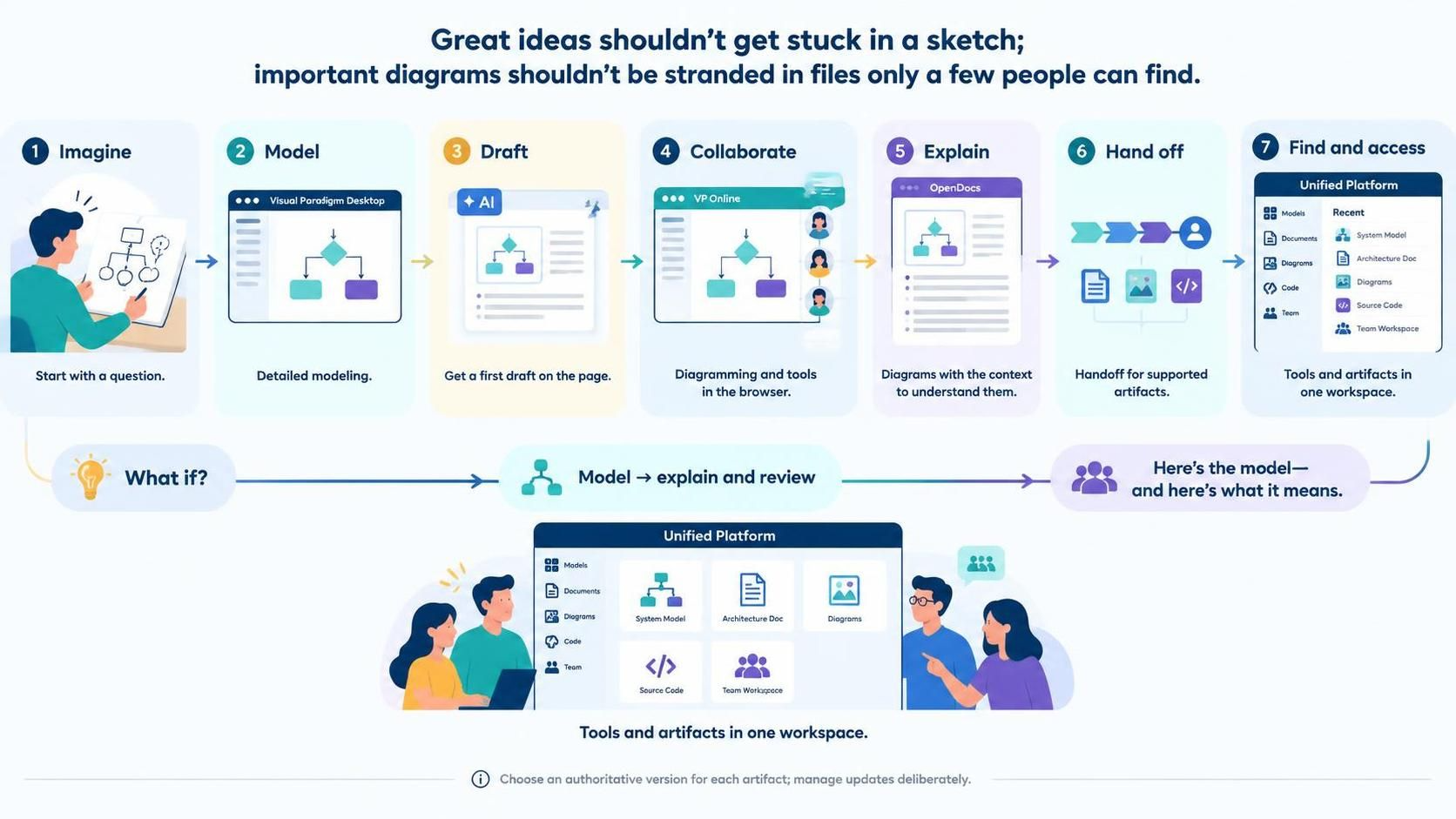
In modern software engineering and system design, the gap between a “great idea” and a “working model” is often bridged by a disconnected series of tools. A sketch on a whiteboard, a diagram in a local file, and a process document in a wiki often live in silos. Visual Paradigm’s ecosystem addresses this fragmentation by creating a unified workflow that connects the work of imagining, modeling, explaining, and sharing.
This tutorial explores the architecture of this ecosystem, specifically focusing on the workflow that leverages Visual Paradigm Desktop Edition (the modeling workbench), AI tools (for rapid drafting), Pipeline (for artifact handoffs), and OpenDocs (for contextual documentation). By understanding this flow, teams can transition from “What if?” to a definitive “Here’s the model—and here’s what it means.”
The Workflow Architecture: 7 Steps to Intentional Modeling
The ecosystem is designed around a deliberate path that respects the strengths of different environments. Rather than forcing a single tool to do everything, it assigns specific roles to specific stages of the project lifecycle.
1. Imagine: The Spark of Inquiry
Every project begins with a conversation or a question: a requirement to be captured, a process to improve, or a system to design. This stage is about exploration, not perfection. It answers the “What if?” question. Teams often start here with rough sketches, whiteboard photos, or brainstorming sessions.
2. Model: The Workbench for Detail
Once an idea gains traction, it moves to Visual Paradigm Desktop. This is the dedicated “workbench” for detailed modeling. Here, the team engages in structured project work, defining strict syntax, complex relationships, and rigorous adherence to standards like UML or BPMN. It is the environment for refinement and ongoing maintenance where precision is paramount.
3. Draft: AI as the Catalyst
The barrier to starting a model is often the “blank page.” Visual Paradigm’s embedded AI tools act as a catalyst here. Instead of building from scratch, teams can use AI to explore ideas and produce a first draft. This does not replace the modeler’s expertise but provides a faster starting point. The AI generates the initial structure, allowing the team to focus on reviewing requirements and terminology immediately.
4. Collaborate: Web-Based Agility
While Desktop is for deep work, VP Online brings diagramming into the browser. This is crucial for collaboration. When a team needs to review a diagram in real-time or when access from various devices is required, the browser environment shines. It ensures that the diagram remains accessible and up-to-date without the friction of file transfers.
5. Explain: Context is King
A diagram shows how something is structured, but documentation explains why it matters. OpenDocs serves as the home for diagrams alongside the explanatory text, decisions, and project notes. This step transforms a visual artifact into a communicable asset. It connects the visual model with its purpose, boundaries, assumptions, and key decisions.
6. Hand Off: The Pipeline Workflow
This is the critical technical bridge in the ecosystem. The Pipeline feature allows teams to move supported artifacts from the modeling environment (Desktop) into the documentation environment (OpenDocs). This is not a simple copy-paste; it is a managed handoff that preserves the link between the model and the documentation.
7. Find and Access: The Unified Platform
Finally, all these tools must be navigable. The Unified Platform acts as a central launchpad. It allows teams to access apps and artifacts across the ecosystem from one workspace. It solves the “where do I start?” problem, ensuring that stakeholders can locate the relevant tools and documents without getting lost in the infrastructure.
Technical Implementation: The Desktop-to-OpenDocs Pipeline
The core technical workflow that binds this ecosystem together is the Desktop-to-OpenDocs Pipeline. This process ensures that diagrams are not static images but dynamic artifacts that can be updated and versioned.
Step-by-Step Handoff Process
- Open the Diagram: Start with your diagram in Visual Paradigm Desktop.
- Initiate Export: Choose the
ExportorSend to OpenDocs Pipelineoption. This action packages the diagram for transfer. - Add Comments: Before sending, add a short comment describing the artifact or its revision. This metadata is vital for the receiving team to understand the context of the update.
- Edit in OpenDocs: Navigate to the relevant OpenDocs page. Place your cursor where the diagram should appear.
- Insert via Pipeline: Choose
Insert > Pipeline, select the artifact from the list, and insert it. - Add Context: Surround the inserted diagram with the necessary explanatory text. This completes the “Explain” phase of the workflow.
Note: This transfer requires cloud connectivity. The exact workflow may vary slightly depending on the product version and account setup.
Best Practices: Keeping the Source Clear
With multiple tools in play, the biggest risk is version drift. To maintain integrity, the ecosystem requires a clear definition of the “Source of Truth.”
- Decide Early: Determine if the authoritative version of an artifact lives in a Desktop project, an online artifact, or a specific team-managed source.
- Treat Updates as Publishing: When a model changes, do not assume the update propagates automatically. Treat it as a publishing step: Revise in the source, send through Pipeline, and explicitly update the OpenDocs page.
- Assign Owners: Assign an owner for the model and an owner for the documentation. This ensures accountability for both the visual accuracy and the textual context.
Conclusion
The power of Visual Paradigm’s ecosystem lies not in any single tool, but in the intentional path it carves from “What if?” to “Shared Understanding.” By leveraging AI for speed, Desktop for precision, and OpenDocs for context, teams can ensure that their diagrams become a stronger, more communicative part of how they work together.